
偵錯協同程式
為使用協同程式的應用程式進行偵錯可能極具挑戰性,因為多個協同程式可以並行執行,在一個執行緒上暫停,並在另一個執行緒上恢復。 它們的執行順序以及所使用的執行緒也可能在每次執行之間發生變化,使得追蹤特定協同程式的執行變得相當困難。
在 JVM 上,你可以使用下列功能讓偵錯協同程式變得更容易:
偵錯模式和堆疊追蹤復原可在 kotlinx-coroutines-core 模組中使用。 偵錯代理則可在 kotlinx-coroutines-debug 模組中使用。
Android 上不支援偵錯代理。
啟用偵錯模式
偵錯模式會為每個啟動的協同程式指派一個專屬名稱。 你可以在 Java 偵錯工具中、協同程式的字串常值表示法中,以及執行該協同程式時的執行緒名稱中看見協同程式名稱。 偵錯模式的執行階段開銷微乎其微,因此你可以保持啟用狀態,以簡化記錄與診斷。
當你在啟用 Java 斷言(assertion)的情況下執行程式碼時,kotlinx.coroutines 程式庫會自動啟用偵錯模式。 單元測試預設會在啟用斷言的情況下執行,因此你不需要為單元測試明確啟用偵錯模式。
若要明確啟用偵錯模式,請設定你的建置工具(例如 Gradle 或 Maven)或 IDE 執行配置,將 -Dkotlinx.coroutines.debug 引數傳遞給執行應用程式的 JVM。
在 IntelliJ IDEA 中,請依照以下步驟啟用偵錯模式:
在 Run 小工具中,選取你要更新的執行/偵錯配置,然後選取 More Actions | Edit:
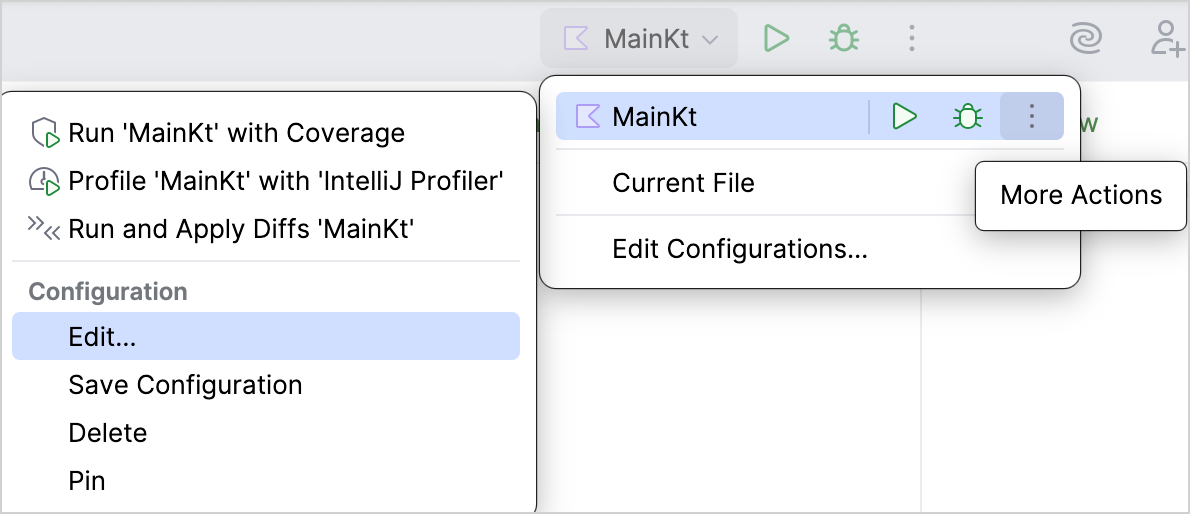
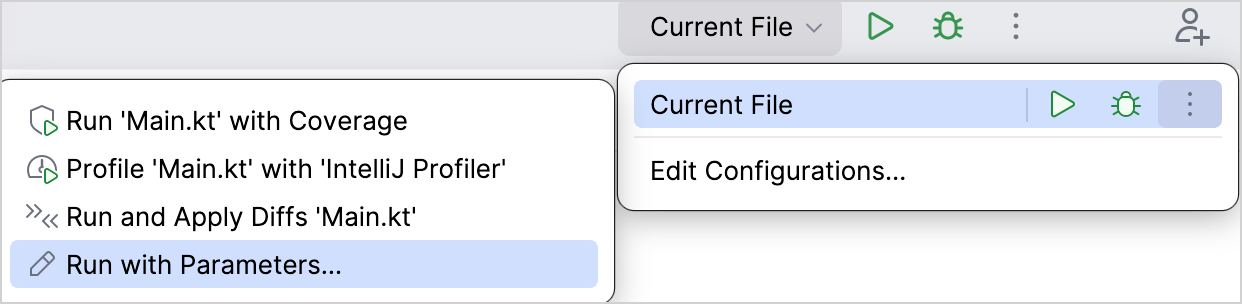
如果你沒有執行/偵錯配置,請在 Run 小工具中選取 Current File,然後選取 More Actions | Run with Parameters 以開啟執行配置設定。
在 Run/Debug Configurations 對話方塊中,於 VM options 欄位輸入
-Dkotlinx.coroutines.debug,然後點擊 OK: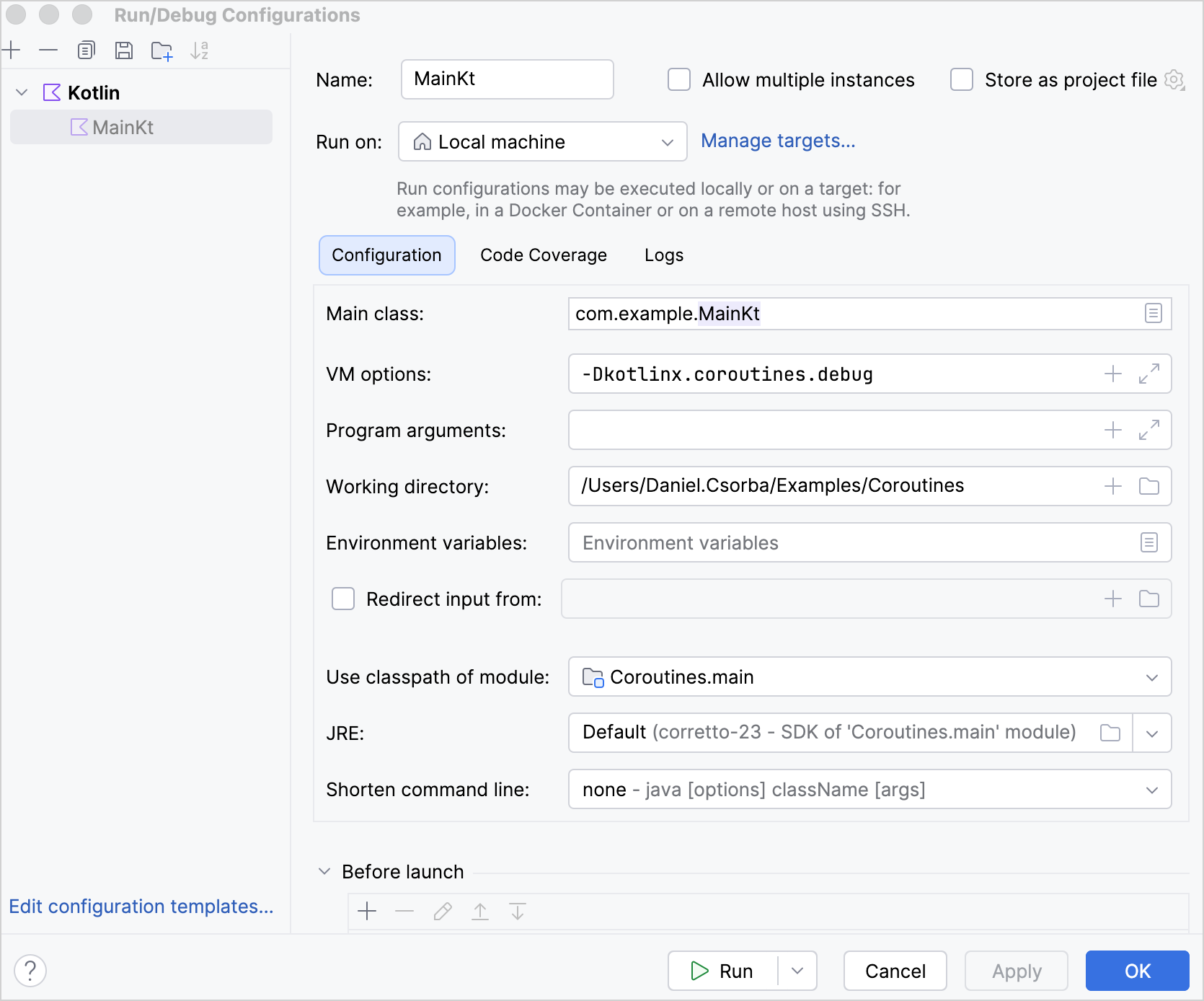
堆疊追蹤復原
當協同程式透過像是 Deferred.await() 等暫停函式接收來自另一個協同程式的例外時, 該例外的堆疊追蹤並不會包含來自接收端協同程式的堆疊訊框。 若缺少這些堆疊訊框,堆疊追蹤就無法顯示呼叫 Deferred.await() 的位置,或是哪些函式導致了該呼叫,這可能會使偵錯變得困難。
kotlinx.coroutines 程式庫透過 堆疊追蹤復原 (stack trace recovery) 來補充此資訊,它會建立一個帶有額外堆疊訊框的例外複本。
當接收端協同程式恢復執行時,它會擲出該複本而非原始例外。 原始例外會成為複本的 cause(原因)。 如果原始例外包含被抑制的例外(suppressed exceptions),它們將保持附加在原始例外上,而不會被複製。 將它們保持附加在原始例外上有助於防止例外鏈中產生循環,並避免在某些架構中造成當機。
偵錯模式預設會啟用堆疊追蹤復原。 若要在偵錯模式下停用堆疊追蹤復原,請傳遞 -Dkotlinx.coroutines.stacktrace.recovery=false VM 選項。
以下範例展示了包含與不包含堆疊追蹤復原的堆疊追蹤差異:
import kotlinx.coroutines.*

object UserProfileService :
    CoroutineScope by CoroutineScope(CoroutineName("UserProfileService")) {

    private fun parseUserProfile(): String {
        error("Invalid user profile")
    }

    private fun loadUserProfile(): String {
        return parseUserProfile()
    }

    // 在呼叫此函式的協同程式中執行
    suspend fun awaitUserProfile() {
        // 啟動一個新的協同程式
        val userProfile = async(Dispatchers.Default) {
            // 新的協同程式擲出例外
            loadUserProfile()
        }

        // 執行 awaitUserProfile() 的協同程式
        // 透過 await() 函式接收該例外
        userProfile.await()
    }
}

suspend fun main() {
    UserProfileService.awaitUserProfile()
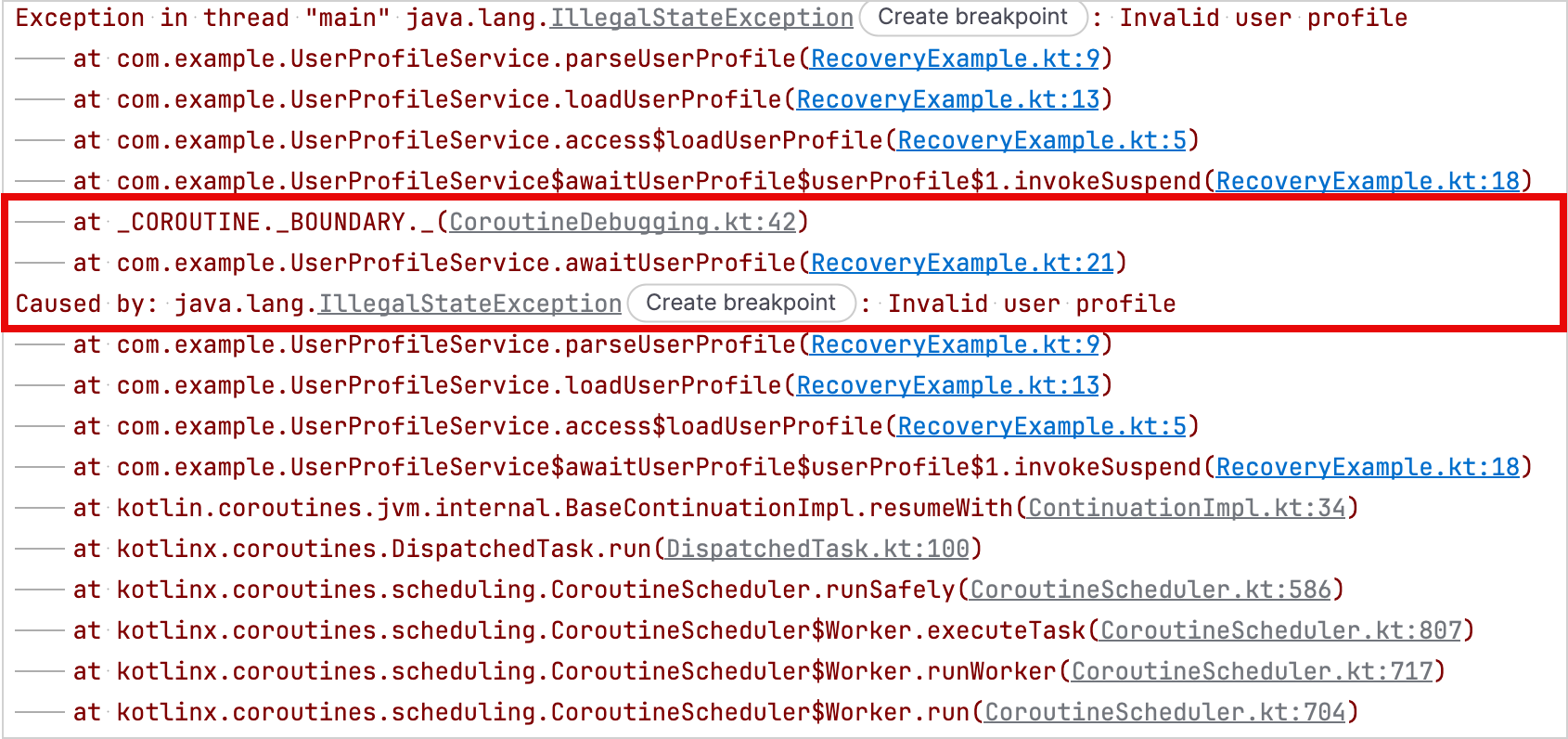
}在這個範例中,parseUserProfile() 函式在由 .async() 建構函式啟動的協同程式中擲出例外。 呼叫 awaitUserProfile() 的協同程式則透過 Deferred.await() 函式接收該例外。
在停用堆疊追蹤復原的情況下,堆疊追蹤僅會顯示 parseUserProfile() 在由 .async() 函式建立的協同程式中擲出例外的位置, 但不會包含 awaitUserProfile() 函式中的 Deferred.await() 呼叫:
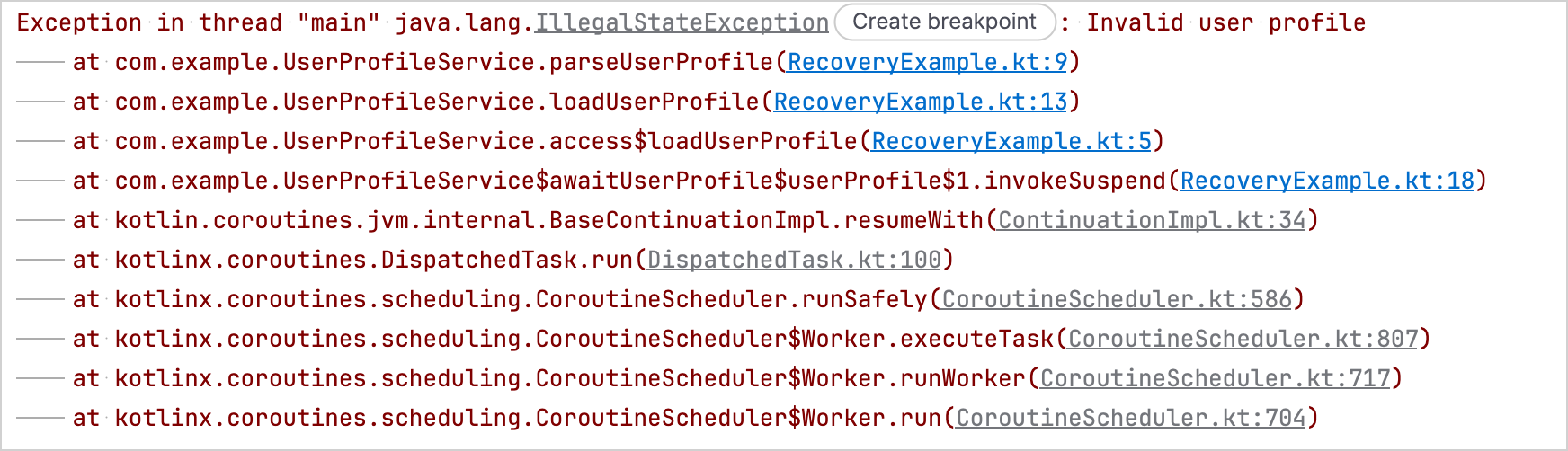
在啟用堆疊追蹤復原的情況下,堆疊追蹤也會包含 awaitUserProfile() 函式中的 Deferred.await() 呼叫:
自訂例外的堆疊追蹤復原
當例外的類別具有接受訊息、原因、兩者皆有或完全不帶引數的公用建構函式時,堆疊追蹤復原可以自動複製該例外。
如果你希望 kotlinx.coroutines 程式庫能為需要額外建構函式引數(例如行號或錯誤代碼)的例外復原堆疊追蹤, 請實作 StackTraceRecoverable 介面。
StackTraceRecoverable 介面是 Kotlin 標準程式庫的一部分,因此你可以在不新增 kotlinx.coroutines 程式庫相依性的情況下實作它。
StackTraceRecoverable 介面適用於所有目標,但 kotlinx.coroutines 程式庫僅在 JVM 上將其用於堆疊追蹤復原。
若要實作該介面,請覆寫 copyForStackTraceRecovery() 函式。 在覆寫中,傳回一個用於堆疊追蹤復原的新例外執行個體;如果你不希望 kotlinx.coroutines 程式庫複製該例外,則傳回 null。
這些 API 屬於實驗性 (Experimental)功能,需要透過 @OptIn(ExperimentalStdlibCoroutineSupportApi::class) 註解選擇加入。
以下範例展示了一個在建立堆疊追蹤復原新執行個體時保留 line 屬性的自訂例外:
import kotlinx.coroutines.*
import kotlin.coroutines.ExperimentalStdlibCoroutineSupportApi
import kotlin.coroutines.debug.StackTraceRecoverable

@OptIn(ExperimentalStdlibCoroutineSupportApi::class)
class FileEditException
// 此實作需要一個私有建構函式
// 以將原因傳遞給 IllegalStateException 建構函式
private constructor(
    val line: Int,
    private val detail: String,
    cause: Throwable?,
) : IllegalStateException("When editing line $line: $detail", cause),
    // 實作 StackTraceRecoverable 以進行堆疊追蹤復原
    StackTraceRecoverable<FileEditException> {

    constructor(line: Int, detail: String) : this(line, detail, null)

    // 複製行號與訊息詳細資訊
    override fun copyForStackTraceRecovery(): FileEditException =
        FileEditException(line, detail, this)
}

private fun editFile() {
    throw FileEditException(15, "Unexpected token")
}

suspend fun main() {
    supervisorScope {
        // 啟動一個新的協同程式
        val fileEdit = async(Dispatchers.Default) {
            // 擲出原始例外
            editFile()
        }

        // 堆疊追蹤復原會建立該例外的複本,
        // 加入呼叫端協同程式的堆疊訊框,並擲出該複本
        fileEdit.await()
    }
}
在啟用偵錯模式的情況下,輸出內容會包含復原後的複本,其後接著原始例外作為其原因。
StackTraceRecoverable 範例輸出 {...}
Exception in thread "main" com.example.FileEditException: When editing line 15: Unexpected token
	at com.example.RecoveryExampleKt.editFile(RecoveryExample.kt:54)
	at com.example.RecoveryExampleKt.access$editFile(RecoveryExample.kt:1)
	at com.example.RecoveryExampleKt$main$2$fileEdit$1.invokeSuspend(RecoveryExample.kt:62)
	at _COROUTINE._BOUNDARY._(CoroutineDebugging.kt:42)
	at com.example.RecoveryExampleKt$main$2.invokeSuspend(RecoveryExample.kt:67)
Caused by: com.example.FileEditException: When editing line 15: Unexpected token
	at com.example.RecoveryExampleKt.editFile(RecoveryExample.kt:54)
	at com.example.RecoveryExampleKt.access$editFile(RecoveryExample.kt:1)
	at com.example.RecoveryExampleKt$main$2$fileEdit$1.invokeSuspend(RecoveryExample.kt:62)
	at kotlin.coroutines.jvm.internal.BaseContinuationImpl.resumeWith(ContinuationImpl.kt:34)
	at kotlinx.coroutines.DispatchedTask.run(DispatchedTask.kt:100)
	at kotlinx.coroutines.scheduling.CoroutineScheduler.runSafely(CoroutineScheduler.kt:586)
	at kotlinx.coroutines.scheduling.CoroutineScheduler$Worker.executeTask(CoroutineScheduler.kt:807)
	at kotlinx.coroutines.scheduling.CoroutineScheduler$Worker.runWorker(CoroutineScheduler.kt:717)
at kotlinx.coroutines.scheduling.CoroutineScheduler$Worker.run(CoroutineScheduler.kt:704)偵錯代理
kotlinx-coroutines-debug 模組為 JVM 應用程式提供了偵錯代理。 該代理會在協同程式建立、暫停和恢復時對其進行追蹤。
DebugProbes API 是偵錯代理的主要進入點。 你可以使用它來印出作用中的協同程式及其目前狀態。 輸出內容包含堆疊追蹤,顯示每個協同程式在何處建立以及在何處暫停。 你也可以使用它為特定 Job 或 CoroutineScope 的階層結構列印協同程式傾印(coroutine dump)。
如果在正式環境中啟用 DebugProbes,它為每個新協同程式建立堆疊追蹤時可能會顯著降低應用程式的效能。 若要避免此開銷,請將 DebugProbes.enableCreationStackTraces 設定為 false。
kotlinx-coroutines-debug 模組提供了自動 BlockHound 整合。 你可以使用它在不允許封鎖的協同程式上下文環境中偵測封鎖操作。
有關設定說明,請參閱 BlockHound 快速入門指南。
新增偵錯代理相依性
若要在你的專案中使用偵錯代理,請新增 kotlinx-coroutines-debug 相依性:
// build.gradle.kts
dependencies {
    testImplementation("org.jetbrains.kotlinx:kotlinx-coroutines-debug:1.11.0")
}<!-- pom.xml -->
<dependency>
<groupId>org.jetbrains.kotlinx</groupId>
<artifactId>kotlinx-coroutines-debug</artifactId>
<version>1.11.0</version>
<scope>test</scope>
</dependency>使用偵錯代理追蹤協同程式
若要開始使用偵錯代理追蹤協同程式,你可以選擇:
- 在 VM 選項中新增
-javaagent:/path/to/kotlinx-coroutines-debug-1.11.0.jar,以在應用程式啟動時載入偵錯代理。 - 在啟動要追蹤的協同程式之前,呼叫
DebugProbes.install()函式。
從 JDK 21 開始,使用 DebugProbes.install() 函式動態載入偵錯代理可能會產生警告。 若要避免此警告,請使用 -javaagent VM 選項載入代理。
在偵錯代理處於作用狀態時,你可以使用下列 API:
DebugProbes.dumpCoroutines()會印出所有作用中的協同程式。DebugProbes.dumpCoroutinesInfo()會傳回作用中協同程式的相關資訊。DebugProbes.printJob()會印出某個Job階層結構的協同程式傾印。DebugProbes.printScope()會印出某個CoroutineScope階層結構的協同程式傾印。
以下範例使用偵錯代理來印出作用中的協同程式以及特定 Job 的協同程式階層結構:
import kotlinx.coroutines.*
import kotlinx.coroutines.debug.*
import kotlin.time.Duration.Companion.seconds

private suspend fun loadAccount() {
    delay(5.seconds)
}

private suspend fun loadPreferences() {
    delay(5.seconds)
}

private suspend fun loadUserProfile() = coroutineScope {
    launch { loadAccount() }
    launch { loadPreferences() }
}

@OptIn(ExperimentalCoroutinesApi::class)
fun main() {
    // 安裝偵錯代理
    // 僅在未使用 -javaagent VM 選項時才需要此步驟
    DebugProbes.install()

    runBlocking {
        // 啟動帶有兩個子協同程式的協同程式
        val loadingJob = launch {
            loadUserProfile()
        }

        // 給子協同程式時間暫停
        delay(1.seconds)

        // 印出所有作用中的協同程式
        DebugProbes.dumpCoroutines()

        println("============")

        // 印出載入工作及其子協同程式
        DebugProbes.printJob(loadingJob)
    }
}在啟用偵錯模式的情況下,執行此範例會產生以下輸出:
偵錯模式範例輸出 {...}
Coroutines dump 2026/08/18 14:00:08

Coroutine "coroutine#1":BlockingCoroutine{Active}@146ba0ac, state: RUNNING
	at java.base/java.lang.Thread.getStackTrace(Thread.java:2389)
	at kotlinx.coroutines.debug.internal.DebugProbesImpl.enhanceStackTraceWithThreadDumpImpl(DebugProbesImpl.kt:339)
	at kotlinx.coroutines.debug.internal.DebugProbesImpl.dumpCoroutinesSynchronized(DebugProbesImpl.kt:294)
	at kotlinx.coroutines.debug.internal.DebugProbesImpl.dumpCoroutines(DebugProbesImpl.kt:266)
	at kotlinx.coroutines.debug.DebugProbes.dumpCoroutines(DebugProbes.kt:181)
	at kotlinx.coroutines.debug.DebugProbes.dumpCoroutines$default(DebugProbes.kt:181)
	at DebugAgentExampleKt$main$1.invokeSuspend(DebugAgentExample.kt:34)

Coroutine "coroutine#2":StandaloneCoroutine{Active}@4dfa3a9d, state: SUSPENDED
	at DebugAgentExampleKt$main$1$loadingJob$1.invokeSuspend(DebugAgentExample.kt:27)

Coroutine "coroutine#3":StandaloneCoroutine{Active}@6eebc39e, state: SUSPENDED
	at DebugAgentExampleKt$loadUserProfile$2$1.invokeSuspend(DebugAgentExample.kt:14)

Coroutine "coroutine#4":StandaloneCoroutine{Active}@464bee09, state: SUSPENDED
	at DebugAgentExampleKt$loadUserProfile$2$2.invokeSuspend(DebugAgentExample.kt:15)============
"coroutine#2":StandaloneCoroutine{Active}, continuation is SUSPENDED at line DebugAgentExampleKt$main$1$loadingJob$1.invokeSuspend(DebugAgentExample.kt:27)
	"coroutine#3":StandaloneCoroutine{Active}, continuation is SUSPENDED at line DebugAgentExampleKt$loadUserProfile$2$1.invokeSuspend(DebugAgentExample.kt:14)
	"coroutine#4":StandaloneCoroutine{Active}, continuation is SUSPENDED at line DebugAgentExampleKt$loadUserProfile$2$2.invokeSuspend(DebugAgentExample.kt:15)
當 JUnit 測試逾時時印出作用中的協同程式
你可以根據 JUnit 版本,使用對應的 CoroutinesTimeout API 為 JUnit 測試設定逾時。 該 API 會自動安裝偵錯探針。 如果測試未在逾時前完成,它會印出所有作用中的協同程式及其堆疊追蹤,並使測試失敗。
JUnit 4
若要為 JUnit 4 測試設定逾時,並在超過逾時時印出所有作用中的協同程式及其堆疊追蹤,請使用 CoroutinesTimeout 規則:
import kotlinx.coroutines.*
import kotlinx.coroutines.debug.junit4.CoroutinesTimeout
import org.junit.Rule
import org.junit.Test
import kotlin.time.Duration

@OptIn(ExperimentalCoroutinesApi::class)
class UserProfileTest {
    @get:Rule
    val timeout = CoroutinesTimeout.seconds(1)

    private suspend fun loadUserProfile() {
        withContext(Dispatchers.IO) {
            // 模擬無法完成的操作
            delay(Duration.INFINITE)
        }
    }

    @Test
    fun loadsUserProfile() = runBlocking {
        val loadingJob = launch {
            loadUserProfile()
        }

        // 等待該協同程式,因此測試無法完成
        loadingJob.join()
    }
}
一秒後,該規則會回報測試逾時,並印出所有作用中的協同程式及其堆疊追蹤。 隨後測試失敗,並擲出 TestTimedOutException。
CoroutinesTimeout JUnit4 範例輸出 {...}
Test loadsUserProfile timed out after 1 seconds

Coroutines dump 2026/08/18 13:48:21

Coroutine "coroutine#1":BlockingCoroutine{Active}@bf1ec20, state: SUSPENDED
	at UserProfileTest$loadsUserProfile$1.invokeSuspend(UserProfileTest.kt:27)
	at _COROUTINE._CREATION._(CoroutineDebugging.kt:30)
	at kotlin.coroutines.intrinsics.IntrinsicsKt__IntrinsicsJvmKt.createCoroutineUnintercepted(IntrinsicsJvm.kt:161)
	at kotlinx.coroutines.intrinsics.CancellableKt.startCoroutineCancellable(Cancellable.kt:26)
	at kotlinx.coroutines.BuildersKt__Builders_concurrentKt.runBlockingK$default(Builders.concurrent.kt:157)
	at kotlinx.coroutines.BuildersKt.runBlockingK$default(Unknown Source)
	at UserProfileTest.loadsUserProfile(UserProfileTest.kt:21)
	at java.base/jdk.internal.reflect.DirectMethodHandleAccessor.invoke(DirectMethodHandleAccessor.java:103)
	at java.base/java.lang.reflect.Method.invoke(Method.java:580)
	at org.junit.runners.model.FrameworkMethod$1.runReflectiveCall(FrameworkMethod.java:59)
	at org.junit.internal.runners.model.ReflectiveCallable.run(ReflectiveCallable.java:12)
	at org.junit.runners.model.FrameworkMethod.invokeExplosively(FrameworkMethod.java:56)
	at org.junit.internal.runners.statements.InvokeMethod.evaluate(InvokeMethod.java:17)
	at kotlinx.coroutines.debug.junit4.CoroutinesTimeoutStatement$evaluate$$inlined$runWithTimeoutDumpingCoroutines$1.call(CoroutinesTimeoutImpl.kt:79)
	at kotlinx.coroutines.debug.junit4.CoroutinesTimeoutStatement$evaluate$$inlined$runWithTimeoutDumpingCoroutines$1.call(CoroutinesTimeoutImpl.kt:79)
	at java.base/java.util.concurrent.FutureTask.run(FutureTask.java:317)
	at java.base/java.lang.Thread.run(Thread.java:1575)

Coroutine "coroutine#2":StandaloneCoroutine{Active}@70efb718, state: SUSPENDED
	at UserProfileTest$loadUserProfile$2.invokeSuspend(UserProfileTest.kt:16)
	at UserProfileTest$loadsUserProfile$1$loadingJob$1.invokeSuspend(UserProfileTest.kt:23)
	at _COROUTINE._CREATION._(CoroutineDebugging.kt:30)
	at kotlin.coroutines.intrinsics.IntrinsicsKt__IntrinsicsJvmKt.createCoroutineUnintercepted(IntrinsicsJvm.kt:161)
	at kotlinx.coroutines.intrinsics.CancellableKt.startCoroutineCancellable(Cancellable.kt:26)
	at kotlinx.coroutines.BuildersKt__Builders_commonKt.launch$default(Builders.common.kt:200)
	at kotlinx.coroutines.BuildersKt.launch$default(Unknown Source)
	at UserProfileTest$loadsUserProfile$1.invokeSuspend(UserProfileTest.kt:22)
	at kotlin.coroutines.jvm.internal.BaseContinuationImpl.resumeWith(ContinuationImpl.kt:34)
	at kotlinx.coroutines.DispatchedTask.run(DispatchedTask.kt:100)
	at kotlinx.coroutines.BuildersKt__Builders_concurrentKt.runBlockingK$default(Builders.concurrent.kt:157)
	at kotlinx.coroutines.BuildersKt.runBlockingK$default(Unknown Source)
	at UserProfileTest.loadsUserProfile(UserProfileTest.kt:21)
	at java.base/jdk.internal.reflect.DirectMethodHandleAccessor.invoke(DirectMethodHandleAccessor.java:103)
	at java.base/java.lang.reflect.Method.invoke(Method.java:580)
	at org.junit.runners.model.FrameworkMethod$1.runReflectiveCall(FrameworkMethod.java:59)
	at org.junit.internal.runners.model.ReflectiveCallable.run(ReflectiveCallable.java:12)
	at org.junit.runners.model.FrameworkMethod.invokeExplosively(FrameworkMethod.java:56)
	at org.junit.internal.runners.statements.InvokeMethod.evaluate(InvokeMethod.java:17)
	at kotlinx.coroutines.debug.junit4.CoroutinesTimeoutStatement$evaluate$$inlined$runWithTimeoutDumpingCoroutines$1.call(CoroutinesTimeoutImpl.kt:79)
	at kotlinx.coroutines.debug.junit4.CoroutinesTimeoutStatement$evaluate$$inlined$runWithTimeoutDumpingCoroutines$1.call(CoroutinesTimeoutImpl.kt:79)
	at java.base/java.util.concurrent.FutureTask.run(FutureTask.java:317)
	at java.base/java.lang.Thread.run(Thread.java:1575)
test timed out after 1000 milliseconds
org.junit.runners.model.TestTimedOutException: test timed out after 1000 milliseconds
	at java.base/jdk.internal.misc.Unsafe.park(Native Method)
	at java.base/java.util.concurrent.locks.LockSupport.parkNanos(LockSupport.java:269)
	at kotlinx.coroutines.BlockingCoroutine.joinBlocking(Builders.kt:57)
	at kotlinx.coroutines.BuildersKt__BuildersKt.runBlockingImpl(Builders.kt:30)
	at kotlinx.coroutines.BuildersKt.runBlockingImpl(Unknown Source)
	at kotlinx.coroutines.BuildersKt__Builders_concurrentKt.runBlockingK(Builders.concurrent.kt:172)
	at kotlinx.coroutines.BuildersKt.runBlockingK(Unknown Source)
	at kotlinx.coroutines.BuildersKt__Builders_concurrentKt.runBlockingK$default(Builders.concurrent.kt:157)
	at kotlinx.coroutines.BuildersKt.runBlockingK$default(Unknown Source)
	at UserProfileTest.loadsUserProfile(UserProfileTest.kt:21)
	at java.base/jdk.internal.reflect.DirectMethodHandleAccessor.invoke(DirectMethodHandleAccessor.java:103)
	at java.base/java.lang.reflect.Method.invoke(Method.java:580)
	at org.junit.runners.model.FrameworkMethod$1.runReflectiveCall(FrameworkMethod.java:59)
	at org.junit.internal.runners.model.ReflectiveCallable.run(ReflectiveCallable.java:12)
	at org.junit.runners.model.FrameworkMethod.invokeExplosively(FrameworkMethod.java:56)
	at org.junit.internal.runners.statements.InvokeMethod.evaluate(InvokeMethod.java:17)
	at kotlinx.coroutines.debug.junit4.CoroutinesTimeoutStatement$evaluate$$inlined$runWithTimeoutDumpingCoroutines$1.call(CoroutinesTimeoutImpl.kt:79)
	at java.base/java.util.concurrent.FutureTask.run(FutureTask.java:317)
	at java.base/java.lang.Thread.run(Thread.java:1575)
JUnit 5
若要將逾時套用至類別中的所有測試函式,請在該類別中新增 @CoroutinesTimeout 註解:
import kotlinx.coroutines.*
import kotlinx.coroutines.debug.junit5.CoroutinesTimeout
import org.junit.jupiter.api.Test
import kotlin.time.Duration

@OptIn(ExperimentalCoroutinesApi::class)
// 為類別中的所有測試函式設定一秒的逾時
@CoroutinesTimeout(testTimeoutMs = 1_000)
class UserProfileTest {
    private suspend fun loadUserProfile() {
        withContext(Dispatchers.IO) {
            // 模擬無法完成的操作
            delay(Duration.INFINITE)
        }
    }

    @Test
    fun loadsUserProfile() = runBlocking {
        val loadingJob = launch {
            loadUserProfile()
        }

        // 等待該協同程式,因此測試無法完成
        loadingJob.join()
    }
}一秒後,CoroutinesTimeout API 會回報逾時,並印出所有作用中的協同程式及其堆疊追蹤。 隨後測試失敗,並擲出 CoroutinesTimeoutException。
CoroutinesTimeout JUnit5 範例輸出 {...}
Test loadsUserProfile timed out after 1 seconds

Coroutines dump 2026/08/18 13:46:15

Coroutine "coroutine#1":BlockingCoroutine{Active}@5c77053b, state: SUSPENDED
	at UserProfileTest$loadsUserProfile$1.invokeSuspend(UserProfileTest.kt:24)

Coroutine "coroutine#2":StandaloneCoroutine{Active}@26b894bd, state: SUSPENDED
	at UserProfileTest$loadUserProfile$2.invokeSuspend(UserProfileTest.kt:13)
	at UserProfileTest$loadsUserProfile$1$loadingJob$1.invokeSuspend(UserProfileTest.kt:20)
test timed out after 1000 ms
kotlinx.coroutines.debug.junit5.CoroutinesTimeoutException: test timed out after 1000 ms
	at java.base/jdk.internal.misc.Unsafe.park(Native Method)
	at java.base/java.util.concurrent.locks.LockSupport.parkNanos(LockSupport.java:269)
	at kotlinx.coroutines.BlockingCoroutine.joinBlocking(Builders.kt:57)
	at kotlinx.coroutines.BuildersKt__BuildersKt.runBlockingImpl(Builders.kt:30)
	at kotlinx.coroutines.BuildersKt.runBlockingImpl(Unknown Source)
	at kotlinx.coroutines.BuildersKt__Builders_concurrentKt.runBlockingK(Builders.concurrent.kt:172)
	at kotlinx.coroutines.BuildersKt.runBlockingK(Unknown Source)
	at kotlinx.coroutines.BuildersKt__Builders_concurrentKt.runBlockingK$default(Builders.concurrent.kt:157)
	at kotlinx.coroutines.BuildersKt.runBlockingK$default(Unknown Source)
	at UserProfileTest.loadsUserProfile(UserProfileTest.kt:18)
	at java.base/java.lang.reflect.Method.invoke(Method.java:580)
	at kotlinx.coroutines.debug.junit5.CoroutinesTimeoutExtension$interceptInvocation$$inlined$runWithTimeoutDumpingCoroutines$1.call(CoroutinesTimeoutImpl.kt:79)
	at java.base/java.util.concurrent.FutureTask.run(FutureTask.java:317)
	at java.base/java.lang.Thread.run(Thread.java:1575)
解決 Android 上的 kotlinx-coroutines-debug 資源衝突
Android 上不支援偵錯代理。
kotlinx-coroutines-debug 模組對 JNA、JNA Platform、Byte Buddy 和 Byte Buddy Agent 具有傳遞相依性。 其中某些相依性包含相同路徑的資源。 當 Android 合併相依性資源時,重複的路徑可能會導致 DuplicateRelativeFileException,進而造成建置失敗。
若要在保留 kotlinx-coroutines-debug 相依性的同時解決建置失敗問題,請在 build.gradle.kts 檔案中使用以下 packaging 設定排除衝突的資源:
// build.gradle.kts
android {
    packaging {
        resources {
            // 排除 JNA 與 JNA Platform 的授權檔案
            excludes += setOf(
                "META-INF/AL2.0",
                "META-INF/LGPL2.1",
            )

            // 排除 Byte Buddy 的 ASM 授權檔案
            excludes += "META-INF/licenses/ASM"

            // 保留每個 Byte Buddy Agent 檔案的一份複本
            pickFirsts += setOf(
                "win32-x86-64/attach_hotspot_windows.dll",
                "win32-x86/attach_hotspot_windows.dll",
            )
        }
    }
}
後續步驟
在使用 IntelliJ IDEA 偵錯協同程式和使用 IntelliJ IDEA 偵錯 Kotlin Flow中了解如何在 IntelliJ IDEA 中進行協同程式的偵錯。