
建立並使用序列化器
序列化器 (serializer) 定義了 Kotlin 型別在其序列化形式中的結構,而諸如 Json 等格式實作則控制該結構如何進行編碼。
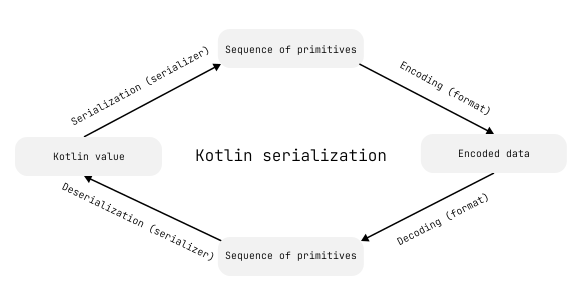
序列化器透過 KSerializer 介面為特定型別定義序列化與反序列化策略。 Kotlin serialization 為內建型別、集合等提供了現成的序列化器。
你可以使用這些序列化器來序列化值或檢查其序列化形式的結構,而自訂序列化器則讓你能自行定義該結構。
取得序列化器
當你使用 @Serializable 註解類別時,Kotlin serialization 外掛程式會為該類別產生一個 KSerializer。
若要擷取這個自動產生的序列化器,請呼叫產生的 .serializer() 函式。 你可以直接將序列化器與諸如 Json.encodeToString() 等函式搭配使用,或存取其 descriptor 屬性以檢查該型別序列化形式的結構。
以下範例定義了一個帶有單一整數屬性的 Color 類別,並檢查其序列化形式的結構:
import kotlinx.serialization.*

@Serializable
data class Color(val rgb: Int)

fun main() {
    // 擷取為 Color 類別產生的序列化器
    val colorSerializer: KSerializer<Color> = Color.serializer()

    println(colorSerializer.descriptor)
    // Color(rgb: kotlin.Int)
}
內建基本型別與 String 也透過 .serializer() 函式提供序列化器,例如 Int.serializer() 和 String.serializer()。
你可以使用頂層的 serializer<T>() 函式來取得任何型別的序列化器,包含參數化型別:
import kotlinx.serialization.*

@Serializable
@SerialName("Color")
class Color(val rgb: Int)

fun main() {
    // 擷取 Map<String, Color> 的序列化器
    val stringToColorMapSerializer: KSerializer<Map<String, Color>> = serializer()

    // 印出:kotlin.collections.LinkedHashMap(PrimitiveDescriptor(kotlin.String), Color(rgb: kotlin.Int))
    println(stringToColorMapSerializer.descriptor)
}
對於泛型類別,若想使用產生的 .serializer() 函式,請為每個型別參數提供一個 KSerializer 引數:
import kotlinx.serialization.*

@Serializable
@SerialName("Color")
class Color(val rgb: Int)

@Serializable
@SerialName("Box")
class Box<T>(val contents: T)

fun main() {
    // 呼叫 .serializer(),並為型別參數傳入 KSerializer
    val boxedColorSerializer = Box.serializer(Color.serializer())

    println(boxedColorSerializer.descriptor)
    // Box(contents: Color)
}
取得集合型別的序列化器
與標註了 @Serializable 的類別不同,像 List<T> 這樣的集合型別並沒有產生的 .serializer() 函式。
若要取得集合型別的序列化器,請使用 ListSerializer()、SetSerializer() 或 MapSerializer() 建立一個序列化器, 並為該集合的型別參數指定序列化器。
以下範例使用 ListSerializer() 函式為 List<String> 建立序列化器:
import kotlinx.serialization.*
import kotlinx.serialization.builtins.*

fun main() {
    val stringListSerializer: KSerializer<List<String>> = ListSerializer(String.serializer())
    println(stringListSerializer.descriptor)
    // kotlin.collections.ArrayList(PrimitiveDescriptor(kotlin.String))
}
建立自訂序列化器
若你想更進一步控制序列化資料的結構,可以建立自訂序列化器。 自訂序列化器讓你能定義型別在其序列化形式中的表示方式。
與自動產生的序列化器相同,自訂序列化器透過 KSerializer 介面為型別定義序列化與反序列化。 為了同時支援兩者,KSerializer 繼承了 SerializationStrategy 與 DeserializationStrategy。
對於 JSON 序列化,你也可以使用 JsonTransformingSerializer 修改現有序列化器產生的 JSON 輸出,而無需重新定義其結構。
建立自訂基本型別序列化器
使用基本型別序列化器將類別表示為單一基本值,例如字串或整數。
若要建立自訂基本型別序列化器:
建立一個自訂序列化器作為實作序列化類別之
KSerializer的object:kotlinobject YourSerializer : KSerializer<Type>覆寫
descriptor屬性以定義序列化資料的架構。使用
PrimitiveSerialDescriptor(serialName, kind)將序列化形式的結構定義為單一基本值。 指定一個唯一的serialName(例如完全限定名稱),並使用與序列化器中編碼器及解碼器函式相符合的PrimitiveKind:kotlinoverride val descriptor: SerialDescriptor = PrimitiveSerialDescriptor("com.example.Type", PrimitiveKind.STRING)如果
descriptor與編碼和解碼函式不相符,kotlinx.serialization專案的更新可能會導致序列化器在某些格式中的行為無法預期。實作
serialize()函式以定義如何將值轉換為其序列化形式。選擇與descriptor中的PrimitiveKind相符的Encoder函式:kotlinoverride fun serialize(encoder: Encoder, value: Type) { val encodedValue: String = // 將值轉換為基本型別表示法 encoder.encodeString(encodedValue) }實作
deserialize()函式以定義如何將序列化資料轉換回類別的執行個體。Decoder提供讀取資料的函式,例如decodeString()。kotlinoverride fun deserialize(decoder: Decoder): Type { val decodedValue: String = decoder.decodeString() // 將 decodedValue 轉換回 Type return ... }使用
@Serializable註解為類別指定自訂序列化器:kotlin@Serializable(YourSerializer::class) data class Type(val stringValue: String)
以下是自訂基本型別序列化器的範例,該序列化器將 Color 序列化為十六進位字串:
import kotlinx.serialization.*
import kotlinx.serialization.encoding.*
import kotlinx.serialization.descriptors.*
import kotlinx.serialization.json.*

// 為 Color 類別建立自訂序列化器
object ColorAsStringSerializer : KSerializer<Color> {
    // 將序列化資料的架構定義為單一字串
    override val descriptor: SerialDescriptor =
        // 指定唯一名稱與 PrimitiveKind
        PrimitiveSerialDescriptor("my.app.Color", PrimitiveKind.STRING)

    // 定義如何將 Color 值序列化為字串
    override fun serialize(encoder: Encoder, value: Color) {
        // 將 RGB 值轉換為十六進位字串
        val hexValue = value.rgb.toString(16).padStart(6, '0')
        // 將序列化值編碼為字串
        encoder.encodeString(hexValue)
    }

    // 定義如何從字串反序列化為 Color 值
    override fun deserialize(decoder: Decoder): Color {
        // 解碼序列化的字串值
        val hexValue = decoder.decodeString()
        // 將解碼後的值轉換回 Color
        return Color(hexValue.toInt(16))
    }
}
// 指定 ColorAsStringSerializer 作為 Color 類別的自訂序列化器
@Serializable(ColorAsStringSerializer::class)
data class Color(val rgb: Int)

fun main() {
    val color = Color(0x00FF00)
    // 將 Color 值序列化為 JSON
    val jsonString = Json.encodeToString(color)

    println(jsonString)
    // "00ff00"

    // 將 JSON 字串反序列化為 Color 值
    val deserializedColor = Json.decodeFromString<Color>(jsonString)

    println(deserializedColor.rgb)
    // 65280
}
將二進制資料序列化為 Base64 字串
你可以使用自訂基本型別序列化器來解決簡單數值轉換之外的常見序列化工作。 其中一項工作就是將二進制資料表示為 Base64 字串。
不同的 API 預設使用不同的 Base64 變體。 請選擇符合預期變體的 Kotlin Base64 編碼器,例如 Base64.Default 或 Base64.Mime。
以下範例在 JSON 格式中使用 Base64.Default 將 ByteArray 序列化為 Base64 字串:
import kotlinx.serialization.*
import kotlinx.serialization.json.*
import kotlinx.serialization.encoding.Encoder
import kotlinx.serialization.encoding.Decoder
import kotlinx.serialization.descriptors.*
import kotlin.io.encoding.*

// 建立自訂基本型別序列化器,
// 將 ByteArray 表示為 Base64 字串
object ByteArrayAsBase64Serializer : KSerializer<ByteArray> {

    // 使用預設的 Base64 變體
    private val base64 = Base64.Default

    // 將序列化形式定義為單一 STRING 基本型別
    override val descriptor: SerialDescriptor
        get() = PrimitiveSerialDescriptor(
            "ByteArrayAsBase64Serializer",
            PrimitiveKind.STRING
        )

    // 將 ByteArray 編碼為 Base64 字串
    override fun serialize(encoder: Encoder, value: ByteArray) {
        val base64Encoded = base64.encode(value)
        encoder.encodeString(base64Encoded)
    }

    // 將 Base64 字串解碼回 ByteArray
    override fun deserialize(decoder: Decoder): ByteArray {
        val base64Decoded = decoder.decodeString()
        return base64.decode(base64Decoded)
    }
}

@Serializable
data class Value(
    // 為此屬性指定自訂序列化器
    @Serializable(ByteArrayAsBase64Serializer::class)
    val base64Input: ByteArray
) {

    // 為 ByteArray 實作以值為基礎的相等性
    override fun equals(other: Any?): Boolean {
        if (this === other) return true
        if (javaClass != other?.javaClass) return false
        other as Value
        return base64Input.contentEquals(other.base64Input)
    }

    // 依據陣列內容計算 hashCode
    override fun hashCode(): Int {
        return base64Input.contentHashCode()
    }
}

fun main() {
    val string = "PNG_IMAGE_DATA"
    val value = Value(string.toByteArray())

    // 將 Value 序列化為 JSON
    val encoded = Json.encodeToString(value)

    println(encoded)
    // {"base64Input":"UE5HX0lNQUdFX0RBVEE="}

    // 將 JSON 反序列化回 Value
    val decoded = Json.decodeFromString<Value>(encoded)

    println(decoded.base64Input.decodeToString())
    // PNG_IMAGE_DATA
}
將序列化委託給另一個序列化器
你可以透過將序列化邏輯委託給該型別的序列化器,將一個類別序列化為另一種型別。 例如,你可以使用此方法將類別序列化為非基本型別,如 IntArray。
若要委託序列化,請建立一個自訂序列化器,並為被委託型別的序列化器定義一個屬性:
覆寫
descriptor屬性以包裝被委託序列化器的descriptor。當你委託序列化時,無法直接使用原始類別的
descriptor或被委託型別的descriptor。 反之,請建立一個重複使用被委託序列化器結構的新descriptor。覆寫
serialize()函式以將類別的執行個體轉換為被委託型別,並使用encoder.encodeSerializableValue()函式以被委託的序列化器進行編碼。覆寫
deserialize()函式,以搭配被委託的序列化器使用decoder.decodeSerializableValue()函式來解碼值,並將其轉換回你類別的執行個體。
以下範例透過將序列化邏輯委託給 IntArraySerializer,將 Color 類別序列化為 IntArray:
import kotlinx.serialization.*
import kotlinx.serialization.encoding.*
import kotlinx.serialization.descriptors.*
import kotlinx.serialization.builtins.IntArraySerializer
import kotlinx.serialization.json.*

// 建立委託給 IntArraySerializer 的自訂序列化器
class ColorIntArraySerializer : KSerializer<Color> {
    private val delegateSerializer = IntArraySerializer()
    override val descriptor = SerialDescriptor("my.app.Color", delegateSerializer.descriptor)

    // 將序列化邏輯委託給 IntArraySerializer
    override fun serialize(encoder: Encoder, value: Color) {
        val data = intArrayOf(
            (value.rgb shr 16) and 0xFF,
            (value.rgb shr 8) and 0xFF,
            value.rgb and 0xFF
        )
        encoder.encodeSerializableValue(delegateSerializer, data)
    }

    // 委託反序列化並將 IntArray 轉換回 Color
    override fun deserialize(decoder: Decoder): Color {
        val array = decoder.decodeSerializableValue(delegateSerializer)
        return Color((array[0] shl 16) or (array[1] shl 8) or array[2])
    }
}

@Serializable(ColorIntArraySerializer::class)
class Color(val rgb: Int)

fun main() {
    val green = Color(0x00ff00)

    println(Json.encodeToString(green))
    // [0,255,0]
}
雖然在 JSON 中使用陣列表示法並不符合慣例,但在與 ByteArray 以及二進制格式搭配使用時,它可以減少序列化資料的大小。
如需深入了解非 JSON 序列化格式如何處理陣列,請參閱 CBOR 格式 與 ProtoBuf 格式。
使用代理類別序列化類別
當你符合以下情況時,可以使用代理類別 (surrogate class)(即符合另一個類別序列化形式的類別):
- 在不修改類別本身的情況下變更類別的序列化方式。
- 避免建立複合序列化器。
- 在建立原始類別之前驗證序列化形式。
- 處理直接序列化不符合該類別規則的情況。
你可以將代理類別設為 private,並使用 init 區塊對類別的序列化表示強制執行約束。 你也可以定義自訂序列化名稱以維持序列化型別名稱不變。
讓我們來看一個範例,該範例將 Color 序列化為具有 r、g 和 b 屬性特定範圍的 JSON 物件:
// 定義符合序列化形式的代理類別
@Serializable
@SerialName("Color")
private class ColorSurrogate(val r: Int, val g: Int, val b: Int) {
    init {
        // 對序列化形式強制執行約束
        require(r in 0..255 && g in 0..255 && b in 0..255)
    }
}類似於將序列化委託給另一個序列化器,自訂序列化器將原始類別轉換為另一種表示形式,並包裝該表示形式自動產生的 SerialDescriptor。
代理類別會定義帶有自己 serialName 的 SerialDescriptor。 你可以重複使用代理類別 SerialDescriptor 的結構,但不能重複使用其 serialName,因為每個 SerialDescriptor 必須具有唯一的 serialName。
若要擷取為代理類別產生的序列化器,請使用 ColorSurrogate.serializer():
object ColorSerializer : KSerializer<Color> {
    // 描述元的 serialName 必須是唯一的
    override val descriptor: SerialDescriptor = SerialDescriptor("my.app.Color", ColorSurrogate.serializer().descriptor)

    // 將原始類別轉換為代理表示形式
    override fun serialize(encoder: Encoder, value: Color) {
        val surrogate = ColorSurrogate((value.rgb shr 16) and 0xff, (value.rgb shr 8) and 0xff, value.rgb and 0xff)
        encoder.encodeSerializableValue(ColorSurrogate.serializer(), surrogate)
    }

    // 將代理表示形式轉換回原始類別
    override fun deserialize(decoder: Decoder): Color {
        val surrogate = decoder.decodeSerializableValue(ColorSurrogate.serializer())
        return Color((surrogate.r shl 16) or (surrogate.g shl 8) or surrogate.b)
    }
}
最後,為該類別指定自訂序列化器:
import kotlinx.serialization.*
import kotlinx.serialization.encoding.*
import kotlinx.serialization.descriptors.*
import kotlinx.serialization.builtins.IntArraySerializer
import kotlinx.serialization.json.*

// 定義具有自訂屬性的私有代理類別
@Serializable
@SerialName("Color")
private class ColorSurrogate(val r: Int, val g: Int, val b: Int) {
    init {
        // 對序列化形式強制執行約束
        require(r in 0..255 && g in 0..255 && b in 0..255)
    }
}

// 建立在代理之間進行轉換的自訂序列化器
object ColorSerializer : KSerializer<Color> {
    // 為包裝的 SerialDescriptor 定義唯一的 serialName
    override val descriptor: SerialDescriptor =
        SerialDescriptor("my.app.Color", ColorSurrogate.serializer().descriptor)

    // 將原始類別轉換為代理表示形式
    override fun serialize(encoder: Encoder, value: Color) {
        val surrogate = ColorSurrogate((value.rgb shr 16) and 0xff, (value.rgb shr 8) and 0xff, value.rgb and 0xff)
        encoder.encodeSerializableValue(ColorSurrogate.serializer(), surrogate)
    }

    // 將代理表示形式轉換回原始類別
    override fun deserialize(decoder: Decoder): Color {
        val surrogate = decoder.decodeSerializableValue(ColorSurrogate.serializer())
        return Color((surrogate.r shl 16) or (surrogate.g shl 8) or surrogate.b)
    }
}

// 指定 ColorSerializer 作為該類別的自訂序列化器
@Serializable(ColorSerializer::class)
class Color(val rgb: Int)

fun main() {
    val green = Color(0x00ff00)

    println(Json.encodeToString(green))
    // {"r":0,"g":255,"b":0}
}
建立自訂複合序列化器
你可以使用複合序列化器來表示複雜的資料結構,例如具有多個屬性的類別。
相較於使用代理類別,自訂複合序列化器讓你能直接定義原始類別的序列化結構,而無需額外的轉換步驟。 這在某些情況下也能提升效能,但需要手動撰寫更多序列化邏輯。
若要建立自訂複合序列化器:
建立一個序列化器作為目標類別實作
KSerializer的object:kotlinobject YourSerializer : KSerializer<Type>覆寫
descriptor屬性,並使用buildClassSerialDescriptor()函式定義序列化架構:kotlinoverride val descriptor: SerialDescriptor = buildClassSerialDescriptor("com.example.Type") { // ... }使用
element()函式在buildClassSerialDescriptor()函式中指定每個屬性。 元素的順序決定了它們的索引,從0開始。序列化器
descriptor的SerialKind決定了每個element()所代表的內容。 在類別descriptor中,element()代表一個屬性;而在列舉descriptor中,element()則代表如RED或GREEN的常數:kotlinoverride val descriptor: SerialDescriptor = buildClassSerialDescriptor("com.example.Type") { element<Int>("first") element<Int>("second") }使用
encodeStructure()DSL 實作serialize()函式。 在其區塊內,Lambda 接收者是一個CompositeEncoder,你可以依照descriptor中定義的順序,使用它為每個欄位呼叫諸如encodeIntElement()等函式:kotlinoverride fun serialize(encoder: Encoder, value: Type) = encoder.encodeStructure(descriptor) { encodeIntElement(descriptor, 0, value.first) encodeIntElement(descriptor, 1, value.second) }使用
decodeStructure()DSL 實作deserialize()函式。 在其區塊內,Lambda 接收者是一個CompositeDecoder,你可以使用它呼叫諸如decodeIntElement()等函式來解碼每個屬性。大多數格式允許資料以任意順序編碼,這可能與序列化器
descriptor中的元素順序不同。 使用decodeElementIndex()函式來識別要解碼的element()。 當沒有剩餘元素時,它會傳回CompositeDecoder.DECODE_DONE,你可以利用它來停止解碼當前結構:kotlinoverride fun deserialize(decoder: Decoder): Type = decoder.decodeStructure(descriptor) { var first = 0 var second = "" // 使用 decodeElementIndex 以確保不論順序如何都能正確解碼 while (true) { when (val index = decodeElementIndex(descriptor)) { 0 -> first = decodeStringElement(descriptor, 0) 1 -> second = decodeIntElement(descriptor, 1) CompositeDecoder.DECODE_DONE -> break else -> error("非預期的索引: $index") } } Type(first, second) }使用
@Serializable(YourSerializer::class)註解為該類別指定自訂序列化器。如果你只需要轉換或重構資料,而無需手動處理每個元素, 可以考慮將序列化委託給另一個序列化器或代理類別以採用更簡單的方法。
讓我們來看一個如何序列化具有多個屬性的 Color 類別的範例:
import kotlinx.serialization.*
import kotlinx.serialization.encoding.*
import kotlinx.serialization.descriptors.*
import kotlinx.serialization.json.*

// 為具有多個屬性的 Color 類別建立自訂序列化器
object ColorAsObjectSerializer : KSerializer<Color> {
    // 定義 Color 類別的架構
    override val descriptor: SerialDescriptor =
        buildClassSerialDescriptor("my.app.Color") {
            // 使用 element() 函式指定每個屬性及其型別與名稱
            element<Int>("r")
            element<Int>("g")
            element<Int>("b")
        }

    // 依 descriptor 中指定的順序序列化 Color
    override fun serialize(encoder: Encoder, value: Color) =
        encoder.encodeStructure(descriptor) {
            encodeIntElement(descriptor, 0, (value.rgb shr 16) and 0xff)
            encodeIntElement(descriptor, 1, (value.rgb shr 8) and 0xff)
            encodeIntElement(descriptor, 2, value.rgb and 0xff)
        }

    // 將資料反序列化回 Color 物件
    override fun deserialize(decoder: Decoder): Color =
        decoder.decodeStructure(descriptor) {
            // 用於保存解碼值的暫存變數
            var r = -1
            var g = -1
            var b = -1
            // 由於元素順序可能因格式而異,使用 decodeElementIndex()
            while (true) {
                when (val index = decodeElementIndex(descriptor)) {
                    0 -> r = decodeIntElement(descriptor, 0)
                    1 -> g = decodeIntElement(descriptor, 1)
                    2 -> b = decodeIntElement(descriptor, 2)
                    CompositeDecoder.DECODE_DONE -> break
                    else -> error("非預期的索引: $index")
                }
            }
            // 驗證值並重建 Color
            require(r in 0..255 && g in 0..255 && b in 0..255)
            Color((r shl 16) or (g shl 8) or b)
        }
}

// 為 Color 指定自訂序列化器
@Serializable(ColorAsObjectSerializer::class)
data class Color(val rgb: Int)

fun main() {
    val color = Color(0x00ff00)
    val string = Json.encodeToString(color)

    println(string)
    // {"r":0,"g":255,"b":0}

    require(Json.decodeFromString<Color>(string) == color)
}
在自訂序列化器中編碼預設值
外掛程式產生的序列化器會檢查編碼器是否需要編碼等於其預設值的值。 例如在 JSON 中,這是由 encodeDefaults 屬性控制的。
若要在自訂序列化器中實現相同的行為,請搭配序列化器的 descriptor 以及你正在編碼的元素索引,使用 shouldEncodeElementDefault() 函式。
如果屬性標註了 @EncodeDefault,外掛程式產生的序列化器不會呼叫 shouldEncodeElementDefault()。
以下範例展示了當啟用 encodeDefaults 時,自訂序列化器如何編碼預設的 Color 值:
import kotlinx.serialization.*
import kotlinx.serialization.encoding.*
import kotlinx.serialization.descriptors.*
import kotlinx.serialization.json.*

// 為具有多個屬性的 Color 類別建立自訂序列化器
object ColorAsObjectSerializer : KSerializer<Color> {
    // 定義 Color 類別的架構
    override val descriptor: SerialDescriptor =
        buildClassSerialDescriptor("my.app.Color") {
            // 使用 element() 函式指定每個屬性及其型別與名稱
            element<Int>("r", isOptional = true)
            element<Int>("g", isOptional = true)
            element<Int>("b", isOptional = true)
        }

    override fun serialize(encoder: Encoder, value: Color) =
        encoder.encodeStructure(descriptor) {
            val r = (value.rgb shr 16) and 0xff
            val g = (value.rgb shr 8) and 0xff
            val b = value.rgb and 0xff

            // 若 r 與其預設值不同,或者編碼器需要編碼第一個元素的預設值,則編碼 r
            if (r != 0 || shouldEncodeElementDefault(descriptor, 0)) {
                encodeIntElement(descriptor, 0, r)
            }
            if (g != 255 || shouldEncodeElementDefault(descriptor, 1)) {
                encodeIntElement(descriptor, 1, g)
            }
            if (b != 0 || shouldEncodeElementDefault(descriptor, 2)) {
                encodeIntElement(descriptor, 2, b)
            }
        }

    // 將資料反序列化回 Color 物件
    override fun deserialize(decoder: Decoder): Color =
        decoder.decodeStructure(descriptor) {
            var r = 0
            var g = 255
            var b = 0

            while (true) {
                when (val index = decodeElementIndex(descriptor)) {
                    0 -> r = decodeIntElement(descriptor, 0)
                    1 -> g = decodeIntElement(descriptor, 1)
                    2 -> b = decodeIntElement(descriptor, 2)
                    CompositeDecoder.DECODE_DONE -> break
                    else -> error("非預期的索引: $index")
                }
            }
            require(r in 0..255 && g in 0..255 && b in 0..255)
            Color((r shl 16) or (g shl 8) or b)
        }
}

// 為 Color 指定自訂序列化器
@Serializable(ColorAsObjectSerializer::class)
data class Color(val rgb: Int = 0x00ff00)

fun main() {
    val color = Color()
    val stringWithDefaults = Json { encodeDefaults = true }.encodeToString(color)

    println(stringWithDefaults)
    // {"r":0,"g":255,"b":0}
}使用循序解碼最佳化反序列化
某些格式使用嚴格有序的架構,並支援循序解碼。 對於這些格式,你可以使用 decodeSequentially() 函式來最佳化反序列化。 如果當前結構可以依序解碼,該函式會傳回 true。 單獨處理該情況,即可略過以任意順序解碼個別元素時較為複雜的邏輯。
kotlinx.serialization 外掛程式產生的序列化器會使用此最佳化。
以下範例在可能的情況下使用 decodeSequentially() 最佳化反序列化:
import kotlinx.serialization.*
import kotlinx.serialization.encoding.*
import kotlinx.serialization.descriptors.*
import kotlinx.serialization.json.*

object ColorAsObjectSerializer : KSerializer<Color> {

    override val descriptor: SerialDescriptor =
        buildClassSerialDescriptor("my.app.Color") {
            element<Int>("r")
            element<Int>("g")
            element<Int>("b")
        }

    override fun serialize(encoder: Encoder, value: Color) =
        encoder.encodeStructure(descriptor) {
            encodeIntElement(descriptor, 0, (value.rgb shr 16) and 0xff)
            encodeIntElement(descriptor, 1, (value.rgb shr 8) and 0xff)
            encodeIntElement(descriptor, 2, value.rgb and 0xff)
        }

    override fun deserialize(decoder: Decoder): Color =
        decoder.decodeStructure(descriptor) {
            var r = -1
            var g = -1
            var b = -1
            // 若格式循序儲存資料,則直接依序解碼數值
            @OptIn(ExperimentalSerializationApi::class)
            if (decodeSequentially()) {
                r = decodeIntElement(descriptor, 0)
                g = decodeIntElement(descriptor, 1)
                b = decodeIntElement(descriptor, 2)
            } else while (true) {
                // 為元素可能無序的格式確保正確解碼
                when (val index = decodeElementIndex(descriptor)) {
                    0 -> r = decodeIntElement(descriptor, 0)
                    1 -> g = decodeIntElement(descriptor, 1)
                    2 -> b = decodeIntElement(descriptor, 2)
                    CompositeDecoder.DECODE_DONE -> break
                    else -> error("非預期的索引: $index")
                }
            }
            require(r in 0..255 && g in 0..255 && b in 0..255)
            Color((r shl 16) or (g shl 8) or b)
        }
}

@Serializable(ColorAsObjectSerializer::class)
data class Color(val rgb: Int)

fun main() {
    val color = Color(0x00ff00)
    val string = Json.encodeToString(color)

    println(string)
    // {"r":0,"g":255,"b":0}

    require(Json.decodeFromString<Color>(string) == color)
}
為泛型型別建立自訂序列化器
若要為泛型類別建立自訂序列化器,請將序列化器宣告為 class 而非 object,並為每個泛型型別參數提供一個 KSerializer 建構函式參數。
你可以將每個型別參數的序列化邏輯委託給對應的 KSerializer,以便依照其自身的序列化規則進行編碼。
讓我們來看一個使用泛型 Box<T> 類別的範例:
import kotlinx.serialization.*
import kotlinx.serialization.encoding.*
import kotlinx.serialization.descriptors.*
import kotlinx.serialization.json.*

@Serializable(BoxSerializer::class)
data class Box<T>(val contents: T)

// 將 Box<T> 的自訂序列化器建立為類別
class BoxSerializer<T>(private val dataSerializer: KSerializer<T>) : KSerializer<Box<T>> {
    // 為 Box<T> 描述元定義唯一的 serialName
    override val descriptor: SerialDescriptor =
        SerialDescriptor("my.app.Box", dataSerializer.descriptor)

    // 委託序列化與反序列化
    override fun serialize(encoder: Encoder, value: Box<T>) = dataSerializer.serialize(encoder, value.contents)
    override fun deserialize(decoder: Decoder) = Box(dataSerializer.deserialize(decoder))
}

@Serializable
data class Project(val name: String)

fun main() {
    val box = Box(Project("kotlinx.serialization"))
    val string = Json.encodeToString(box)

    println(string)
    // {"name":"kotlinx.serialization"}

    println(Json.decodeFromString<Box<Project>>(string))
    // Box(contents=Project(name=kotlinx.serialization))
}將外掛程式產生的序列化器與自訂序列化器一起使用
預設情況下,如果你使用 @Serializable(YourSerializer::class) 指定了自訂序列化器,Kotlin serialization 外掛程式將不會產生序列化器。
你可能仍會想使用外掛程式產生的序列化器,例如:
- 將外掛程式產生的序列化器作為備援策略。
- 檢查外掛程式產生的
descriptor以存取預設結構。 - 在未使用自訂序列化器的子類別中重複使用預設序列化行為。
你可以透過使用 @KeepGeneratedSerializer 註解可序列化類別,將自動產生的序列化器與你的自訂序列化器一同保留。 若要存取外掛程式產生的序列化器,請在可序列化類別的伴隨物件上使用 .generatedSerializer() 函式。
當使用 JsonTransformingSerializer 調整 JSON 結構並為預設序列化邏輯重複使用外掛程式產生的序列化器時,這也非常實用。
以下是同時使用自訂序列化器與外掛程式產生序列化器的範例:
import kotlinx.serialization.*
import kotlinx.serialization.json.*
import kotlinx.serialization.encoding.*
import kotlinx.serialization.descriptors.*

object ColorAsStringSerializer : KSerializer<Color> {
    override val descriptor: SerialDescriptor = PrimitiveSerialDescriptor("my.app.ColorAsString", PrimitiveKind.STRING)

    override fun serialize(encoder: Encoder, value: Color) {
        val string = value.rgb.toString(16).padStart(6, '0')
        encoder.encodeString(string)
    }

    override fun deserialize(decoder: Decoder): Color {
        val string = decoder.decodeString()
        return Color(string.toInt(16))
    }
}

@OptIn(ExperimentalSerializationApi::class)
@KeepGeneratedSerializer
@Serializable(ColorAsStringSerializer::class)
class Color(val rgb: Int)

fun main() {
    val green = Color(0x00ff00)

    // 使用自訂序列化器
    println(Json.encodeToString(green))
    // "00ff00"

    // 使用外掛程式產生的序列化器
    println(Json.encodeToString(Color.generatedSerializer(), green))
    // {"rgb":65280}

}
套用序列化器
你可以將自訂序列化器套用至自己的類別以及第三方型別。 第三方型別(例如 java.util.Date)無法直接標註 @Serializable,因為無法修改其原始碼。
手動傳遞序列化器
若要使用自訂序列化器序列化型別,請建立該序列化器並明確傳遞給諸如 Json.encodeToString() 和 Json.decodeFromString() 等函式的多載版本。
以下範例將 Date 值序列化為自 Unix 紀元以來的毫秒數:
import kotlinx.serialization.*
import kotlinx.serialization.encoding.*
import kotlinx.serialization.descriptors.*
import kotlinx.serialization.json.*
import java.util.Date
import java.text.SimpleDateFormat

// 無法存取 Date 原始碼時不能在其上使用 @Serializable
object DateAsLongSerializer : KSerializer<Date> {
    override val descriptor: SerialDescriptor = PrimitiveSerialDescriptor("my.app.DateAsLong", PrimitiveKind.LONG)
    override fun serialize(encoder: Encoder, value: Date) = encoder.encodeLong(value.time)
    override fun deserialize(decoder: Decoder): Date = Date(decoder.decodeLong())
}

fun main() {
    val kotlin10ReleaseDate = SimpleDateFormat("yyyy-MM-ddX").parse("2016-02-15+00")

    // 將 Date 序列化為以毫秒為單位的 Long
    println(Json.encodeToString(DateAsLongSerializer, kotlin10ReleaseDate))
    // 1455494400000
}
在屬性上指定序列化器
當型別用作可序列化類別中的屬性時,可以在該屬性上使用 @Serializable 註解指定其自訂序列化器:
import kotlinx.serialization.*
import kotlinx.serialization.encoding.*
import kotlinx.serialization.descriptors.*
import kotlinx.serialization.json.*
import java.util.Date
import java.text.SimpleDateFormat

object DateAsLongSerializer : KSerializer<Date> {
    override val descriptor: SerialDescriptor = PrimitiveSerialDescriptor("my.app.DateAsLong", PrimitiveKind.LONG)
    override fun serialize(encoder: Encoder, value: Date) = encoder.encodeLong(value.time)
    override fun deserialize(decoder: Decoder): Date = Date(decoder.decodeLong())
}

@Serializable
class ProgrammingLanguage(
    val name: String,
    // 為 Date 屬性指定自訂序列化器
    @Serializable(DateAsLongSerializer::class)
    val stableReleaseDate: Date
)

fun main() {
    val data = ProgrammingLanguage("Kotlin", SimpleDateFormat("yyyy-MM-ddX").parse("2016-02-15+00"))

    println(Json.encodeToString(data))
    // {"name":"Kotlin","stableReleaseDate":1455494400000}
}
在型別上指定序列化器
你也可以直接在型別上套用 @Serializable 註解。 當型別作為泛型型別引數使用時(例如在 List<Date> 中),你可以使用此方式為該型別指定自訂序列化器:
import kotlinx.serialization.*
import kotlinx.serialization.encoding.*
import kotlinx.serialization.descriptors.*
import kotlinx.serialization.json.*
import java.util.Date
import java.text.SimpleDateFormat

object DateAsLongSerializer : KSerializer<Date> {
    override val descriptor: SerialDescriptor = PrimitiveSerialDescriptor("my.app.DateAsLong", PrimitiveKind.LONG)
    override fun serialize(encoder: Encoder, value: Date) = encoder.encodeLong(value.time)
    override fun deserialize(decoder: Decoder): Date = Date(decoder.decodeLong())
}

@Serializable
class ProgrammingLanguage(
    val name: String,
     // 為作為泛型型別引數的 Date 指定自訂序列化器
    val releaseDates: List<@Serializable(DateAsLongSerializer::class) Date>
)

fun main() {
    val df = SimpleDateFormat("yyyy-MM-ddX")
    val data = ProgrammingLanguage("Kotlin", listOf(df.parse("2023-07-06+00"), df.parse("2023-04-25+00"), df.parse("2022-12-28+00")))

   println(Json.encodeToString(data))
    // {"name":"Kotlin","releaseDates":[1688601600000,1682380800000,1672185600000]}
}
為檔案指定序列化器
若要將序列化器套用至原始碼檔案中特定型別的所有屬性,請在檔案開頭加上 @UseSerializers 註解:
@file:UseSerializers(DateAsLongSerializer::class)這會將 DateAsLongSerializer 套用至檔案內該型別的所有執行個體, 因此你不需要單獨為每個屬性加上註解。
以下為範例:
// 將自訂序列化器套用至檔案中該型別的所有屬性
@file:UseSerializers(DateAsLongSerializer::class)

import kotlinx.serialization.*
import kotlinx.serialization.encoding.*
import kotlinx.serialization.descriptors.*
import kotlinx.serialization.json.*
import java.util.Date
import java.text.SimpleDateFormat

object DateAsLongSerializer : KSerializer<Date> {
    override val descriptor: SerialDescriptor = PrimitiveSerialDescriptor("my.app.DateAsLong", PrimitiveKind.LONG)
    override fun serialize(encoder: Encoder, value: Date) = encoder.encodeLong(value.time)
    override fun deserialize(decoder: Decoder): Date = Date(decoder.decodeLong())
}

// 為 Date 屬性使用檔案層級的序列化器
@Serializable
class ProgrammingLanguage(val name: String, val stableReleaseDate: Date)

fun main() {
    val data = ProgrammingLanguage("Kotlin", SimpleDateFormat("yyyy-MM-ddX").parse("2016-02-15+00"))

   println(Json.encodeToString(data))
    // {"name":"Kotlin","stableReleaseDate":1455494400000}
}
使用型別別名指定序列化器
在 Kotlin serialization 中,通常使用 @Serializable 註解明確指定序列化策略。 除了上下文序列化之外,它不提供全域序列化器配置。
如果你在多個地方重複使用相同的序列化器,可以定義帶有序列化器註解的 typealias。
這讓你可以重複使用已標註的型別,而無需在每次呼叫處都加上 @Serializable 註解。
以下是使用 typealias 將 DateAsLongSerializer 和 DateAsSimpleTextSerializer 套用至 Date 的範例:
import kotlinx.serialization.*
import kotlinx.serialization.encoding.*
import kotlinx.serialization.descriptors.*
import kotlinx.serialization.json.*
import java.util.Date
import java.text.SimpleDateFormat
import java.util.TimeZone

object DateAsLongSerializer : KSerializer<Date> {
    override val descriptor: SerialDescriptor = PrimitiveSerialDescriptor("my.app.DateAsLong", PrimitiveKind.LONG)
    override fun serialize(encoder: Encoder, value: Date) = encoder.encodeLong(value.time)
    override fun deserialize(decoder: Decoder): Date = Date(decoder.decodeLong())
}

// 定義將 Date 編碼為格式化字串 (yyyy-MM-dd) 的序列化器
object DateAsSimpleTextSerializer: KSerializer<Date> {
    override val descriptor: SerialDescriptor = PrimitiveSerialDescriptor("my.app.DateAsSimpleText", PrimitiveKind.LONG)
    private val format = SimpleDateFormat("yyyy-MM-dd").apply {
        // 設定時區為 UTC 以取得一致的輸出
        setTimeZone(TimeZone.getTimeZone("UTC"))
    }
    override fun serialize(encoder: Encoder, value: Date) = encoder.encodeString(format.format(value))
    override fun deserialize(decoder: Decoder): Date = format.parse(decoder.decodeString())
}

// 使用 typealias 套用全域序列化器,避免每次出現時都要加上註解
typealias DateAsLong = @Serializable(DateAsLongSerializer::class) Date

typealias DateAsText = @Serializable(DateAsSimpleTextSerializer::class) Date

// 使用型別別名為 Date 屬性套用自訂序列化器
@Serializable
class ProgrammingLanguage(val stableReleaseDate: DateAsText, val lastReleaseTimestamp: DateAsLong)

fun main() {
    val format = SimpleDateFormat("yyyy-MM-ddX")
    val data = ProgrammingLanguage(format.parse("2016-02-15+00"), format.parse("2022-07-07+00"))

    println(Json.encodeToString(data))
    // {"stableReleaseDate":"2016-02-15","lastReleaseTimestamp":1657152000000}
}
實作上下文序列化
預設情況下,序列化策略是在編譯期決定的。 上下文序列化 (Contextual serialization) 允許你在執行期調整特定型別的序列化策略,即使它們深層巢狀在物件樹中。
例如,你可以使用上下文序列化,根據使用的協定版本,將 JSON 格式的 java.util.Date 序列化為 ISO 8601 String 或 Long。 此方式由內建的 ContextualSerializer 類別提供支援。
上下文序列化會在執行期從 SerializersModule 為型別選取自訂序列化器。
若要實作上下文序列化:
在可序列化類別中的屬性標註
@Contextual註解。@Contextual註解是ContextualSerializer類別的簡寫。 若要跨同一個檔案中的多個屬性套用上下文序列化,請使用@UseContextualSerialization註解。使用
SerializersModule()建構函式建立SerializersModule。 使用contextual()函式註冊自訂序列化器以進行上下文序列化。若沒有
SerializersModule,在序列化或反序列化沒有預設序列化器的上下文標註型別時,將會擲回SerializationException。建立
Json執行個體並將SerializersModule傳遞給serializersModule屬性。
以下為範例:
import kotlinx.serialization.*
import kotlinx.serialization.encoding.*
import kotlinx.serialization.descriptors.*
import kotlinx.serialization.json.*
import java.util.Date
import java.text.SimpleDateFormat

// 為 Date 建立自訂序列化器
object DateAsLongSerializer : KSerializer<Date> {
    override val descriptor: SerialDescriptor = PrimitiveSerialDescriptor("my.app.Date", PrimitiveKind.LONG)
    override fun serialize(encoder: Encoder, value: Date) = encoder.encodeLong(value.time)
    override fun deserialize(decoder: Decoder): Date = Date(decoder.decodeLong())
}

@Serializable
class ProgrammingLanguage(
    val name: String,
    // 為 Date 指定上下文序列化
    @Contextual
    val stableReleaseDate: Date
)

// 定義 SerializersModule 並為 Date 註冊上下文序列化器
private val module = SerializersModule {
    contextual(DateAsLongSerializer)
}

// 建立帶有自訂 SerializersModule 的 Json 執行個體
val format = Json { serializersModule = module }

fun main() {
    val data = ProgrammingLanguage("Kotlin", SimpleDateFormat("yyyy-MM-ddX").parse("2016-02-15+00"))

   println(format.encodeToString(data))
    // {"name":"Kotlin","stableReleaseDate":1455494400000}
}
上下文序列化泛型類別
若要以上下文方式序列化泛型類別,可以在 SerializersModule 中註冊一個函式。 此函式接收泛型型別引數的序列化器,並在執行期建立對應的序列化器。
你不能對泛型類別使用單一序列化器執行個體,因為泛型型別引數可能有所不同。 例如,下列做法僅適用於 Box<Int>,但不適用於其他型別如 Box<String>:
val incorrectModule = SerializersModule {
    // 這僅適用於 Box<Int>,但不適用於 Box<String> 或其他型別
    contextual(BoxSerializer(Int.serializer()))
}
相反地,應註冊一個函式,根據型別引數的序列化器為諸如 Box<T> 的泛型型別建立序列化器。 以下為範例:
val correctModule = SerializersModule {
    // args[0] 是 T 的序列化器,
    // 例如 Int.serializer() 或 String.serializer()
    contextual(Box::class) { args -> BoxSerializer(args[0]) }
}
你可以使用 plus 運算子組合多個 SerializersModule 執行個體,例如泛型和非泛型類別的模組。 如需更多資訊,請參閱合併多個 SerializersModule 執行個體。
下一步
- 探索如何透過修改 JSON 元素樹來轉換 JSON 結構,而非建立自訂序列化器。
- 在自訂序列化格式中了解如何建立自訂格式。
- 探索實驗性序列化格式,例如 CBOR 和 ProtoBuf。