
コルーチンのデバッグ
複数のコルーチンが並行して実行され、あるスレッドで中断して別のスレッドで再開することがあるため、コルーチンを使用するアプリケーションのデバッグは困難になる場合があります。 また、実行順序や使用されるスレッドは実行ごとに変わる可能性があり、特定のコルーチンの実行を追跡するのが難しくなります。
JVM上では、コルーチンのデバッグを容易にするために以下の機能を使用できます:
- デバッグモード: 各コルーチンに一意の名前を付与し、デバッガや診断出力で識別できるようにします。
- スタックトレースの復元: コルーチンが期待される結果の代わりに例外を受け取った場所に関する情報を追加します。
- デバッグエージェント: アクティブなコルーチンを追跡し、その状態などを報告します。
デバッグモードとスタックトレースの復元は、kotlinx-coroutines-core モジュールで利用可能です。 デバッグエージェントは、kotlinx-coroutines-debug モジュールで利用可能です。
デバッグエージェントはAndroidではサポートされていません。
デバッグモードを有効にする
デバッグモードは、起動されたすべてのコルーチンに一意の名前を割り当てます。 コルーチン名は、Javaデバッガ、コルーチンの文字列表現、およびそのコルーチンを実行しているスレッドの名前で確認できます。 デバッグモードによるランタイムオーバーヘッドはごくわずかであるため、ログ出力や診断を容易にするために有効にしたままにしておくことができます。
Javaのアサーションを有効にしてコードを実行すると、kotlinx.coroutines ライブラリは自動的にデバッグモードを有効にします。 ユニットテストはデフォルトでアサーションが有効な状態で実行されるため、テストのために明示的にデバッグモードを有効にする必要はありません。
デバッグモードを明示的に有効にするには、Gradle や Maven などのビルドツール、またはIDEの実行構成を設定して、アプリケーションを実行するJVMに -Dkotlinx.coroutines.debug 引数を渡します。
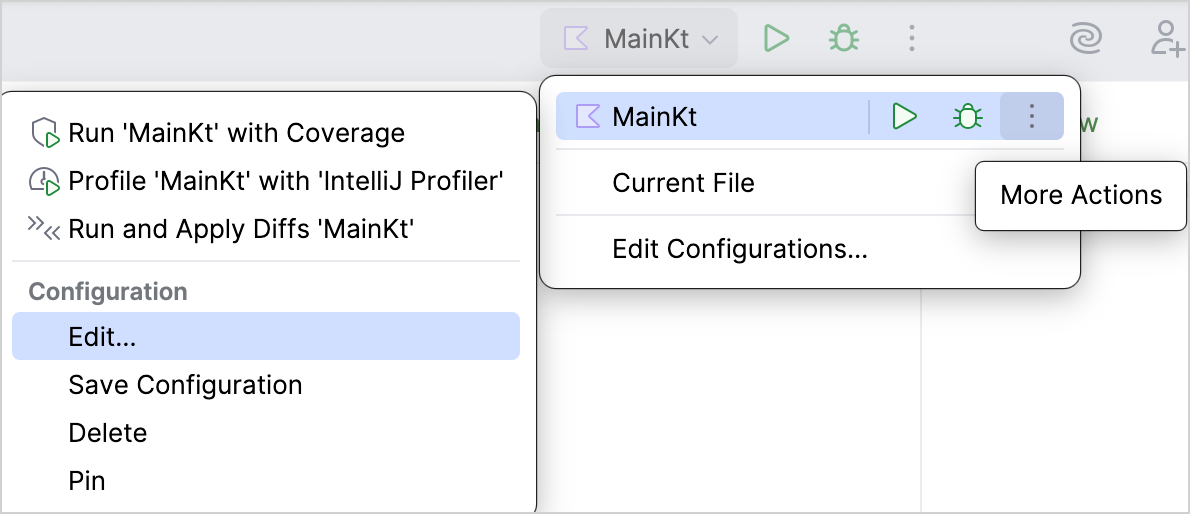
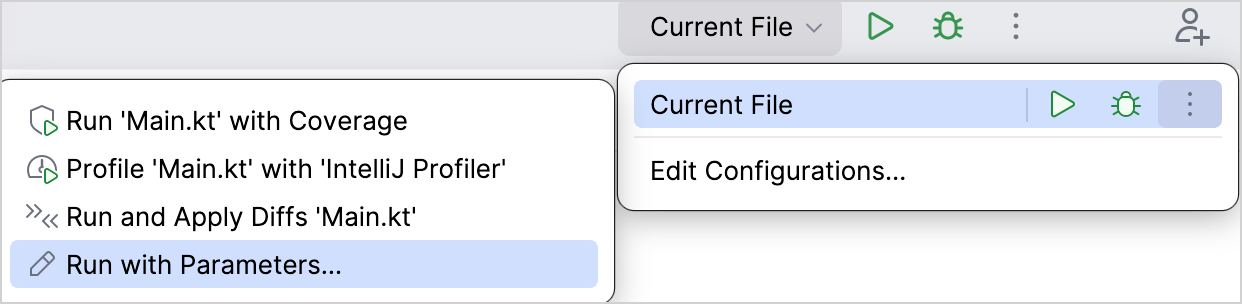
IntelliJ IDEAでデバッグモードを有効にするには、以下の手順に従います:
Run widget(実行ウィジェット)で更新したい実行/デバッグ構成を選択し、More Actions | Edit を選択します:
実行/デバッグ構成がない場合は、Run widget で Current File を選択し、More Actions | Run with Parameters を選択して実行構成の設定を開きます。
Run/Debug Configurations ダイアログで、VM options フィールドに
-Dkotlinx.coroutines.debugを入力し、OK をクリックします: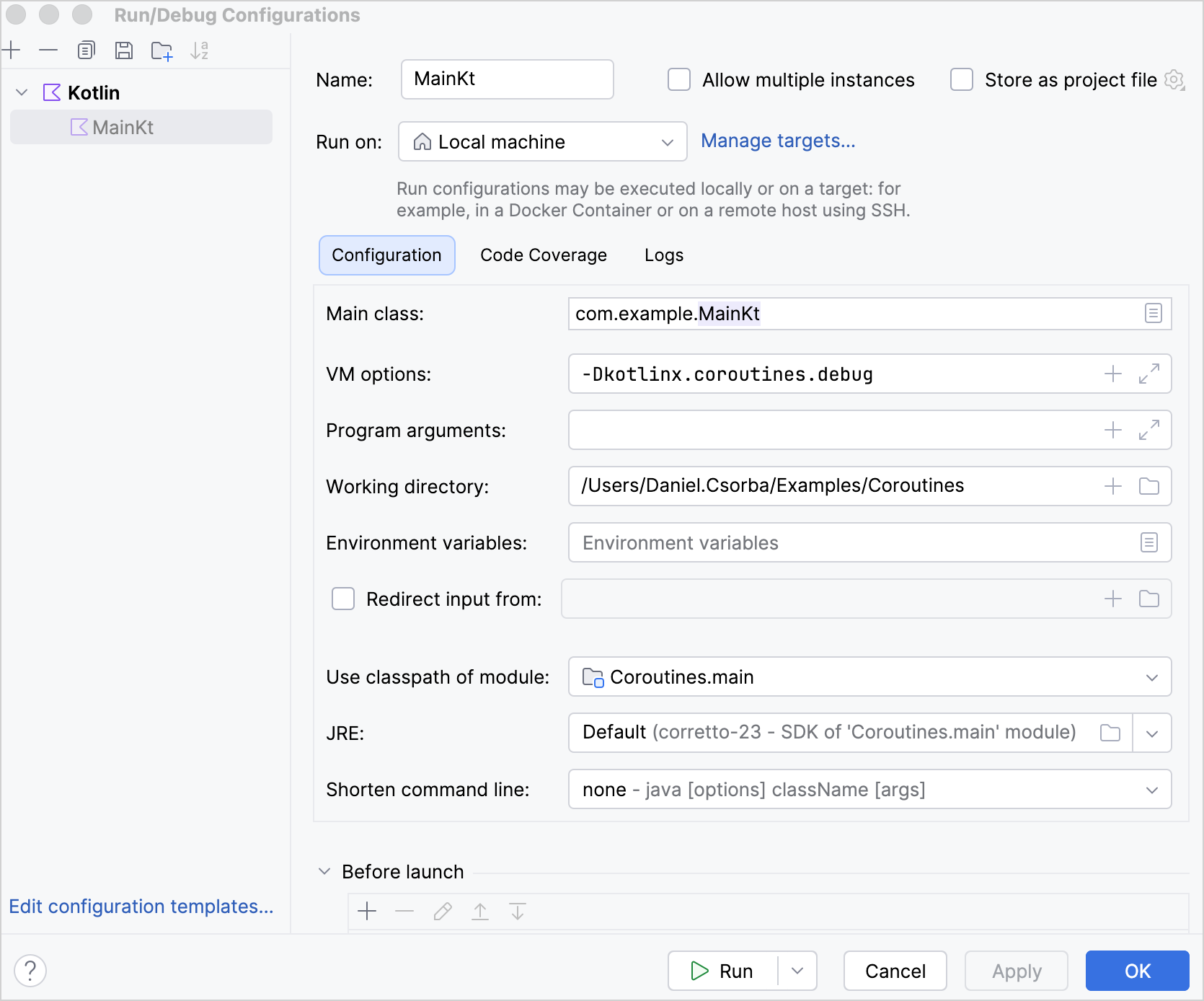
スタックトレースの復元
あるコルーチンが Deferred.await() などの中断関数(suspending function)を介して別のコルーチンから例外を受け取ると、その例外のスタックトレースには受け取り側のコルーチンのスタックフレームが含まれません。 これらのスタックフレームがないと、スタックトレースには Deferred.await() がどこで呼び出されたかや、その呼び出しに至った関数が表示されないため、デバッグが困難になることがあります。
kotlinx.coroutines ライブラリは、追加のスタックフレームを持つ例外のコピーを作成する スタックトレースの復元(stack trace recovery) を使用して、この情報を追加します。
受け取り側のコルーチンが再開すると、元の例外ではなくそのコピーをスローします。 元の例外はコピーの cause(原因)になります。 元の例外に抑制された例外(suppressed exceptions)がある場合、それらはコピーされずに元の例外に添付されたままになります。 これらを元の例外に添付したままにしておくことで、例外チェーンの循環や一部のフレームワークでのクラッシュを防ぐことができます。
デバッグモードでは、デフォルトでスタックトレースの復元が有効になっています。 デバッグモードでスタックトレースの復元を無効にするには、-Dkotlinx.coroutines.stacktrace.recovery=false VMオプションを渡します。
以下は、スタックトレースの復元がある場合とない場合のスタックトレースの違いを示す例です:
import kotlinx.coroutines.*

object UserProfileService :
    CoroutineScope by CoroutineScope(CoroutineName("UserProfileService")) {

    private fun parseUserProfile(): String {
        error("Invalid user profile")
    }

    private fun loadUserProfile(): String {
        return parseUserProfile()
    }

    // この関数を呼び出したコルーチンで実行される
    suspend fun awaitUserProfile() {
        // 新しいコルーチンを開始する
        val userProfile = async(Dispatchers.Default) {
            // 新しいコルーチンが例外をスローする
            loadUserProfile()
        }

        // awaitUserProfile() を実行しているコルーチンが
        // await() 関数を通じて例外を受け取る
        userProfile.await()
    }
}

suspend fun main() {
    UserProfileService.awaitUserProfile()
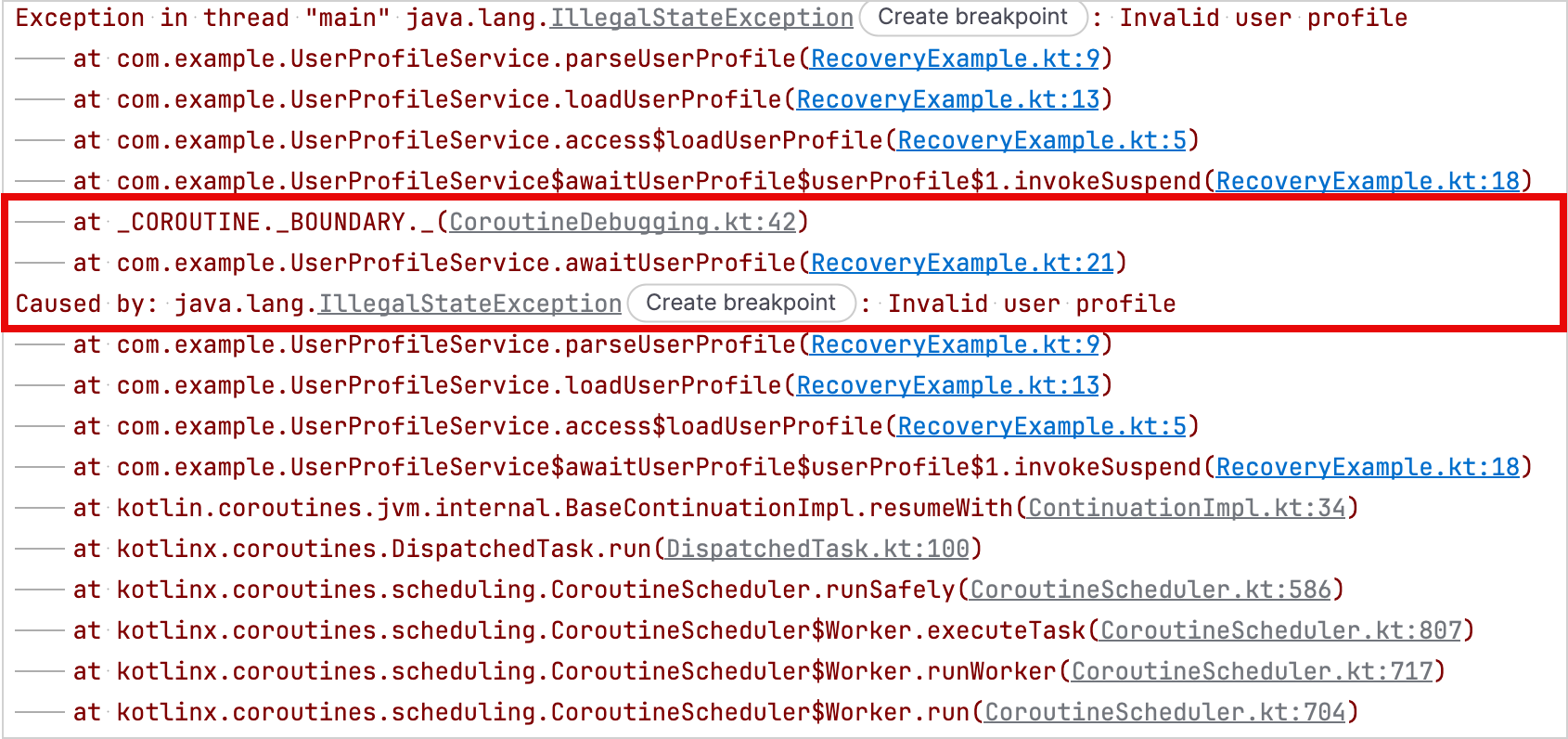
}この例では、parseUserProfile() 関数が .async() ビルダー関数によって開始されたコルーチン内で例外をスローします。 awaitUserProfile() を呼び出すコルーチンは、Deferred.await() 関数を介してその例外を受け取ります。
スタックトレースの復元が無効になっている場合、スタックトレースは .async() 関数によって作成されたコルーチン内で parseUserProfile() が例外をスローした場所を示しますが、awaitUserProfile() 関数内の Deferred.await() 呼び出しは含まれません:
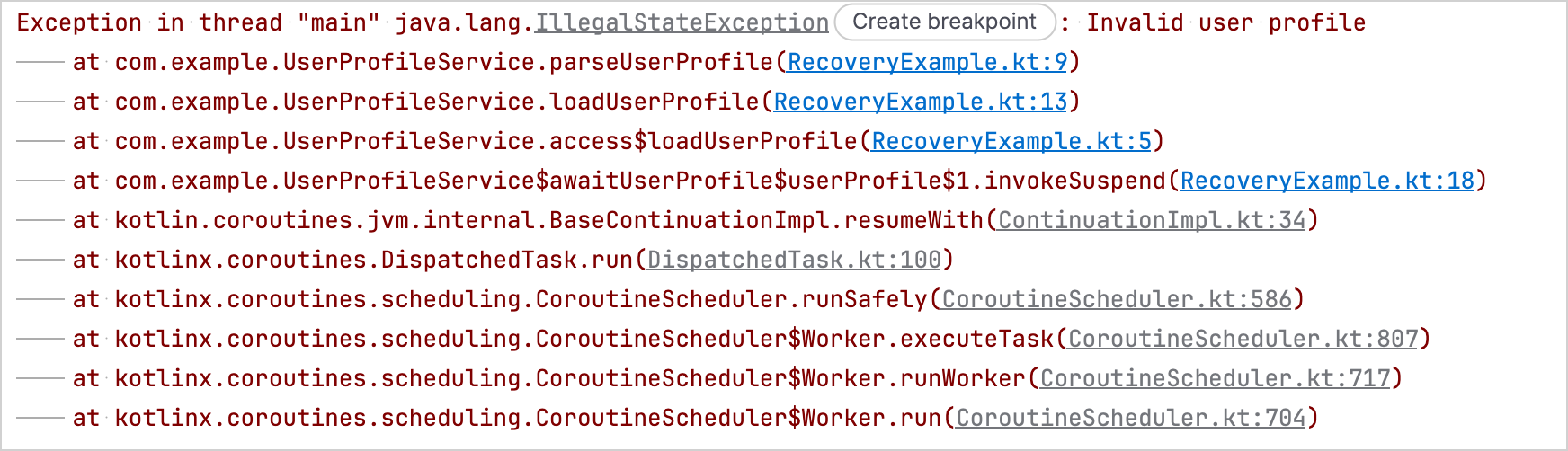
スタックトレースの復元が有効になっている場合、スタックトレースには awaitUserProfile() 関数内の Deferred.await() 呼び出しも含まれます:
カスタム例外のスタックトレースの復元
スタックトレースの復元は、例外のクラスに message、cause、その両方、または引数をまったく取らないパブリックコンストラクタがある場合、例外を自動的にコピーできます。
行番号やエラーコードなど、追加のコンストラクタ引数を必要とする例外のスタックトレースを kotlinx.coroutines ライブラリに復元させたい場合は、StackTraceRecoverable インターフェースを実装します。
StackTraceRecoverable インターフェースはKotlin標準ライブラリの一部であるため、kotlinx.coroutines ライブラリへの依存関係を追加することなく実装できます。
StackTraceRecoverable インターフェースはすべてのターゲットで利用可能ですが、kotlinx.coroutines ライブラリがスタックトレースの復元に使用するのはJVM上のみです。
このインターフェースを実装するには、copyForStackTraceRecovery() 関数をオーバーライドします。 オーバーライド内では、スタックトレースの復元用の新しい例外インスタンスを返すか、kotlinx.coroutines ライブラリに例外をコピーさせたくない場合は null を返します。
これらのAPIは実験的(Experimental)であり、@OptIn(ExperimentalStdlibCoroutineSupportApi::class) アノテーションによるオプトインが必要です。
以下は、スタックトレースの復元用に新しいインスタンスを作成する際に line プロパティを保持するカスタム例外の例です:
import kotlinx.coroutines.*
import kotlin.coroutines.ExperimentalStdlibCoroutineSupportApi
import kotlin.coroutines.debug.StackTraceRecoverable

@OptIn(ExperimentalStdlibCoroutineSupportApi::class)
class FileEditException
// cause を IllegalStateException のコンストラクタに渡すため、
// プライベートコンストラクタが必要
private constructor(
    val line: Int,
    private val detail: String,
    cause: Throwable?,
) : IllegalStateException("When editing line $line: $detail", cause),
    // スタックトレースの復元のために StackTraceRecoverable を実装
    StackTraceRecoverable<FileEditException> {

    constructor(line: Int, detail: String) : this(line, detail, null)

    // 行番号とメッセージの詳細をコピーする
    override fun copyForStackTraceRecovery(): FileEditException =
        FileEditException(line, detail, this)
}

private fun editFile() {
    throw FileEditException(15, "Unexpected token")
}

suspend fun main() {
    supervisorScope {
        // 新しいコルーチンを開始する
        val fileEdit = async(Dispatchers.Default) {
            // 元の例外をスローする
            editFile()
        }

        // スタックトレースの復元が例外のコピーを作成し、
        // 呼び出し元コルーチンのスタックフレームを追加して、そのコピーをスローする
        fileEdit.await()
    }
}
デバッグモードを有効にすると、出力には復元されたコピーが含まれ、その原因(cause)として元の例外が続きます。
StackTraceRecoverable の出力例 {...}
Exception in thread "main" com.example.FileEditException: When editing line 15: Unexpected token
	at com.example.RecoveryExampleKt.editFile(RecoveryExample.kt:54)
	at com.example.RecoveryExampleKt.access$editFile(RecoveryExample.kt:1)
	at com.example.RecoveryExampleKt$main$2$fileEdit$1.invokeSuspend(RecoveryExample.kt:62)
	at _COROUTINE._BOUNDARY._(CoroutineDebugging.kt:42)
	at com.example.RecoveryExampleKt$main$2.invokeSuspend(RecoveryExample.kt:67)
Caused by: com.example.FileEditException: When editing line 15: Unexpected token
	at com.example.RecoveryExampleKt.editFile(RecoveryExample.kt:54)
	at com.example.RecoveryExampleKt.access$editFile(RecoveryExample.kt:1)
	at com.example.RecoveryExampleKt$main$2$fileEdit$1.invokeSuspend(RecoveryExample.kt:62)
	at kotlin.coroutines.jvm.internal.BaseContinuationImpl.resumeWith(ContinuationImpl.kt:34)
	at kotlinx.coroutines.DispatchedTask.run(DispatchedTask.kt:100)
	at kotlinx.coroutines.scheduling.CoroutineScheduler.runSafely(CoroutineScheduler.kt:586)
	at kotlinx.coroutines.scheduling.CoroutineScheduler$Worker.executeTask(CoroutineScheduler.kt:807)
	at kotlinx.coroutines.scheduling.CoroutineScheduler$Worker.runWorker(CoroutineScheduler.kt:717)
at kotlinx.coroutines.scheduling.CoroutineScheduler$Worker.run(CoroutineScheduler.kt:704)デバッグエージェント
kotlinx-coroutines-debug モジュールは、JVMアプリケーション用のデバッグエージェントを提供します。 このエージェントは、コルーチンの作成、中断、再開を追跡します。
DebugProbes APIは、デバッグエージェントのメインエントリポイントです。 これを使用して、アクティブなコルーチンとその現在の状態を出力できます。 出力には、各コルーチンがどこで作成され、どこで中断されているかを示すスタックトレースが含まれます。 また、特定の Job や CoroutineScope の階層に対するコルーチンダンプを出力するために使用することもできます。
本番環境で DebugProbes を有効にすると、新しいコルーチンごとにスタックトレースを作成するため、アプリケーションのパフォーマンスが著しく低下する可能性があります。 このオーバーヘッドを回避するには、DebugProbes.enableCreationStackTraces を false に設定します。
kotlinx-coroutines-debug モジュールは、自動的な BlockHound 統合を提供します。 これを使用して、許可されていないコルーチンコンテキストでのブロッキング操作を検出できます。
セットアップ手順については、BlockHoundクイックスタートガイドを参照してください。
デバッグエージェントの依存関係を追加する
プロジェクトでデバッグエージェントを使用するには、kotlinx-coroutines-debug の依存関係を追加します:
// build.gradle.kts
dependencies {
    testImplementation("org.jetbrains.kotlinx:kotlinx-coroutines-debug:1.11.0")
}<!-- pom.xml -->
<dependency>
<groupId>org.jetbrains.kotlinx</groupId>
<artifactId>kotlinx-coroutines-debug</artifactId>
<version>1.11.0</version>
<scope>test</scope>
</dependency>デバッグエージェントでコルーチンを追跡する
デバッグエージェントでコルーチンの追跡を開始するには、以下のいずれかを行います:
- アプリケーションの起動時にデバッグエージェントをロードするために、VMオプションに
-javaagent:/path/to/kotlinx-coroutines-debug-1.11.0.jarを追加する。 - 追跡したいコルーチンを開始する前に、
DebugProbes.install()関数を呼び出す。
JDK 21以降では、DebugProbes.install() 関数を使用してデバッグエージェントを動的にロードすると警告が発生する場合があります。 この警告を回避するには、-javaagent VMオプションを使用してエージェントをロードしてください。
デバッグエージェントがアクティブな状態では、以下のAPIを使用できます:
DebugProbes.dumpCoroutines(): すべてのアクティブなコルーチンを出力します。DebugProbes.dumpCoroutinesInfo(): アクティブなコルーチンに関する情報を返します。DebugProbes.printJob():Jobの階層に対するコルーチンダンプを出力します。DebugProbes.printScope():CoroutineScopeの階層に対するコルーチンダンプを出力します。
以下は、デバッグエージェントを使用して、アクティブなコルーチンおよび特定の Job に対するコルーチン階層を出力する例です:
import kotlinx.coroutines.*
import kotlinx.coroutines.debug.*
import kotlin.time.Duration.Companion.seconds

private suspend fun loadAccount() {
    delay(5.seconds)
}

private suspend fun loadPreferences() {
    delay(5.seconds)
}

private suspend fun loadUserProfile() = coroutineScope {
    launch { loadAccount() }
    launch { loadPreferences() }
}

@OptIn(ExperimentalCoroutinesApi::class)
fun main() {
    // デバッグエージェントをインストールする
    // これは -javaagent VMオプションを使用しない場合にのみ必要
    DebugProbes.install()

    runBlocking {
        // 2つの子コルーチンを持つコルーチンを開始する
        val loadingJob = launch {
            loadUserProfile()
        }

        // 子コルーチンが中断するのを待つ
        delay(1.seconds)

        // すべてのアクティブなコルーチンを出力する
        DebugProbes.dumpCoroutines()

        println("============")

        // loadingJob とその子コルーチンを出力する
        DebugProbes.printJob(loadingJob)
    }
}デバッグモードを有効にしてこの例を実行すると、次の出力が生成されます:
デバッグモードの出力例 {...}
Coroutines dump 2026/08/18 14:00:08

Coroutine "coroutine#1":BlockingCoroutine{Active}@146ba0ac, state: RUNNING
	at java.base/java.lang.Thread.getStackTrace(Thread.java:2389)
	at kotlinx.coroutines.debug.internal.DebugProbesImpl.enhanceStackTraceWithThreadDumpImpl(DebugProbesImpl.kt:339)
	at kotlinx.coroutines.debug.internal.DebugProbesImpl.dumpCoroutinesSynchronized(DebugProbesImpl.kt:294)
	at kotlinx.coroutines.debug.internal.DebugProbesImpl.dumpCoroutines(DebugProbesImpl.kt:266)
	at kotlinx.coroutines.debug.DebugProbes.dumpCoroutines(DebugProbes.kt:181)
	at kotlinx.coroutines.debug.DebugProbes.dumpCoroutines$default(DebugProbes.kt:181)
	at DebugAgentExampleKt$main$1.invokeSuspend(DebugAgentExample.kt:34)

Coroutine "coroutine#2":StandaloneCoroutine{Active}@4dfa3a9d, state: SUSPENDED
	at DebugAgentExampleKt$main$1$loadingJob$1.invokeSuspend(DebugAgentExample.kt:27)

Coroutine "coroutine#3":StandaloneCoroutine{Active}@6eebc39e, state: SUSPENDED
	at DebugAgentExampleKt$loadUserProfile$2$1.invokeSuspend(DebugAgentExample.kt:14)

Coroutine "coroutine#4":StandaloneCoroutine{Active}@464bee09, state: SUSPENDED
	at DebugAgentExampleKt$loadUserProfile$2$2.invokeSuspend(DebugAgentExample.kt:15)============
"coroutine#2":StandaloneCoroutine{Active}, continuation is SUSPENDED at line DebugAgentExampleKt$main$1$loadingJob$1.invokeSuspend(DebugAgentExample.kt:27)
	"coroutine#3":StandaloneCoroutine{Active}, continuation is SUSPENDED at line DebugAgentExampleKt$loadUserProfile$2$1.invokeSuspend(DebugAgentExample.kt:14)
	"coroutine#4":StandaloneCoroutine{Active}, continuation is SUSPENDED at line DebugAgentExampleKt$loadUserProfile$2$2.invokeSuspend(DebugAgentExample.kt:15)
JUnitテストがタイムアウトしたときにアクティブなコルーチンを出力する
JUnitのバージョンに応じて、対応する CoroutinesTimeout APIを使用してJUnitテストにタイムアウトを設定できます。 このAPIは自動的にデバッグプローブをインストールします。 テストがタイムアウト前に完了しない場合、すべてのアクティブなコルーチンとそのスタックトレースを出力し、テストを失敗させます。
JUnit 4
JUnit 4テストにタイムアウトを設定し、それを超過した場合にすべてのアクティブなコルーチンとそのスタックトレースを出力するには、CoroutinesTimeout ルールを使用します:
import kotlinx.coroutines.*
import kotlinx.coroutines.debug.junit4.CoroutinesTimeout
import org.junit.Rule
import org.junit.Test
import kotlin.time.Duration

@OptIn(ExperimentalCoroutinesApi::class)
class UserProfileTest {
    @get:Rule
    val timeout = CoroutinesTimeout.seconds(1)

    private suspend fun loadUserProfile() {
        withContext(Dispatchers.IO) {
            // 完了しない操作をシミュレートする
            delay(Duration.INFINITE)
        }
    }

    @Test
    fun loadsUserProfile() = runBlocking {
        val loadingJob = launch {
            loadUserProfile()
        }

        // コルーチンを待機するため、テストは完了しない
        loadingJob.join()
    }
}
1秒後、このルールはテストがタイムアウトしたことを報告し、すべてのアクティブなコルーチンとそのスタックトレースを出力します。 その後、テストは TestTimedOutException で失敗します。
CoroutinesTimeout JUnit4 の出力例 {...}
Test loadsUserProfile timed out after 1 seconds

Coroutines dump 2026/08/18 13:48:21

Coroutine "coroutine#1":BlockingCoroutine{Active}@bf1ec20, state: SUSPENDED
	at UserProfileTest$loadsUserProfile$1.invokeSuspend(UserProfileTest.kt:27)
	at _COROUTINE._CREATION._(CoroutineDebugging.kt:30)
	at kotlin.coroutines.intrinsics.IntrinsicsKt__IntrinsicsJvmKt.createCoroutineUnintercepted(IntrinsicsJvm.kt:161)
	at kotlinx.coroutines.intrinsics.CancellableKt.startCoroutineCancellable(Cancellable.kt:26)
	at kotlinx.coroutines.BuildersKt__Builders_concurrentKt.runBlockingK$default(Builders.concurrent.kt:157)
	at kotlinx.coroutines.BuildersKt.runBlockingK$default(Unknown Source)
	at UserProfileTest.loadsUserProfile(UserProfileTest.kt:21)
	at java.base/jdk.internal.reflect.DirectMethodHandleAccessor.invoke(DirectMethodHandleAccessor.java:103)
	at java.base/java.lang.reflect.Method.invoke(Method.java:580)
	at org.junit.runners.model.FrameworkMethod$1.runReflectiveCall(FrameworkMethod.java:59)
	at org.junit.internal.runners.model.ReflectiveCallable.run(ReflectiveCallable.java:12)
	at org.junit.runners.model.FrameworkMethod.invokeExplosively(FrameworkMethod.java:56)
	at org.junit.internal.runners.statements.InvokeMethod.evaluate(InvokeMethod.java:17)
	at kotlinx.coroutines.debug.junit4.CoroutinesTimeoutStatement$evaluate$$inlined$runWithTimeoutDumpingCoroutines$1.call(CoroutinesTimeoutImpl.kt:79)
	at kotlinx.coroutines.debug.junit4.CoroutinesTimeoutStatement$evaluate$$inlined$runWithTimeoutDumpingCoroutines$1.call(CoroutinesTimeoutImpl.kt:79)
	at java.base/java.util.concurrent.FutureTask.run(FutureTask.java:317)
	at java.base/java.lang.Thread.run(Thread.java:1575)

Coroutine "coroutine#2":StandaloneCoroutine{Active}@70efb718, state: SUSPENDED
	at UserProfileTest$loadUserProfile$2.invokeSuspend(UserProfileTest.kt:16)
	at UserProfileTest$loadsUserProfile$1$loadingJob$1.invokeSuspend(UserProfileTest.kt:23)
	at _COROUTINE._CREATION._(CoroutineDebugging.kt:30)
	at kotlin.coroutines.intrinsics.IntrinsicsKt__IntrinsicsJvmKt.createCoroutineUnintercepted(IntrinsicsJvm.kt:161)
	at kotlinx.coroutines.intrinsics.CancellableKt.startCoroutineCancellable(Cancellable.kt:26)
	at kotlinx.coroutines.BuildersKt__Builders_commonKt.launch$default(Builders.common.kt:200)
	at kotlinx.coroutines.BuildersKt.launch$default(Unknown Source)
	at UserProfileTest$loadsUserProfile$1.invokeSuspend(UserProfileTest.kt:22)
	at kotlin.coroutines.jvm.internal.BaseContinuationImpl.resumeWith(ContinuationImpl.kt:34)
	at kotlinx.coroutines.DispatchedTask.run(DispatchedTask.kt:100)
	at kotlinx.coroutines.BuildersKt__Builders_concurrentKt.runBlockingK$default(Builders.concurrent.kt:157)
	at kotlinx.coroutines.BuildersKt.runBlockingK$default(Unknown Source)
	at UserProfileTest.loadsUserProfile(UserProfileTest.kt:21)
	at java.base/jdk.internal.reflect.DirectMethodHandleAccessor.invoke(DirectMethodHandleAccessor.java:103)
	at java.base/java.lang.reflect.Method.invoke(Method.java:580)
	at org.junit.runners.model.FrameworkMethod$1.runReflectiveCall(FrameworkMethod.java:59)
	at org.junit.internal.runners.model.ReflectiveCallable.run(ReflectiveCallable.java:12)
	at org.junit.runners.model.FrameworkMethod.invokeExplosively(FrameworkMethod.java:56)
	at org.junit.internal.runners.statements.InvokeMethod.evaluate(InvokeMethod.java:17)
	at kotlinx.coroutines.debug.junit4.CoroutinesTimeoutStatement$evaluate$$inlined$runWithTimeoutDumpingCoroutines$1.call(CoroutinesTimeoutImpl.kt:79)
	at kotlinx.coroutines.debug.junit4.CoroutinesTimeoutStatement$evaluate$$inlined$runWithTimeoutDumpingCoroutines$1.call(CoroutinesTimeoutImpl.kt:79)
	at java.base/java.util.concurrent.FutureTask.run(FutureTask.java:317)
	at java.base/java.lang.Thread.run(Thread.java:1575)
test timed out after 1000 milliseconds
org.junit.runners.model.TestTimedOutException: test timed out after 1000 milliseconds
	at java.base/jdk.internal.misc.Unsafe.park(Native Method)
	at java.base/java.util.concurrent.locks.LockSupport.parkNanos(LockSupport.java:269)
	at kotlinx.coroutines.BlockingCoroutine.joinBlocking(Builders.kt:57)
	at kotlinx.coroutines.BuildersKt__BuildersKt.runBlockingImpl(Builders.kt:30)
	at kotlinx.coroutines.BuildersKt.runBlockingImpl(Unknown Source)
	at kotlinx.coroutines.BuildersKt__Builders_concurrentKt.runBlockingK(Builders.concurrent.kt:172)
	at kotlinx.coroutines.BuildersKt.runBlockingK(Unknown Source)
	at kotlinx.coroutines.BuildersKt__Builders_concurrentKt.runBlockingK$default(Builders.concurrent.kt:157)
	at kotlinx.coroutines.BuildersKt.runBlockingK$default(Unknown Source)
	at UserProfileTest.loadsUserProfile(UserProfileTest.kt:21)
	at java.base/jdk.internal.reflect.DirectMethodHandleAccessor.invoke(DirectMethodHandleAccessor.java:103)
	at java.base/java.lang.reflect.Method.invoke(Method.java:580)
	at org.junit.runners.model.FrameworkMethod$1.runReflectiveCall(FrameworkMethod.java:59)
	at org.junit.internal.runners.model.ReflectiveCallable.run(ReflectiveCallable.java:12)
	at org.junit.runners.model.FrameworkMethod.invokeExplosively(FrameworkMethod.java:56)
	at org.junit.internal.runners.statements.InvokeMethod.evaluate(InvokeMethod.java:17)
	at kotlinx.coroutines.debug.junit4.CoroutinesTimeoutStatement$evaluate$$inlined$runWithTimeoutDumpingCoroutines$1.call(CoroutinesTimeoutImpl.kt:79)
	at java.base/java.util.concurrent.FutureTask.run(FutureTask.java:317)
	at java.base/java.lang.Thread.run(Thread.java:1575)
JUnit 5
クラス内のすべてのテスト関数にタイムアウトを適用するには、そのクラスに @CoroutinesTimeout アノテーションを追加します:
import kotlinx.coroutines.*
import kotlinx.coroutines.debug.junit5.CoroutinesTimeout
import org.junit.jupiter.api.Test
import kotlin.time.Duration

@OptIn(ExperimentalCoroutinesApi::class)
// クラス内のすべてのテスト関数に1秒のタイムアウトを設定する
@CoroutinesTimeout(testTimeoutMs = 1_000)
class UserProfileTest {
    private suspend fun loadUserProfile() {
        withContext(Dispatchers.IO) {
            // 完了しない操作をシミュレートする
            delay(Duration.INFINITE)
        }
    }

    @Test
    fun loadsUserProfile() = runBlocking {
        val loadingJob = launch {
            loadUserProfile()
        }

        // コルーチンを待機するため、テストは完了しない
        loadingJob.join()
    }
}1秒後、CoroutinesTimeout APIはタイムアウトを報告し、すべてのアクティブなコルーチンとそのスタックトレースを出力します。 その後、テストは CoroutinesTimeoutException で失敗します。
CoroutinesTimeout JUnit5 の出力例 {...}
Test loadsUserProfile timed out after 1 seconds

Coroutines dump 2026/08/18 13:46:15

Coroutine "coroutine#1":BlockingCoroutine{Active}@5c77053b, state: SUSPENDED
	at UserProfileTest$loadsUserProfile$1.invokeSuspend(UserProfileTest.kt:24)

Coroutine "coroutine#2":StandaloneCoroutine{Active}@26b894bd, state: SUSPENDED
	at UserProfileTest$loadUserProfile$2.invokeSuspend(UserProfileTest.kt:13)
	at UserProfileTest$loadsUserProfile$1$loadingJob$1.invokeSuspend(UserProfileTest.kt:20)
test timed out after 1000 ms
kotlinx.coroutines.debug.junit5.CoroutinesTimeoutException: test timed out after 1000 ms
	at java.base/jdk.internal.misc.Unsafe.park(Native Method)
	at java.base/java.util.concurrent.locks.LockSupport.parkNanos(LockSupport.java:269)
	at kotlinx.coroutines.BlockingCoroutine.joinBlocking(Builders.kt:57)
	at kotlinx.coroutines.BuildersKt__BuildersKt.runBlockingImpl(Builders.kt:30)
	at kotlinx.coroutines.BuildersKt.runBlockingImpl(Unknown Source)
	at kotlinx.coroutines.BuildersKt__Builders_concurrentKt.runBlockingK(Builders.concurrent.kt:172)
	at kotlinx.coroutines.BuildersKt.runBlockingK(Unknown Source)
	at kotlinx.coroutines.BuildersKt__Builders_concurrentKt.runBlockingK$default(Builders.concurrent.kt:157)
	at kotlinx.coroutines.BuildersKt.runBlockingK$default(Unknown Source)
	at UserProfileTest.loadsUserProfile(UserProfileTest.kt:18)
	at java.base/java.lang.reflect.Method.invoke(Method.java:580)
	at kotlinx.coroutines.debug.junit5.CoroutinesTimeoutExtension$interceptInvocation$$inlined$runWithTimeoutDumpingCoroutines$1.call(CoroutinesTimeoutImpl.kt:79)
	at java.base/java.util.concurrent.FutureTask.run(FutureTask.java:317)
	at java.base/java.lang.Thread.run(Thread.java:1575)
Androidでの kotlinx-coroutines-debug リソースの競合を解決する
デバッグエージェントはAndroidではサポートされていません。
kotlinx-coroutines-debug モジュールは、JNA、JNA Platform、Byte Buddy、およびByte Buddy Agentへの推移的依存関係を持っています。 これらの依存関係の一部には、同じパスを持つリソースが含まれています。 Androidが依存関係のリソースをマージする際に、重複したパスによって DuplicateRelativeFileException が発生し、ビルドエラーとなる場合があります。
kotlinx-coroutines-debug の依存関係を維持しながらビルドエラーを解決するには、build.gradle.kts ファイルで以下の packaging 設定を使用して競合するリソースを除外します:
// build.gradle.kts
android {
    packaging {
        resources {
            // JNAおよびJNA Platformからのライセンスファイルを除外する
            excludes += setOf(
                "META-INF/AL2.0",
                "META-INF/LGPL2.1",
            )

            // Byte BuddyからのASMライセンスファイルを除外する
            excludes += "META-INF/licenses/ASM"

            // Byte Buddy Agentファイルのコピーを1つだけ保持する
            pickFirsts += setOf(
                "win32-x86-64/attach_hotspot_windows.dll",
                "win32-x86/attach_hotspot_windows.dll",
            )
        }
    }
}
次のステップ
IntelliJ IDEAでのコルーチンのデバッグ方法については、IntelliJ IDEAを使用したコルーチンのデバッグ および IntelliJ IDEAを使用したKotlin Flowのデバッグ を参照してください。