
코루틴 디버깅
코루틴을 사용하는 애플리케이션의 디버깅은 여러 코루틴이 동시에 실행되고, 한 스레드에서 일시 중단(suspend)되었다가 다른 스레드에서 재개(resume)될 수 있기 때문에 까다로울 수 있습니다. 또한 실행할 때마다 실행 순서와 사용되는 스레드가 변경될 수 있어 특정 코루틴의 실행 흐름을 추적하기 어렵습니다.
JVM에서는 코루틴 디버깅을 더 쉽게 만들어 주는 다음과 같은 기능을 사용할 수 있습니다:
- 디버그 모드는 각 코루틴에 고유한 이름을 부여하여 디버거와 진단 출력에서 코루틴을 식별할 수 있도록 합니다.
- 스택 추적 복구(Stack trace recovery)는 코루틴이 예상된 결과 대신 예외를 수신한 위치에 대한 정보를 추가합니다.
- 디버그 에이전트(debug agent)는 활성 코루틴을 추적하고 상태를 보고하는 등의 작업을 수행합니다.
디버그 모드와 스택 추적 복구 기능은 kotlinx-coroutines-core 모듈에서 제공됩니다. 디버그 에이전트는 kotlinx-coroutines-debug 모듈에서 제공됩니다.
디버그 에이전트는 Android에서 지원되지 않습니다.
디버그 모드 활성화
디버그 모드는 실행되는 모든 코루틴에 고유한 이름을 할당합니다. Java 디버거, 코루틴의 문자열 표현, 그리고 해당 코루틴을 실행하는 동안의 스레드 이름에서 코루틴 이름을 확인할 수 있습니다. 디버그 모드는 런타임 오버헤드가 거의 없으므로, 로깅과 진단을 단순화하기 위해 계속 활성화된 상태로 유지할 수 있습니다.
Java 단언(assertion)을 활성화하여 코드를 실행하면 kotlinx.coroutines 라이브러리가 디버그 모드를 자동으로 활성화합니다. 단위 테스트는 기본적으로 단언이 활성화된 상태로 실행되므로, 단위 테스트를 위해 명시적으로 디버그 모드를 활성화할 필요는 없습니다.
디버그 모드를 명시적으로 활성화하려면 Gradle 또는 Maven과 같은 빌드 도구나 IDE 실행 구성을 설정하여 애플리케이션을 실행하는 JVM에 -Dkotlinx.coroutines.debug 인자를 전달하도록 구성하세요.
IntelliJ IDEA에서 디버그 모드를 활성화하려면 다음 단계를 따르세요:
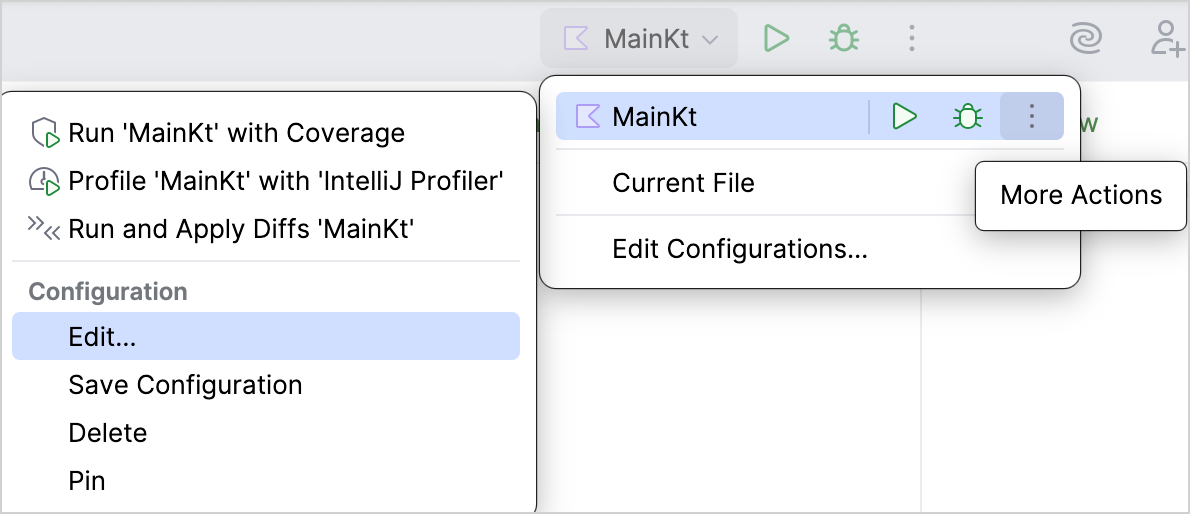
Run 위젯에서 업데이트하려는 실행/디버그 구성을 선택한 다음, More Actions | Edit을 선택합니다:
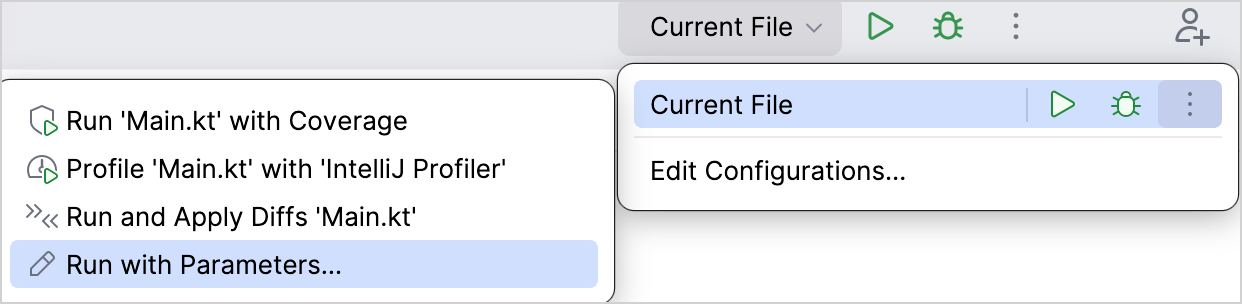
실행/디버그 구성이 없는 경우 Run 위젯에서 Current File을 선택한 다음, More Actions | Run with Parameters를 선택하여 실행 구성 설정을 엽니다.
Run/Debug Configurations 대화상자에서 VM options 필드에
-Dkotlinx.coroutines.debug를 입력하고 OK를 클릭합니다: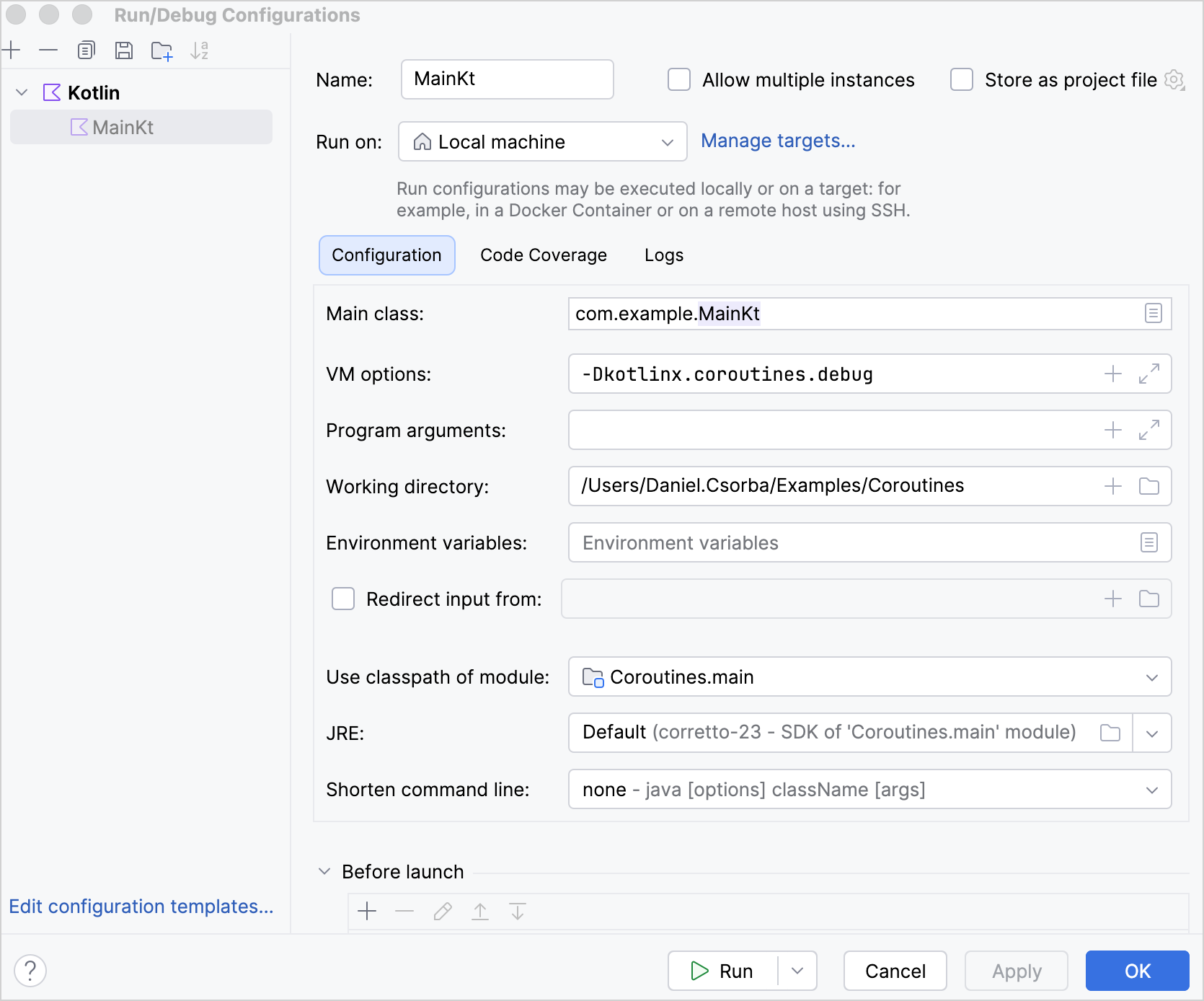
스택 추적 복구
코루틴이 Deferred.await()과 같은 일시 중단 함수를 통해 다른 코루틴으로부터 예외를 수신할 때, 해당 예외의 스택 추적(stack trace)에는 예외를 수신하는 코루틴의 스택 프레임이 포함되지 않습니다. 이러한 스택 프레임이 없으면 스택 추적에서 Deferred.await()이 호출된 위치나 해당 호출로 이어진 함수가 무엇인지 표시되지 않아 디버깅이 어려워질 수 있습니다.
kotlinx.coroutines 라이브러리는 추가 스택 프레임이 포함된 예외 복사본을 생성하는 _스택 추적 복구(stack trace recovery)_를 사용하여 이 정보를 추가합니다.
예외를 수신하는 코루틴이 재개될 때 원래 예외 대신 이 복사본을 던집니다. 원래 예외는 복사본의 원인(cause)이 됩니다. 원래 예외에 억제된 예외(suppressed exception)가 있는 경우, 복사되지 않고 원래 예외에 연결된 상태로 유지됩니다. 원래 예외에 연결된 상태로 유지하면 예외 체인에서의 순환 참조와 일부 프레임워크에서의 비정상 종료(crash)를 방지할 수 있습니다.
디버그 모드에서는 기본적으로 스택 추적 복구가 활성화되어 있습니다. 디버그 모드에서 스택 추적 복구를 비활성화하려면 -Dkotlinx.coroutines.stacktrace.recovery=false VM 옵션을 전달하세요.
스택 추적 복구가 활성화된 경우와 비활성화된 경우의 스택 추적 차이를 보여주는 예제는 다음과 같습니다:
import kotlinx.coroutines.*

object UserProfileService :
    CoroutineScope by CoroutineScope(CoroutineName("UserProfileService")) {

    private fun parseUserProfile(): String {
        error("Invalid user profile")
    }

    private fun loadUserProfile(): String {
        return parseUserProfile()
    }

    // 이 함수를 호출하는 코루틴에서 실행됩니다
    suspend fun awaitUserProfile() {
        // 새 코루틴을 시작합니다
        val userProfile = async(Dispatchers.Default) {
            // 새 코루틴이 예외를 던집니다
            loadUserProfile()
        }

        // awaitUserProfile()을 실행하는 코루틴이
        // await() 함수를 통해 예외를 수신합니다
        userProfile.await()
    }
}

suspend fun main() {
    UserProfileService.awaitUserProfile()
}
이 예제에서 parseUserProfile() 함수는 .async() 빌더 함수에 의해 시작된 코루틴 내에서 예외를 던집니다. awaitUserProfile()을 호출하는 코루틴은 Deferred.await() 함수를 통해 예외를 수신합니다.
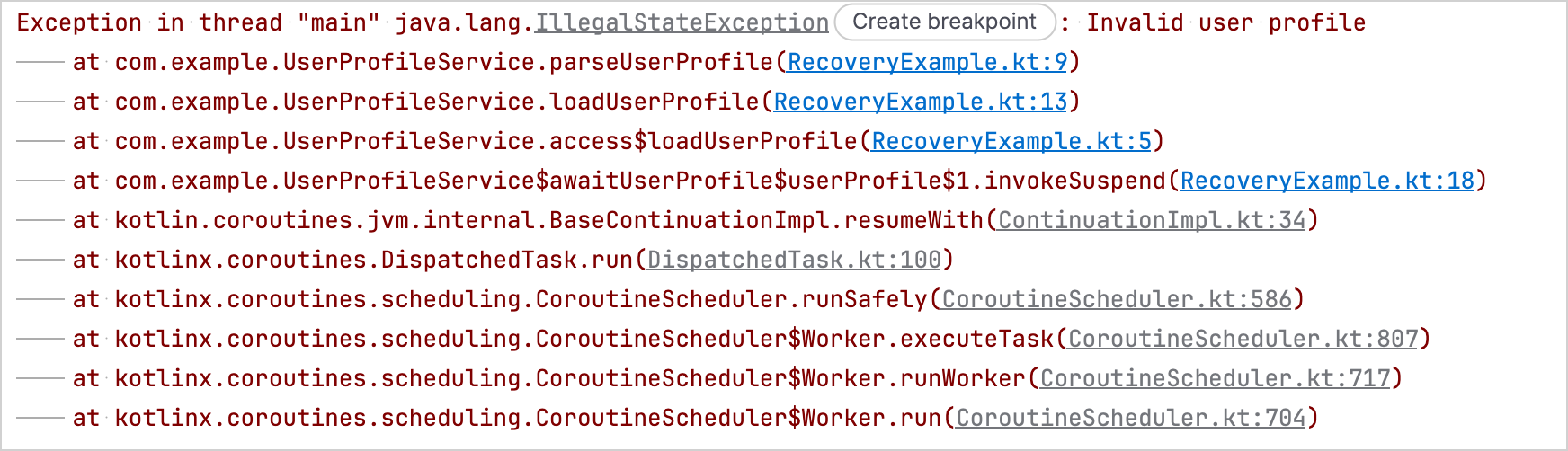
스택 추적 복구가 비활성화된 경우, 스택 추적에는 .async() 함수로 생성된 코루틴 내에서 parseUserProfile()이 예외를 던진 위치는 표시되지만, awaitUserProfile() 함수 내의 Deferred.await() 호출은 포함되지 않습니다:
스택 추적 복구가 활성화된 경우, 스택 추적에는 awaitUserProfile() 함수 내의 Deferred.await() 호출도 포함됩니다:
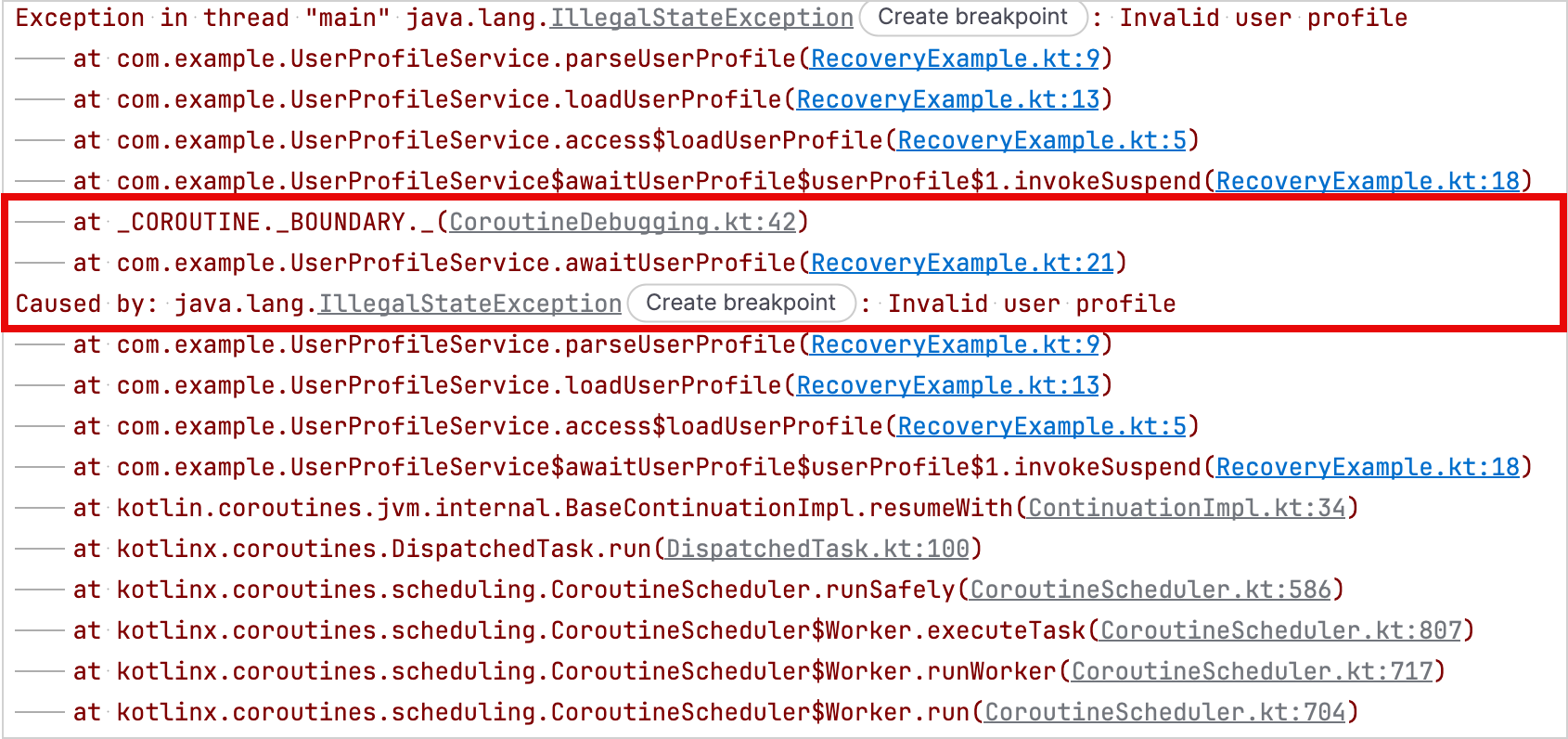
커스텀 예외에 대한 스택 추적 복구
스택 추적 복구는 예외 클래스에 메시지(message), 원인(cause), 둘 다, 또는 인자를 전혀 받지 않는 공개(public) 생성자가 있는 경우 예외를 자동으로 복사할 수 있습니다.
줄 번호나 에러 코드와 같은 추가 생성자 인자가 필요한 예외의 스택 추적을 kotlinx.coroutines 라이브러리가 복구하도록 하려면 StackTraceRecoverable 인터페이스를 구현하세요.
StackTraceRecoverable 인터페이스는 Kotlin 표준 라이브러리의 일부이므로, kotlinx.coroutines 라이브러리에 대한 종속성을 추가하지 않고도 구현할 수 있습니다.
StackTraceRecoverable 인터페이스는 모든 대상 플랫폼에서 사용할 수 있지만, kotlinx.coroutines 라이브러리는 JVM에서만 스택 추적 복구에 이 인터페이스를 사용합니다.
인터페이스를 구현하려면 copyForStackTraceRecovery() 함수를 오버라이드하세요. 오버라이드 구현부에서 스택 추적 복구를 위한 새 예외 인스턴스를 반환하거나, kotlinx.coroutines 라이브러리가 예외를 복사하지 않도록 하려면 null을 반환하세요.
이러한 API는 실험적(Experimental)이며 @OptIn(ExperimentalStdlibCoroutineSupportApi::class) 애너테이션을 통한 동의(opt-in)가 필요합니다.
다음은 스택 추적 복구를 위한 새 인스턴스를 생성할 때 line 프로퍼티를 보존하는 커스텀 예외의 예입니다:
import kotlinx.coroutines.*
import kotlin.coroutines.ExperimentalStdlibCoroutineSupportApi
import kotlin.coroutines.debug.StackTraceRecoverable

@OptIn(ExperimentalStdlibCoroutineSupportApi::class)
class FileEditException
// IllegalStateException 생성자에 원인(cause)을 전달하기 위해
// private 생성자가 필요합니다
private constructor(
    val line: Int,
    private val detail: String,
    cause: Throwable?,
) : IllegalStateException("When editing line $line: $detail", cause),
    // 스택 추적 복구를 위해 StackTraceRecoverable을 구현합니다
    StackTraceRecoverable<FileEditException> {

    constructor(line: Int, detail: String) : this(line, detail, null)

    // 줄 번호와 메시지 세부정보를 복사합니다
    override fun copyForStackTraceRecovery(): FileEditException =
        FileEditException(line, detail, this)
}

private fun editFile() {
    throw FileEditException(15, "Unexpected token")
}

suspend fun main() {
    supervisorScope {
        // 새 코루틴을 시작합니다
        val fileEdit = async(Dispatchers.Default) {
            // 원래 예외를 던집니다
            editFile()
        }

        // 스택 추적 복구가 예외 복사본을 생성하고,
        // 호출 코루틴의 스택 프레임을 추가한 후 복사본을 던집니다
        fileEdit.await()
    }
}
디버그 모드가 활성화되면 출력에 복구된 복사본이 표시되고, 그 뒤에 해당 복사본의 원인으로 원래 예외가 표시됩니다.
StackTraceRecoverable 예제 출력 {...}
Exception in thread "main" com.example.FileEditException: When editing line 15: Unexpected token
	at com.example.RecoveryExampleKt.editFile(RecoveryExample.kt:54)
	at com.example.RecoveryExampleKt.access$editFile(RecoveryExample.kt:1)
	at com.example.RecoveryExampleKt$main$2$fileEdit$1.invokeSuspend(RecoveryExample.kt:62)
	at _COROUTINE._BOUNDARY._(CoroutineDebugging.kt:42)
	at com.example.RecoveryExampleKt$main$2.invokeSuspend(RecoveryExample.kt:67)
Caused by: com.example.FileEditException: When editing line 15: Unexpected token
	at com.example.RecoveryExampleKt.editFile(RecoveryExample.kt:54)
	at com.example.RecoveryExampleKt.access$editFile(RecoveryExample.kt:1)
	at com.example.RecoveryExampleKt$main$2$fileEdit$1.invokeSuspend(RecoveryExample.kt:62)
	at kotlin.coroutines.jvm.internal.BaseContinuationImpl.resumeWith(ContinuationImpl.kt:34)
	at kotlinx.coroutines.DispatchedTask.run(DispatchedTask.kt:100)
	at kotlinx.coroutines.scheduling.CoroutineScheduler.runSafely(CoroutineScheduler.kt:586)
	at kotlinx.coroutines.scheduling.CoroutineScheduler$Worker.executeTask(CoroutineScheduler.kt:807)
	at kotlinx.coroutines.scheduling.CoroutineScheduler$Worker.runWorker(CoroutineScheduler.kt:717)
at kotlinx.coroutines.scheduling.CoroutineScheduler$Worker.run(CoroutineScheduler.kt:704)디버그 에이전트
kotlinx-coroutines-debug 모듈은 JVM 애플리케이션용 디버그 에이전트를 제공합니다. 이 에이전트는 코루틴이 생성, 일시 중단, 재개될 때 코루틴을 추적합니다.
DebugProbes API는 디버그 에이전트의 주요 진입점입니다. 이를 사용하여 활성 코루틴과 현재 상태를 출력할 수 있습니다. 출력에는 각 코루틴이 생성된 위치와 일시 중단된 위치를 보여주는 스택 추적이 포함됩니다. 또한 특정 Job 또는 CoroutineScope의 계층 구조에 대한 코루틴 덤프를 출력하는 데 사용할 수도 있습니다.
프로덕션 환경에서 DebugProbes를 활성화하면 각 새 코루틴에 대해 스택 추적을 생성할 때 애플리케이션의 성능이 크게 저하될 수 있습니다. 이러한 오버헤드를 방지하려면 DebugProbes.enableCreationStackTraces를 false로 설정하세요.
kotlinx-coroutines-debug 모듈은 자동 BlockHound 통합을 제공합니다. 이를 사용하여 허용되지 않는 코루틴 컨텍스트에서 블로킹 작업을 감지할 수 있습니다.
설정 방법은 BlockHound 빠른 시작 가이드를 참조하세요.
디버그 에이전트 종속성 추가
프로젝트에서 디버그 에이전트를 사용하려면 kotlinx-coroutines-debug 종속성을 추가하세요:
// build.gradle.kts
dependencies {
    testImplementation("org.jetbrains.kotlinx:kotlinx-coroutines-debug:1.11.0")
}<!-- pom.xml -->
<dependency>
<groupId>org.jetbrains.kotlinx</groupId>
<artifactId>kotlinx-coroutines-debug</artifactId>
<version>1.11.0</version>
<scope>test</scope>
</dependency>디버그 에이전트로 코루틴 추적
디버그 에이전트로 코루틴 추적을 시작하려면 다음 중 하나를 수행할 수 있습니다:
- 애플리케이션이 시작될 때 디버그 에이전트를 로드하도록 VM 옵션에
-javaagent:/path/to/kotlinx-coroutines-debug-1.11.0.jar를 추가합니다. - 추적하려는 코루틴을 시작하기 전에
DebugProbes.install()함수를 호출합니다.
JDK 21부터는 DebugProbes.install() 함수를 사용하여 디버그 에이전트를 동적으로 로드할 때 경고가 발생할 수 있습니다. 이 경고를 방지하려면 -javaagent VM 옵션을 사용하여 에이전트를 로드하세요.
디버그 에이전트가 활성화되면 다음 API를 사용할 수 있습니다:
DebugProbes.dumpCoroutines()는 모든 활성 코루틴을 출력합니다.DebugProbes.dumpCoroutinesInfo()는 활성 코루틴에 대한 정보를 반환합니다.DebugProbes.printJob()은Job의 계층 구조에 대한 코루틴 덤프를 출력합니다.DebugProbes.printScope()는CoroutineScope의 계층 구조에 대한 코루틴 덤프를 출력합니다.
다음은 디버그 에이전트를 사용하여 활성 코루틴과 특정 Job의 코루틴 계층 구조를 출력하는 예제입니다:
import kotlinx.coroutines.*
import kotlinx.coroutines.debug.*
import kotlin.time.Duration.Companion.seconds

private suspend fun loadAccount() {
    delay(5.seconds)
}

private suspend fun loadPreferences() {
    delay(5.seconds)
}

private suspend fun loadUserProfile() = coroutineScope {
    launch { loadAccount() }
    launch { loadPreferences() }
}

@OptIn(ExperimentalCoroutinesApi::class)
fun main() {
    // 디버그 에이전트를 설치합니다
    // 이는 -javaagent VM 옵션을 사용하지 않는 경우에만 필요합니다
    DebugProbes.install()

    runBlocking {
        // 두 개의 자식 코루틴이 있는 코루틴을 시작합니다
        val loadingJob = launch {
            loadUserProfile()
        }

        // 자식 코루틴이 일시 중단될 시간을 줍니다
        delay(1.seconds)

        // 모든 활성 코루틴을 출력합니다
        DebugProbes.dumpCoroutines()

        println("============")

        // loadingJob과 그 자식 코루틴들을 출력합니다
        DebugProbes.printJob(loadingJob)
    }
}
디버그 모드가 활성화된 상태에서 예제를 실행하면 다음과 같은 출력이 생성됩니다:
디버그 모드 예제 출력 {...}
Coroutines dump 2026/08/18 14:00:08

Coroutine "coroutine#1":BlockingCoroutine{Active}@146ba0ac, state: RUNNING
	at java.base/java.lang.Thread.getStackTrace(Thread.java:2389)
	at kotlinx.coroutines.debug.internal.DebugProbesImpl.enhanceStackTraceWithThreadDumpImpl(DebugProbesImpl.kt:339)
	at kotlinx.coroutines.debug.internal.DebugProbesImpl.dumpCoroutinesSynchronized(DebugProbesImpl.kt:294)
	at kotlinx.coroutines.debug.internal.DebugProbesImpl.dumpCoroutines(DebugProbesImpl.kt:266)
	at kotlinx.coroutines.debug.DebugProbes.dumpCoroutines(DebugProbes.kt:181)
	at kotlinx.coroutines.debug.DebugProbes.dumpCoroutines$default(DebugProbes.kt:181)
	at DebugAgentExampleKt$main$1.invokeSuspend(DebugAgentExample.kt:34)

Coroutine "coroutine#2":StandaloneCoroutine{Active}@4dfa3a9d, state: SUSPENDED
	at DebugAgentExampleKt$main$1$loadingJob$1.invokeSuspend(DebugAgentExample.kt:27)

Coroutine "coroutine#3":StandaloneCoroutine{Active}@6eebc39e, state: SUSPENDED
	at DebugAgentExampleKt$loadUserProfile$2$1.invokeSuspend(DebugAgentExample.kt:14)

Coroutine "coroutine#4":StandaloneCoroutine{Active}@464bee09, state: SUSPENDED
	at DebugAgentExampleKt$loadUserProfile$2$2.invokeSuspend(DebugAgentExample.kt:15)============
"coroutine#2":StandaloneCoroutine{Active}, continuation is SUSPENDED at line DebugAgentExampleKt$main$1$loadingJob$1.invokeSuspend(DebugAgentExample.kt:27)
	"coroutine#3":StandaloneCoroutine{Active}, continuation is SUSPENDED at line DebugAgentExampleKt$loadUserProfile$2$1.invokeSuspend(DebugAgentExample.kt:14)
	"coroutine#4":StandaloneCoroutine{Active}, continuation is SUSPENDED at line DebugAgentExampleKt$loadUserProfile$2$2.invokeSuspend(DebugAgentExample.kt:15)
JUnit 테스트 시간 초과 시 활성 코루틴 출력
JUnit 버전에 따라 해당하는 CoroutinesTimeout API를 사용하여 JUnit 테스트의 제한 시간을 설정할 수 있습니다. 이 API는 디버그 프로브(debug probes)를 자동으로 설치합니다. 테스트가 제한 시간 내에 완료되지 않으면 모든 활성 코루틴과 스택 추적을 출력하고 테스트를 실패 처리합니다.
JUnit 4
JUnit 4 테스트에 제한 시간을 설정하고 시간 초과 시 모든 활성 코루틴과 해당 스택 추적을 출력하려면 CoroutinesTimeout 룰(rule)을 사용하세요:
import kotlinx.coroutines.*
import kotlinx.coroutines.debug.junit4.CoroutinesTimeout
import org.junit.Rule
import org.junit.Test
import kotlin.time.Duration

@OptIn(ExperimentalCoroutinesApi::class)
class UserProfileTest {
    @get:Rule
    val timeout = CoroutinesTimeout.seconds(1)

    private suspend fun loadUserProfile() {
        withContext(Dispatchers.IO) {
            // 완료되지 않는 작업을 시뮬레이션합니다
            delay(Duration.INFINITE)
        }
    }

    @Test
    fun loadsUserProfile() = runBlocking {
        val loadingJob = launch {
            loadUserProfile()
        }

        // 코루틴을 기다리므로 테스트가 완료되지 않습니다
        loadingJob.join()
    }
}
1초 후 룰은 테스트 시간이 초과되었음을 보고하고 모든 활성 코루틴과 해당 스택 추적을 출력합니다. 그런 다음 테스트는 TestTimedOutException과 함께 실패합니다.
CoroutinesTimeout JUnit4 예제 출력 {...}
Test loadsUserProfile timed out after 1 seconds

Coroutines dump 2026/08/18 13:48:21

Coroutine "coroutine#1":BlockingCoroutine{Active}@bf1ec20, state: SUSPENDED
	at UserProfileTest$loadsUserProfile$1.invokeSuspend(UserProfileTest.kt:27)
	at _COROUTINE._CREATION._(CoroutineDebugging.kt:30)
	at kotlin.coroutines.intrinsics.IntrinsicsKt__IntrinsicsJvmKt.createCoroutineUnintercepted(IntrinsicsJvm.kt:161)
	at kotlinx.coroutines.intrinsics.CancellableKt.startCoroutineCancellable(Cancellable.kt:26)
	at kotlinx.coroutines.BuildersKt__Builders_concurrentKt.runBlockingK$default(Builders.concurrent.kt:157)
	at kotlinx.coroutines.BuildersKt.runBlockingK$default(Unknown Source)
	at UserProfileTest.loadsUserProfile(UserProfileTest.kt:21)
	at java.base/jdk.internal.reflect.DirectMethodHandleAccessor.invoke(DirectMethodHandleAccessor.java:103)
	at java.base/java.lang.reflect.Method.invoke(Method.java:580)
	at org.junit.runners.model.FrameworkMethod$1.runReflectiveCall(FrameworkMethod.java:59)
	at org.junit.internal.runners.model.ReflectiveCallable.run(ReflectiveCallable.java:12)
	at org.junit.runners.model.FrameworkMethod.invokeExplosively(FrameworkMethod.java:56)
	at org.junit.internal.runners.statements.InvokeMethod.evaluate(InvokeMethod.java:17)
	at kotlinx.coroutines.debug.junit4.CoroutinesTimeoutStatement$evaluate$$inlined$runWithTimeoutDumpingCoroutines$1.call(CoroutinesTimeoutImpl.kt:79)
	at kotlinx.coroutines.debug.junit4.CoroutinesTimeoutStatement$evaluate$$inlined$runWithTimeoutDumpingCoroutines$1.call(CoroutinesTimeoutImpl.kt:79)
	at java.base/java.util.concurrent.FutureTask.run(FutureTask.java:317)
	at java.base/java.lang.Thread.run(Thread.java:1575)

Coroutine "coroutine#2":StandaloneCoroutine{Active}@70efb718, state: SUSPENDED
	at UserProfileTest$loadUserProfile$2.invokeSuspend(UserProfileTest.kt:16)
	at UserProfileTest$loadsUserProfile$1$loadingJob$1.invokeSuspend(UserProfileTest.kt:23)
	at _COROUTINE._CREATION._(CoroutineDebugging.kt:30)
	at kotlin.coroutines.intrinsics.IntrinsicsKt__IntrinsicsJvmKt.createCoroutineUnintercepted(IntrinsicsJvm.kt:161)
	at kotlinx.coroutines.intrinsics.CancellableKt.startCoroutineCancellable(Cancellable.kt:26)
	at kotlinx.coroutines.BuildersKt__Builders_commonKt.launch$default(Builders.common.kt:200)
	at kotlinx.coroutines.BuildersKt.launch$default(Unknown Source)
	at UserProfileTest$loadsUserProfile$1.invokeSuspend(UserProfileTest.kt:22)
	at kotlin.coroutines.jvm.internal.BaseContinuationImpl.resumeWith(ContinuationImpl.kt:34)
	at kotlinx.coroutines.DispatchedTask.run(DispatchedTask.kt:100)
	at kotlinx.coroutines.BuildersKt__Builders_concurrentKt.runBlockingK$default(Builders.concurrent.kt:157)
	at kotlinx.coroutines.BuildersKt.runBlockingK$default(Unknown Source)
	at UserProfileTest.loadsUserProfile(UserProfileTest.kt:21)
	at java.base/jdk.internal.reflect.DirectMethodHandleAccessor.invoke(DirectMethodHandleAccessor.java:103)
	at java.base/java.lang.reflect.Method.invoke(Method.java:580)
	at org.junit.runners.model.FrameworkMethod$1.runReflectiveCall(FrameworkMethod.java:59)
	at org.junit.internal.runners.model.ReflectiveCallable.run(ReflectiveCallable.java:12)
	at org.junit.runners.model.FrameworkMethod.invokeExplosively(FrameworkMethod.java:56)
	at org.junit.internal.runners.statements.InvokeMethod.evaluate(InvokeMethod.java:17)
	at kotlinx.coroutines.debug.junit4.CoroutinesTimeoutStatement$evaluate$$inlined$runWithTimeoutDumpingCoroutines$1.call(CoroutinesTimeoutImpl.kt:79)
	at kotlinx.coroutines.debug.junit4.CoroutinesTimeoutStatement$evaluate$$inlined$runWithTimeoutDumpingCoroutines$1.call(CoroutinesTimeoutImpl.kt:79)
	at java.base/java.util.concurrent.FutureTask.run(FutureTask.java:317)
	at java.base/java.lang.Thread.run(Thread.java:1575)
test timed out after 1000 milliseconds
org.junit.runners.model.TestTimedOutException: test timed out after 1000 milliseconds
	at java.base/jdk.internal.misc.Unsafe.park(Native Method)
	at java.base/java.util.concurrent.locks.LockSupport.parkNanos(LockSupport.java:269)
	at kotlinx.coroutines.BlockingCoroutine.joinBlocking(Builders.kt:57)
	at kotlinx.coroutines.BuildersKt__BuildersKt.runBlockingImpl(Builders.kt:30)
	at kotlinx.coroutines.BuildersKt.runBlockingImpl(Unknown Source)
	at kotlinx.coroutines.BuildersKt__Builders_concurrentKt.runBlockingK(Builders.concurrent.kt:172)
	at kotlinx.coroutines.BuildersKt.runBlockingK(Unknown Source)
	at kotlinx.coroutines.BuildersKt__Builders_concurrentKt.runBlockingK$default(Builders.concurrent.kt:157)
	at kotlinx.coroutines.BuildersKt.runBlockingK$default(Unknown Source)
	at UserProfileTest.loadsUserProfile(UserProfileTest.kt:21)
	at java.base/jdk.internal.reflect.DirectMethodHandleAccessor.invoke(DirectMethodHandleAccessor.java:103)
	at java.base/java.lang.reflect.Method.invoke(Method.java:580)
	at org.junit.runners.model.FrameworkMethod$1.runReflectiveCall(FrameworkMethod.java:59)
	at org.junit.internal.runners.model.ReflectiveCallable.run(ReflectiveCallable.java:12)
	at org.junit.runners.model.FrameworkMethod.invokeExplosively(FrameworkMethod.java:56)
	at org.junit.internal.runners.statements.InvokeMethod.evaluate(InvokeMethod.java:17)
	at kotlinx.coroutines.debug.junit4.CoroutinesTimeoutStatement$evaluate$$inlined$runWithTimeoutDumpingCoroutines$1.call(CoroutinesTimeoutImpl.kt:79)
	at java.base/java.util.concurrent.FutureTask.run(FutureTask.java:317)
	at java.base/java.lang.Thread.run(Thread.java:1575)
JUnit 5
클래스 내의 모든 테스트 함수에 제한 시간을 적용하려면 클래스에 @CoroutinesTimeout 애너테이션을 추가하세요:
import kotlinx.coroutines.*
import kotlinx.coroutines.debug.junit5.CoroutinesTimeout
import org.junit.jupiter.api.Test
import kotlin.time.Duration

@OptIn(ExperimentalCoroutinesApi::class)
// 클래스의 모든 테스트 함수에 1초의 제한 시간을 설정합니다
@CoroutinesTimeout(testTimeoutMs = 1_000)
class UserProfileTest {
    private suspend fun loadUserProfile() {
        withContext(Dispatchers.IO) {
            // 완료되지 않는 작업을 시뮬레이션합니다
            delay(Duration.INFINITE)
        }
    }

    @Test
    fun loadsUserProfile() = runBlocking {
        val loadingJob = launch {
            loadUserProfile()
        }

        // 코루틴을 기다리므로 테스트가 완료되지 않습니다
        loadingJob.join()
    }
}
1초 후 CoroutinesTimeout API가 시간 초과를 보고하고 모든 활성 코루틴과 해당 스택 추적을 출력합니다. 그런 다음 테스트는 CoroutinesTimeoutException과 함께 실패합니다.
CoroutinesTimeout JUnit5 예제 출력 {...}
Test loadsUserProfile timed out after 1 seconds

Coroutines dump 2026/08/18 13:46:15

Coroutine "coroutine#1":BlockingCoroutine{Active}@5c77053b, state: SUSPENDED
	at UserProfileTest$loadsUserProfile$1.invokeSuspend(UserProfileTest.kt:24)

Coroutine "coroutine#2":StandaloneCoroutine{Active}@26b894bd, state: SUSPENDED
	at UserProfileTest$loadUserProfile$2.invokeSuspend(UserProfileTest.kt:13)
	at UserProfileTest$loadsUserProfile$1$loadingJob$1.invokeSuspend(UserProfileTest.kt:20)
test timed out after 1000 ms
kotlinx.coroutines.debug.junit5.CoroutinesTimeoutException: test timed out after 1000 ms
	at java.base/jdk.internal.misc.Unsafe.park(Native Method)
	at java.base/java.util.concurrent.locks.LockSupport.parkNanos(LockSupport.java:269)
	at kotlinx.coroutines.BlockingCoroutine.joinBlocking(Builders.kt:57)
	at kotlinx.coroutines.BuildersKt__BuildersKt.runBlockingImpl(Builders.kt:30)
	at kotlinx.coroutines.BuildersKt.runBlockingImpl(Unknown Source)
	at kotlinx.coroutines.BuildersKt__Builders_concurrentKt.runBlockingK(Builders.concurrent.kt:172)
	at kotlinx.coroutines.BuildersKt.runBlockingK(Unknown Source)
	at kotlinx.coroutines.BuildersKt__Builders_concurrentKt.runBlockingK$default(Builders.concurrent.kt:157)
	at kotlinx.coroutines.BuildersKt.runBlockingK$default(Unknown Source)
	at UserProfileTest.loadsUserProfile(UserProfileTest.kt:18)
	at java.base/java.lang.reflect.Method.invoke(Method.java:580)
	at kotlinx.coroutines.debug.junit5.CoroutinesTimeoutExtension$interceptInvocation$$inlined$runWithTimeoutDumpingCoroutines$1.call(CoroutinesTimeoutImpl.kt:79)
	at java.base/java.util.concurrent.FutureTask.run(FutureTask.java:317)
	at java.base/java.lang.Thread.run(Thread.java:1575)
Android에서 kotlinx-coroutines-debug 리소스 충돌 해결
디버그 에이전트는 Android에서 지원되지 않습니다.
kotlinx-coroutines-debug 모듈은 JNA, JNA Platform, Byte Buddy 및 Byte Buddy Agent에 대한 전이적 종속성을 갖습니다. 이러한 종속성 중 일부는 동일한 경로의 리소스를 포함하고 있습니다. Android가 종속성 리소스를 병합할 때 중복된 경로로 인해 DuplicateRelativeFileException이 발생하여 빌드가 실패할 수 있습니다.
kotlinx-coroutines-debug 종속성을 유지하면서 빌드 실패를 해결하려면 build.gradle.kts 파일에 다음과 같은 packaging 구성을 추가하여 충돌하는 리소스를 제외하세요:
// build.gradle.kts
android {
    packaging {
        resources {
            // JNA 및 JNA Platform의 라이선스 파일을 제외합니다
            excludes += setOf(
                "META-INF/AL2.0",
                "META-INF/LGPL2.1",
            )

            // Byte Buddy의 ASM 라이선스 파일을 제외합니다
            excludes += "META-INF/licenses/ASM"

            // 각 Byte Buddy Agent 파일의 복사본을 하나만 유지합니다
            pickFirsts += setOf(
                "win32-x86-64/attach_hotspot_windows.dll",
                "win32-x86/attach_hotspot_windows.dll",
            )
        }
    }
}
다음 단계
IntelliJ IDEA를 사용하여 코루틴 디버깅하기 및 IntelliJ IDEA를 사용하여 Kotlin Flow 디버깅하기에서 IntelliJ IDEA로 코루틴을 디버깅하는 방법을 알아보세요.