
程式庫與 API
若要充分發揮 Kotlin 的優勢,請使用現有的程式庫與 API,這樣你就能將更多時間花在編寫程式碼上,減少重複發明輪子的時間。
程式庫散布可簡化常見任務的可重複使用程式碼。在程式庫中,有將相關類別、函式和公用程式分組的套件與物件。程式庫將 API(應用程式設計介面,Application Programming Interfaces)公開為一組函式、類別或屬性,讓開發人員可以在其程式碼中使用。
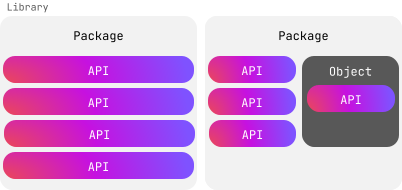
讓我們來探索 Kotlin 的各種可能性。
標準程式庫
Kotlin 擁有一個標準程式庫,提供不可或缺的型別、函式、集合和公用程式,讓你的程式碼簡潔且富有表達力。標準程式庫的絕大部分內容(kotlin 套件中的所有內容)在任何 Kotlin 檔案中都隨手可用,無需明確匯入:
fun main() {
    val text = "emosewa si niltoK"

   // 使用標準程式庫中的 reversed() 函式
    val reversedText = text.reversed()

    // 使用標準程式庫中的 print() 函式
    print(reversedText)
    // Kotlin is awesome
}
然而,標準程式庫的某些部分需要先匯入才能在程式碼中使用。例如,如果你想使用標準程式庫的時間測量功能,就需要匯入 kotlin.time 套件。
在檔案頂端,加上 import 關鍵字,後接你需要的套件:
import kotlin.time.*星號 * 是一種萬用字元匯入,它會指示 Kotlin 匯入該套件中的所有內容。你不能對伴隨物件(companion object)使用星號 *;相反地,你需要明確宣告想要使用的伴隨物件成員。
例如:
import kotlin.time.Duration
import kotlin.time.Duration.Companion.hours
import kotlin.time.Duration.Companion.minutes

fun main() {
    val thirtyMinutes: Duration = 30.minutes
    val halfHour: Duration = 0.5.hours
    println(thirtyMinutes == halfHour)
    // true
}
這個範例:
- 匯入了
Duration類別以及來自其伴隨物件的hours與minutes擴充屬性。 - 使用
minutes屬性將30轉換為 30 分鐘的Duration。 - 使用
hours屬性將0.5轉換為 30 分鐘的Duration。 - 檢查兩個時長是否相等並印出結果。
動手編寫前先搜尋
在決定自己編寫程式碼之前,請先檢查標準程式庫,看看你所尋找的功能是否已經存在。以下列出標準程式庫已為你提供許多類別、函式和屬性的領域:
若要深入了解標準程式庫中還有哪些內容,請瀏覽其 API 參考文件。
Kotlin 程式庫
標準程式庫涵蓋了許多常見的使用案例,但仍有一些情境無法滿足。幸運的是,Kotlin 團隊與社群成員開發了各式各樣的程式庫來補充標準程式庫。例如,kotlinx-datetime 能協助你在不同平台之間管理時間。
你可以在我們的搜尋平台上找到實用的程式庫。若要使用它們,你需要執行額外的步驟,例如加入相依性或外掛程式。每個程式庫都有一個 GitHub 存儲庫,其中包含如何將其引入 Kotlin 專案的說明。
加入程式庫後,你就可以匯入其中的任何套件。以下範例示範如何匯入 kotlinx-datetime 套件以取得紐約的當前時間:
import kotlinx.datetime.*

fun main() {
    val now = Clock.System.now() // 取得當前時刻
    println("Current instant: $now")

    val zone = TimeZone.of("America/New_York")
    val localDateTime = now.toLocalDateTime(zone)
    println("Local date-time in NY: $localDateTime")
}
這個範例:
- 匯入了
kotlinx.datetime套件。 - 使用
Clock.System.now()函式建立包含當前時間的Instant類別執行個體,並將結果指派給now變數。 - 印出當前時間。
- 使用
TimeZone.of()函式查詢紐約的時區,並將結果指派給zone變數。 - 在包含當前時間的執行個體上呼叫
.toLocalDateTime()函式,並傳入紐約時區作為引數。 - 將結果指派給
localDateTime變數。 - 印出根據紐約時區調整後的時間。
若要更詳細地探索此範例使用的函式與類別,請參閱 API 參考文件。
選擇加入 (Opt in) API
程式庫作者可能會將某些 API 標記為需要 opt-in,然後你才能在程式碼中使用它們。他們通常會在 API 仍在開發中且未來可能會變更時這樣做。如果你沒有 opt in,將會看到如下的警告或錯誤:
This declaration needs opt-in. Its usage should be marked with '@...' or '@OptIn(...)'若要 opt in,請寫下 @OptIn,後面接著圓括號,括號內為該 API 分類的類別名稱,並在其後加上兩個冒號 :: 與 class。
例如,標準程式庫中的 uintArrayOf() 函式歸屬於 @ExperimentalUnsignedTypes,如 API 參考文件所示:
@ExperimentalUnsignedTypes
inline fun uintArrayOf(vararg elements: UInt): UIntArray
在你的程式碼中,opt-in 看起來會像這樣:
@OptIn(ExperimentalUnsignedTypes::class)以下範例展示如何 opt in 使用 uintArrayOf() 函式來建立無符號整數陣列,並修改其中的一個元素:
@OptIn(ExperimentalUnsignedTypes::class)
fun main() {
    // 建立無符號整數陣列
    val unsignedArray: UIntArray = uintArrayOf(1u, 2u, 3u, 4u, 5u)

    // 修改元素
    unsignedArray[2] = 42u
    println("Updated array: ${unsignedArray.joinToString()}")
    // Updated array: 1, 2, 42, 4, 5
}
這是 opt in 最簡單的方式,但還有其他方式。若要了解更多,請參閱選擇加入需求 (Opt-in requirements)。
練習
計算複利
你正在開發一個金融應用程式,幫助使用者計算其投資的未來價值。計算複利的公式如下:
其中:
A是計入利息後的累積金額(本金 + 利息)。P是本金金額(初始投資)。r是年利率(以小數表示)。n是每年複利計算的次數。t是資金投資的時間(以年為單位)。
更新程式碼以完成以下項目:
- 從
kotlin.math套件匯入必要的函式。 - 為
calculateCompoundInterest()函式加上函式主體,以計算套用複利後的最終金額。
// 在此處編寫你的程式碼

fun calculateCompoundInterest(P: Double, r: Double, n: Int, t: Int): Double {
    // 在此處編寫你的程式碼
}

fun main() {
    val principal = 1000.0
    val rate = 0.05
    val timesCompounded = 4
    val years = 5
    val amount = calculateCompoundInterest(principal, rate, timesCompounded, years)
    println("The accumulated amount is: $amount")
    // The accumulated amount is: 1282.0372317085844
}
範例解答 {...}
import kotlin.math.*

fun calculateCompoundInterest(P: Double, r: Double, n: Int, t: Int): Double {
    return P * (1 + r / n).pow(n * t)
}

fun main() {
    val principal = 1000.0
    val rate = 0.05
    val timesCompounded = 4
    val years = 5
    val amount = calculateCompoundInterest(principal, rate, timesCompounded, years)
    println("The accumulated amount is: $amount")
    // The accumulated amount is: 1282.0372317085844
}
測量資料處理所需的時間
你想要測量在程式中執行多個資料處理任務所需的時間。請更新程式碼,從 kotlin.time 套件加入正確的匯入陳述式與函式:
// 在此處編寫你的程式碼

fun main() {
    val timeTaken = /* 在此處編寫你的程式碼 */ {
        // 模擬一些資料處理
        val data = List(1000) { it * 2 }
        val filteredData = data.filter { it % 3 == 0 }

        // 模擬處理篩選後的資料
        val processedData = filteredData.map { it / 2 }
        println("Processed data")
    }

    println("Time taken: $timeTaken") // 例如 16 ms
}
範例解答 {...}
import kotlin.time.measureTime

fun main() {
    val timeTaken = measureTime {
        // 模擬一些資料處理
        val data = List(1000) { it * 2 }
        val filteredData = data.filter { it % 3 == 0 }

        // 模擬處理篩選後的資料
        val processedData = filteredData.map { it / 2 }
        println("Processed data")
    }

    println("Time taken: $timeTaken") // 例如 16 ms
}
選擇加入實驗性 API
最新發行的 Kotlin 版本中包含標準程式庫的一項新功能。你想要試用它,但它需要 opt-in。該功能歸屬於 @ExperimentalStdlibApi。在你的程式碼中,opt-in 應該寫成什麼樣子?
範例解答 {...}
@OptIn(ExperimentalStdlibApi::class)下一步?
恭喜!你已完成了中級導覽!你願意分享你的回饋與體驗嗎?
下一步,請參考我們針對熱門 Kotlin 應用程式所準備的教學: