
Tab 導覽與鍵盤焦點
標籤頁導覽
在 Compose Multiplatform 桌面版中,您可以透過鍵盤快速鍵 導覽至下一個組件,並透過 導覽至上一個組件。
undefined
預設 Tab 導覽
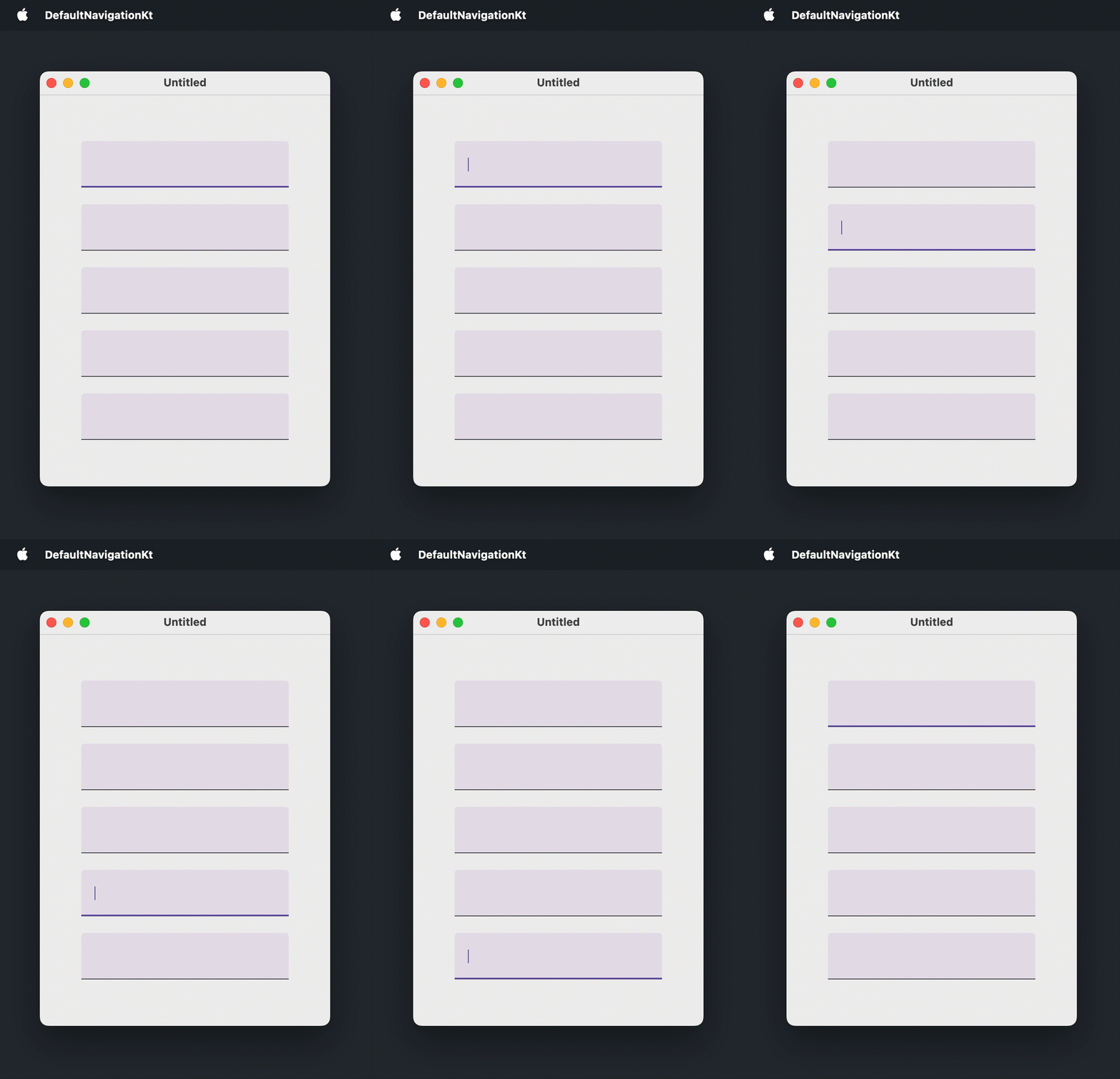
預設情況下,Tab 導覽允許使用者按照可聚焦組件出現的順序在它們之間移動。此功能預設啟用,不需要任何額外的程式碼。
可聚焦組件包括在其實作中使用clickable()、selectable()、toggleable()或focusable()修飾符的任何內容。例如:文字欄位、按鈕、滑桿、導覽項目、具有非 null 回呼的選取控制項,以及Card()、Surface()與ListItem()的onClick多載。
以下是一個視窗範例,使用者可以使用標準快速鍵在五個文字欄位之間導覽:
import androidx.compose.foundation.layout.Arrangement
import androidx.compose.foundation.layout.Box
import androidx.compose.foundation.layout.Column
import androidx.compose.foundation.layout.fillMaxSize
import androidx.compose.foundation.layout.padding
import androidx.compose.foundation.text.input.TextFieldLineLimits
import androidx.compose.foundation.text.input.rememberTextFieldState
import androidx.compose.material3.TextField
import androidx.compose.ui.Alignment
import androidx.compose.ui.Modifier
import androidx.compose.ui.unit.DpSize
import androidx.compose.ui.unit.dp
import androidx.compose.ui.window.Window
import androidx.compose.ui.window.WindowState
import androidx.compose.ui.window.application

fun main() = application {
    Window(
        onCloseRequest = ::exitApplication,
        state = WindowState(size = DpSize(350.dp, 500.dp))
    ) {
        Box(
            modifier = Modifier.fillMaxSize(),
            contentAlignment = Alignment.Center
        ) {
            Column(
                modifier = Modifier.padding(50.dp),
                verticalArrangement = Arrangement.spacedBy(20.dp)
            ) {
                repeat(5) {
                    TextField(
                        state = rememberTextFieldState(),
                        lineLimits = TextFieldLineLimits.SingleLine
                    )
                }
            }
        }
    }
}
自訂可聚焦組件
若要將預設不可聚焦的組件納入 Tab 順序,請套用focusable()修飾符。
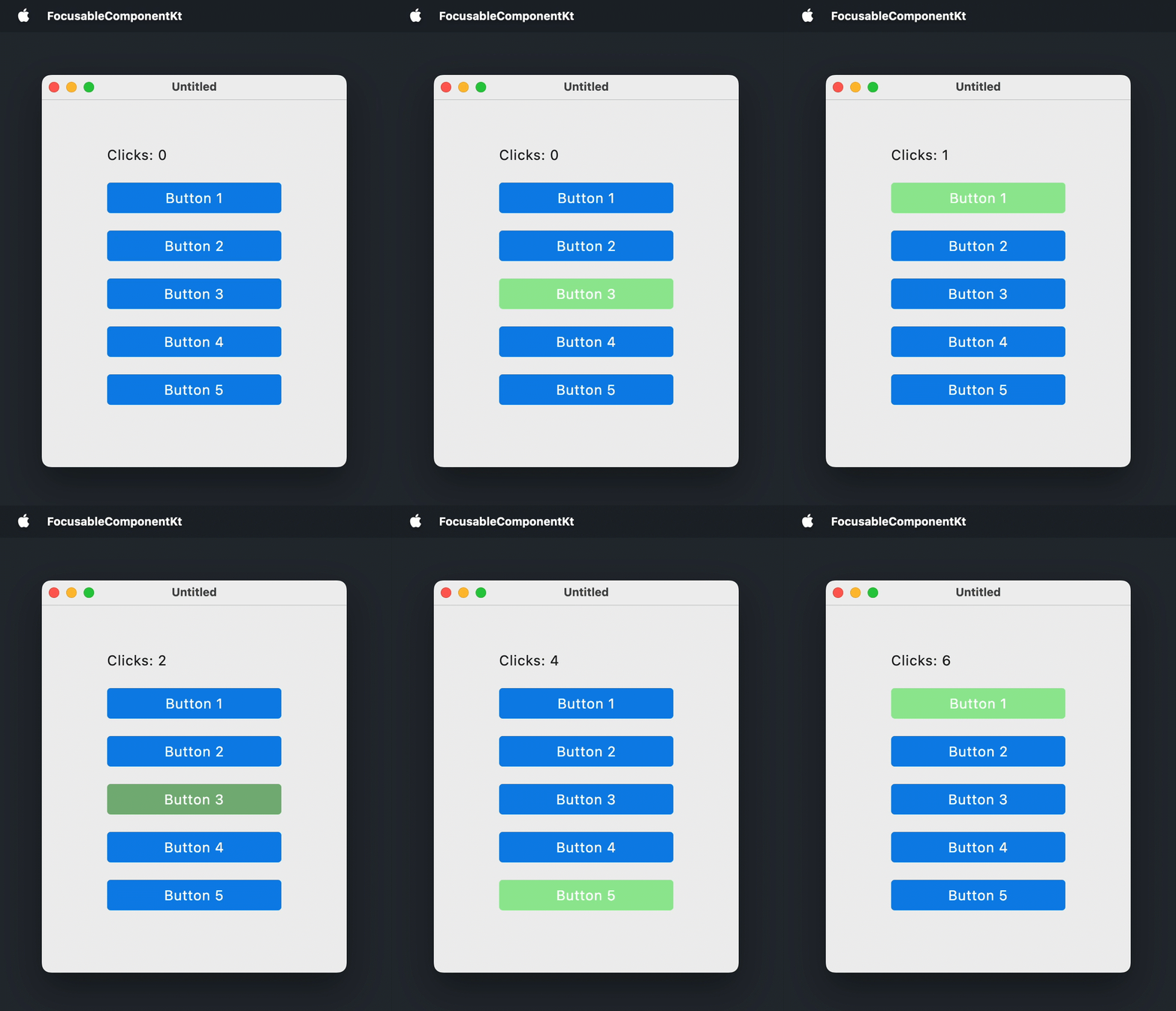
若要在組件獲得焦點時變更其外觀,請將MutableInteractionSource傳遞給focusable()修飾符,使用collectIsFocusedAsState()從中讀取焦點狀態,並使用該狀態來變更組件的樣式:例如不同的背景、邊框或任何其他醒目提示。若要讓組件對鍵盤按下做出反應,請使用onKeyEvent()修飾符處理按鍵事件。
以下範例將Box()可組合項轉換為類似按鈕的組件。該 Box 在獲得焦點時會醒目提示,且按下 鍵或 會觸發相關操作:
import androidx.compose.foundation.background
import androidx.compose.foundation.focusable
import androidx.compose.foundation.interaction.MutableInteractionSource
import androidx.compose.foundation.interaction.collectIsFocusedAsState
import androidx.compose.foundation.layout.Arrangement
import androidx.compose.foundation.layout.Box
import androidx.compose.foundation.layout.Column
import androidx.compose.foundation.layout.fillMaxSize
import androidx.compose.foundation.layout.padding
import androidx.compose.foundation.layout.size
import androidx.compose.foundation.shape.RoundedCornerShape
import androidx.compose.material3.MaterialTheme
import androidx.compose.material3.Text
import androidx.compose.runtime.Composable
import androidx.compose.runtime.getValue
import androidx.compose.runtime.mutableStateOf
import androidx.compose.runtime.remember
import androidx.compose.runtime.setValue
import androidx.compose.ui.Alignment
import androidx.compose.ui.ExperimentalComposeUiApi
import androidx.compose.ui.Modifier
import androidx.compose.ui.draw.clip
import androidx.compose.ui.graphics.Color
import androidx.compose.ui.graphics.lerp
import androidx.compose.ui.input.key.Key
import androidx.compose.ui.input.key.KeyEventType
import androidx.compose.ui.input.key.key
import androidx.compose.ui.input.key.onKeyEvent
import androidx.compose.ui.input.key.type
import androidx.compose.ui.input.pointer.PointerEventType
import androidx.compose.ui.input.pointer.onPointerEvent
import androidx.compose.ui.unit.DpSize
import androidx.compose.ui.unit.dp
import androidx.compose.ui.window.Window
import androidx.compose.ui.window.WindowState
import androidx.compose.ui.window.application

fun main() = application {
    Window(
        onCloseRequest = ::exitApplication,
        state = WindowState(size = DpSize(350.dp, 450.dp))
    ) {
        MaterialTheme(
            colorScheme = MaterialTheme.colorScheme.copy(
                primary = Color(10, 132, 232),
                secondary = Color(150, 232, 150)
            )
        ) {
            var clicks by remember { mutableStateOf(0) }
            Box(
                modifier = Modifier.fillMaxSize(),
                contentAlignment = Alignment.Center
            ) {
                Column(
                    modifier = Modifier.padding(40.dp),
                    verticalArrangement = Arrangement.spacedBy(20.dp)
                ) {
                    Text(text = "點擊次數: $clicks")
                    repeat(5) { index ->
                        FocusableBox("按鈕 ${index + 1}", onClick = { clicks++ })
                    }
                }
            }
        }
    }
}

@OptIn(ExperimentalComposeUiApi::class)
@Composable
fun FocusableBox(
    text: String = "",
    onClick: () -> Unit = {},
    size: DpSize = DpSize(200.dp, 35.dp)
) {
    var isKeyPressed by remember { mutableStateOf(false) }
    val interactionSource = remember { MutableInteractionSource() }
    val isFocused by interactionSource.collectIsFocusedAsState()
    val backgroundColor = when {
        isFocused && isKeyPressed -> lerp(MaterialTheme.colorScheme.secondary, Color(64, 64, 64), 0.3f)
        isFocused -> MaterialTheme.colorScheme.secondary
        else -> MaterialTheme.colorScheme.primary
    }
    Box(
        modifier = Modifier
            .clip(RoundedCornerShape(4.dp))
            .background(backgroundColor)
            .size(size)
            .onPointerEvent(PointerEventType.Press) { onClick() }
            .onKeyEvent {
                if (it.key == Key.Enter || it.key == Key.Spacebar) {
                    when (it.type) {
                        KeyEventType.KeyDown -> isKeyPressed = true
                        KeyEventType.KeyUp -> {
                            isKeyPressed = false
                            onClick()
                        }
                    }
                }
                false
            }
            .focusable(interactionSource = interactionSource),
        contentAlignment = Alignment.Center
    ) {
        Text(text = text, color = Color.White)
    }
}
自訂 Tab 順序
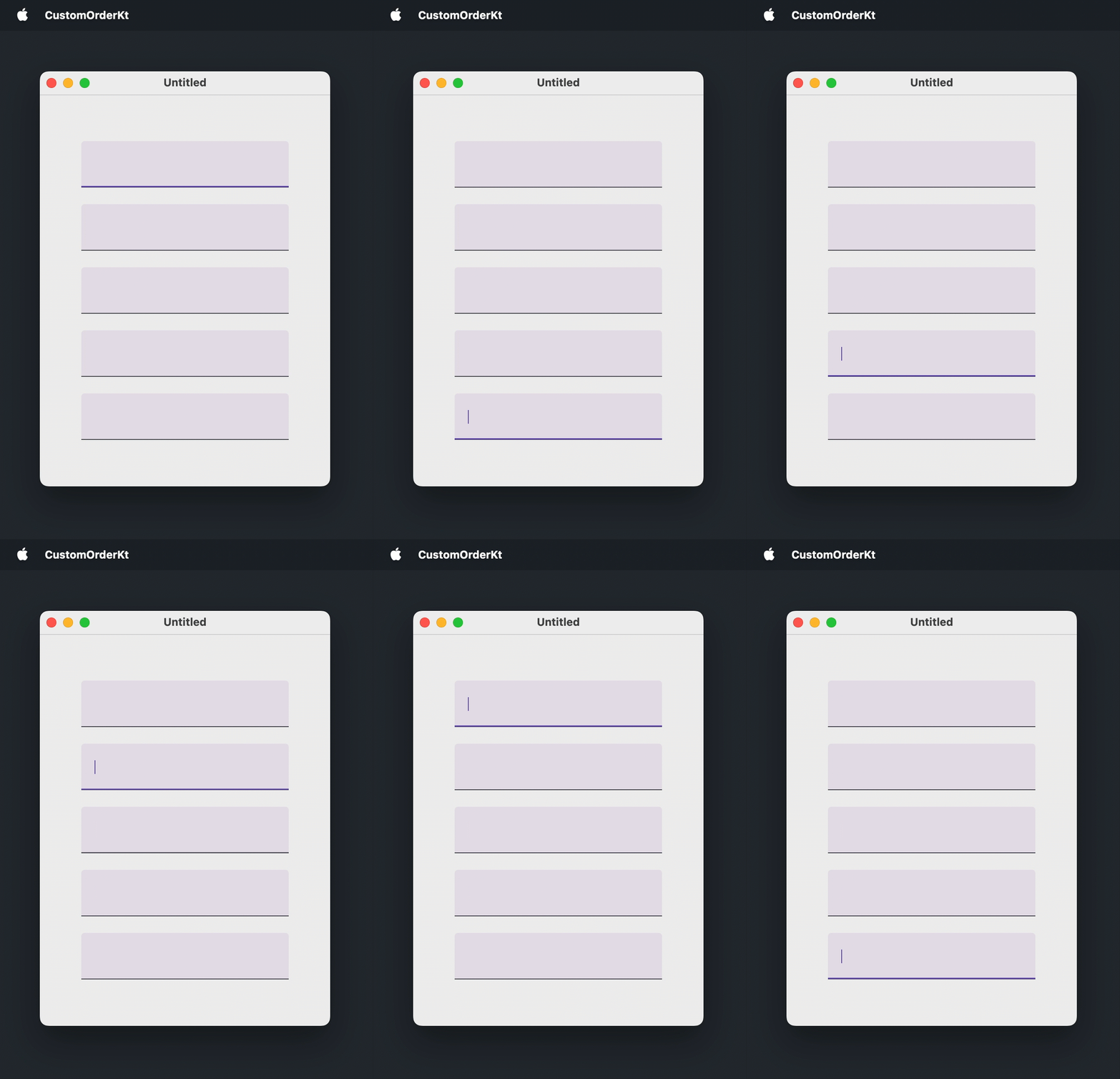
若要以出現順序以外的順序移動焦點,請結合兩個修飾符:
focusRequester()將FocusRequester控制代碼附加到可聚焦組件。如果組件預設不可聚焦,請在focusRequester()之後 套用focusable()修飾符。focusProperties()設定 Tab 順序中的next與previous元素:即按下 鍵或 時聚焦的具有FocusRequester控制代碼的組件。
以下範例為五個文字欄位中的每一個都建立了一個 FocusRequester,並反轉了預設的 Tab 順序:
import androidx.compose.foundation.layout.Arrangement
import androidx.compose.foundation.layout.Box
import androidx.compose.foundation.layout.Column
import androidx.compose.foundation.layout.fillMaxSize
import androidx.compose.foundation.layout.padding
import androidx.compose.foundation.text.input.TextFieldLineLimits
import androidx.compose.foundation.text.input.rememberTextFieldState
import androidx.compose.material3.TextField
import androidx.compose.runtime.remember
import androidx.compose.ui.Alignment
import androidx.compose.ui.Modifier
import androidx.compose.ui.focus.FocusRequester
import androidx.compose.ui.focus.focusProperties
import androidx.compose.ui.focus.focusRequester
import androidx.compose.ui.unit.DpSize
import androidx.compose.ui.unit.dp
import androidx.compose.ui.window.Window
import androidx.compose.ui.window.WindowState
import androidx.compose.ui.window.application

fun main() = application {
    Window(
        onCloseRequest = ::exitApplication,
        state = WindowState(size = DpSize(350.dp, 500.dp))
    ) {
        val focusRequesters = remember { List(5) { FocusRequester() } }
        Box(
            modifier = Modifier.fillMaxSize(),
            contentAlignment = Alignment.Center
        ) {
            Column(
                modifier = Modifier.padding(50.dp),
                verticalArrangement = Arrangement.spacedBy(20.dp)
            ) {
                focusRequesters.forEachIndexed { index, focusRequester ->
                    TextField(
                        state = rememberTextFieldState(),
                        lineLimits = TextFieldLineLimits.SingleLine,
                        modifier = Modifier
                            .focusRequester(focusRequester)
                            .focusProperties {
                                // 反轉預設順序:
                                next = focusRequesters[(index - 1 + focusRequesters.size) % focusRequesters.size]
                                previous = focusRequesters[(index + 1) % focusRequesters.size]
                            }
                    )
                }
            }
        }
    }
}
從程式碼移動焦點
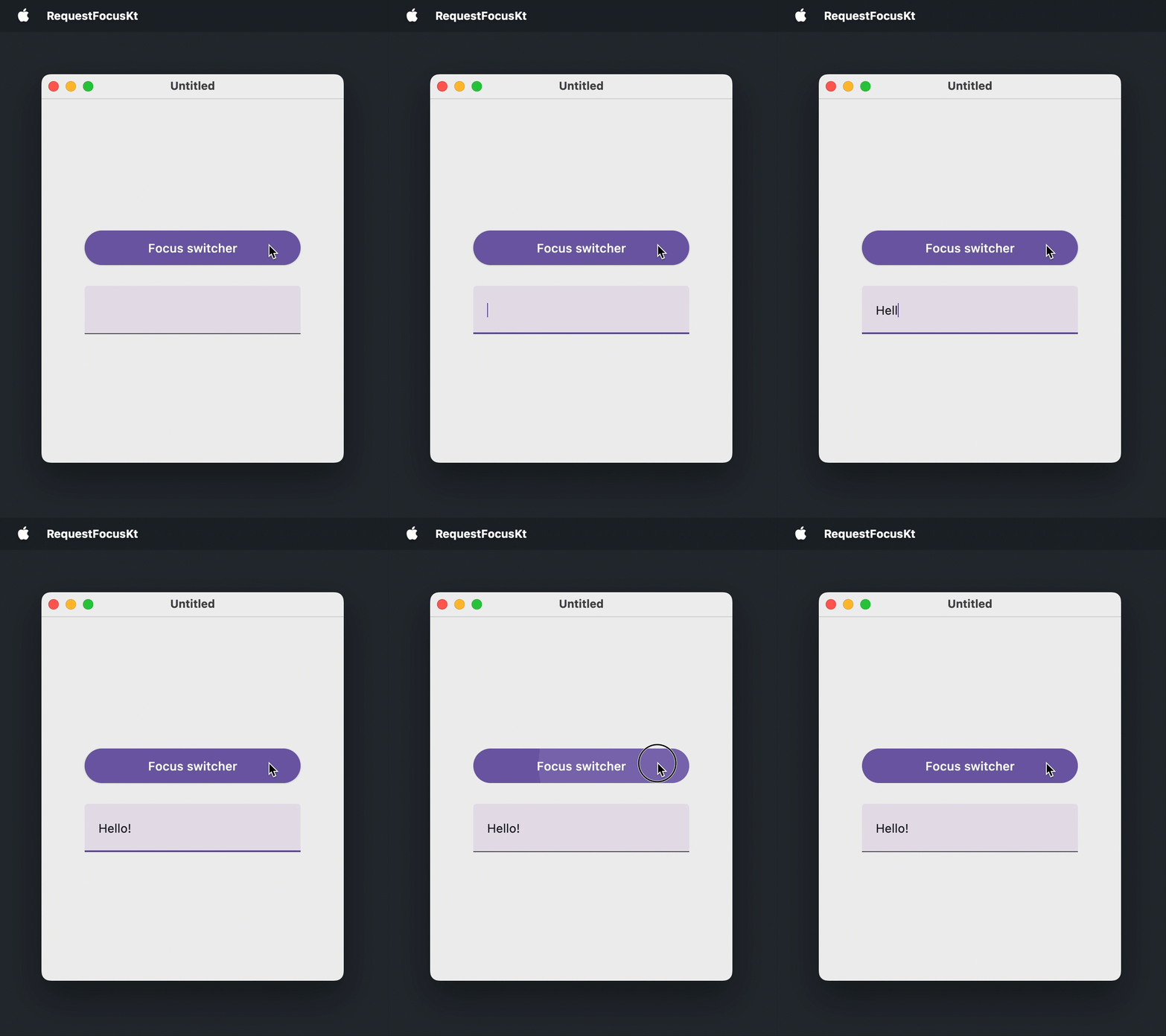
若要在無須使用者互動的情況下讓組件獲得焦點,請使用 focusRequester() 修飾符將 FocusRequester 附加到可聚焦組件,並呼叫 FocusRequester.requestFocus()。如果組件預設不可聚焦,則應在 focusRequester() 之後 套用 focusable() 修飾符。
在以下範例中,一個按鈕會將焦點移至文字欄位,然後再移回自身:
import androidx.compose.foundation.layout.Arrangement
import androidx.compose.foundation.layout.Box
import androidx.compose.foundation.layout.Column
import androidx.compose.foundation.layout.fillMaxSize
import androidx.compose.foundation.layout.fillMaxWidth
import androidx.compose.foundation.layout.padding
import androidx.compose.foundation.text.input.TextFieldLineLimits
import androidx.compose.foundation.text.input.rememberTextFieldState
import androidx.compose.material3.Button
import androidx.compose.material3.Text
import androidx.compose.material3.TextField
import androidx.compose.runtime.getValue
import androidx.compose.runtime.mutableStateOf
import androidx.compose.runtime.remember
import androidx.compose.runtime.setValue
import androidx.compose.ui.Alignment
import androidx.compose.ui.Modifier
import androidx.compose.ui.focus.FocusRequester
import androidx.compose.ui.focus.focusRequester
import androidx.compose.ui.unit.DpSize
import androidx.compose.ui.unit.dp
import androidx.compose.ui.window.Window
import androidx.compose.ui.window.WindowState
import androidx.compose.ui.window.application

fun main() = application {
    Window(
        onCloseRequest = ::exitApplication,
        state = WindowState(size = DpSize(350.dp, 450.dp))
    ) {
        val buttonFocusRequester = remember { FocusRequester() }
        val textFieldFocusRequester = remember { FocusRequester() }
        var isTextFieldFocused by remember { mutableStateOf(false) }
        Box(
            modifier = Modifier.fillMaxSize(),
            contentAlignment = Alignment.Center
        ) {
            Column(
                modifier = Modifier.padding(50.dp),
                verticalArrangement = Arrangement.spacedBy(20.dp)
            ) {
                Button(
                    onClick = {
                        isTextFieldFocused = !isTextFieldFocused
                        if (isTextFieldFocused) {
                            textFieldFocusRequester.requestFocus()
                        } else {
                            buttonFocusRequester.requestFocus()
                        }
                    },
                    modifier = Modifier
                        .fillMaxWidth()
                        .focusRequester(buttonFocusRequester)
                ) {
                    Text(text = "焦點切換器")
                }
                TextField(
                    state = rememberTextFieldState(),
                    lineLimits = TextFieldLineLimits.SingleLine,
                    modifier = Modifier.focusRequester(textFieldFocusRequester)
                )
            }
        }
    }
}
組件出現時聚焦
表單和對話方塊通常會立即聚焦於第一個輸入項,以便使用者無需動用滑鼠即可開始輸入。在此使用案例中,請從 LaunchedEffect(Unit) 區塊請求焦點,該區塊在組件進入組成後執行一次。
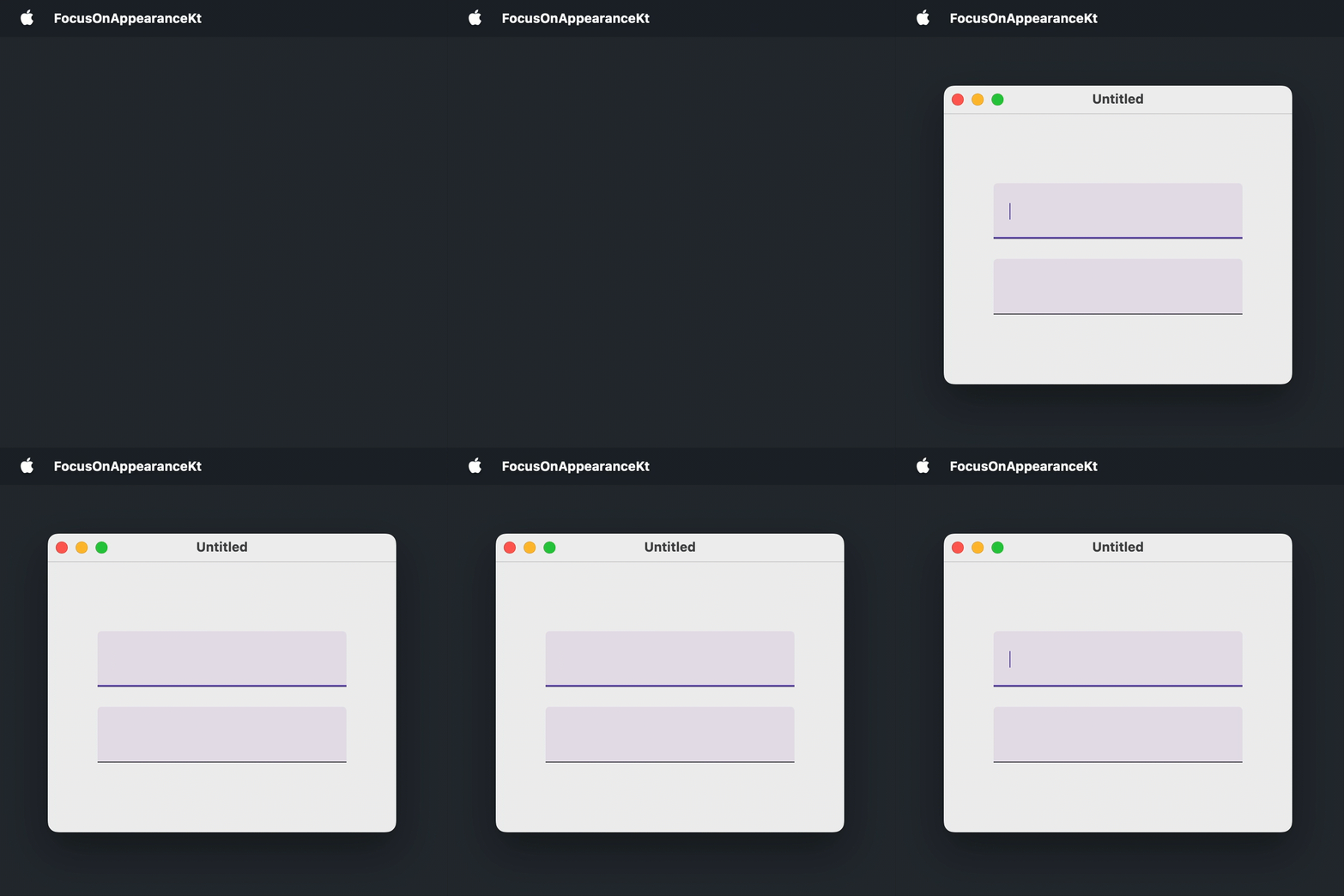
在以下範例中,第一個文字欄位在視窗開啟時立即獲得焦點:
import androidx.compose.foundation.layout.Arrangement
import androidx.compose.foundation.layout.Box
import androidx.compose.foundation.layout.Column
import androidx.compose.foundation.layout.fillMaxSize
import androidx.compose.foundation.layout.padding
import androidx.compose.foundation.text.input.TextFieldLineLimits
import androidx.compose.foundation.text.input.rememberTextFieldState
import androidx.compose.material3.TextField
import androidx.compose.runtime.LaunchedEffect
import androidx.compose.runtime.remember
import androidx.compose.ui.Alignment
import androidx.compose.ui.Modifier
import androidx.compose.ui.focus.FocusRequester
import androidx.compose.ui.focus.focusRequester
import androidx.compose.ui.unit.DpSize
import androidx.compose.ui.unit.dp
import androidx.compose.ui.window.Window
import androidx.compose.ui.window.WindowState
import androidx.compose.ui.window.application

fun main() = application {
    Window(
        onCloseRequest = ::exitApplication,
        state = WindowState(size = DpSize(350.dp, 300.dp))
    ) {
        val focusRequester = remember { FocusRequester() }
        Box(
            modifier = Modifier.fillMaxSize(),
            contentAlignment = Alignment.Center
        ) {
            Column(
                modifier = Modifier.padding(50.dp),
                verticalArrangement = Arrangement.spacedBy(20.dp)
            ) {
                TextField(
                    state = rememberTextFieldState(),
                    lineLimits = TextFieldLineLimits.SingleLine,
                    modifier = Modifier.focusRequester(focusRequester)
                )
                TextField(
                    state = rememberTextFieldState(),
                    lineLimits = TextFieldLineLimits.SingleLine
                )
            }
        }
        LaunchedEffect(Unit) {
            focusRequester.requestFocus()
        }
    }
}
從多行文字欄位移動焦點
在多行文字欄位中,按下 鍵會插入一個 tab 字元,而不是將焦點移至下一個組件:
Column {
    repeat(5) {
        TextField(
            state = rememberTextFieldState("Hello, World!"),
            // MultiLine 是 lineLimits 的預設值
            lineLimits = TextFieldLineLimits.MultiLine(),
            modifier = Modifier.padding(8.dp)
        )
    }
}這是一個已知問題,CMP-5822。它會影響任何接受多於一行的文字欄位(這是預設行為)。作為因應措施,請使用 onPreviewKeyEvent 修飾符攔截 鍵,並使用來自 LocalFocusManager 的 FocusManager 移動焦點:
import androidx.compose.foundation.layout.Column
import androidx.compose.foundation.layout.padding
import androidx.compose.foundation.text.input.TextFieldLineLimits
import androidx.compose.foundation.text.input.rememberTextFieldState
import androidx.compose.material3.TextField
import androidx.compose.runtime.Composable
import androidx.compose.ui.Modifier
import androidx.compose.ui.focus.FocusDirection
import androidx.compose.ui.input.key.Key
import androidx.compose.ui.input.key.KeyEventType
import androidx.compose.ui.input.key.isShiftPressed
import androidx.compose.ui.input.key.key
import androidx.compose.ui.input.key.onPreviewKeyEvent
import androidx.compose.ui.input.key.type
import androidx.compose.ui.platform.LocalFocusManager
import androidx.compose.ui.unit.dp
import androidx.compose.ui.window.singleWindowApplication

fun main() = singleWindowApplication(title = "多行文字欄位") {
    Column {
        repeat(5) {
            TextField(
                state = rememberTextFieldState("Hello, World!"),
                lineLimits = TextFieldLineLimits.MultiLine(),
                modifier = Modifier.padding(8.dp).moveFocusOnTab()
            )
        }
    }
}

@Composable
fun Modifier.moveFocusOnTab(): Modifier {
    val focusManager = LocalFocusManager.current
    return onPreviewKeyEvent {
        if (it.type == KeyEventType.KeyDown && it.key == Key.Tab) {
            focusManager.moveFocus(
                if (it.isShiftPressed) FocusDirection.Previous else FocusDirection.Next
            )
            true
        } else {
            false
        }
    }
}
下一步
- 進一步了解如何處理鍵盤事件。
- 了解不同平台上的輔助功能支援。
- 探索關於其他桌面組件的教學。