
Tab 键导航与键盘焦点
Tab 键导航
在 Compose Multiplatform 桌面端中,您可以使用 快捷键导航到下一个组件,使用 导航到上一个组件。
默认 Tab 键导航
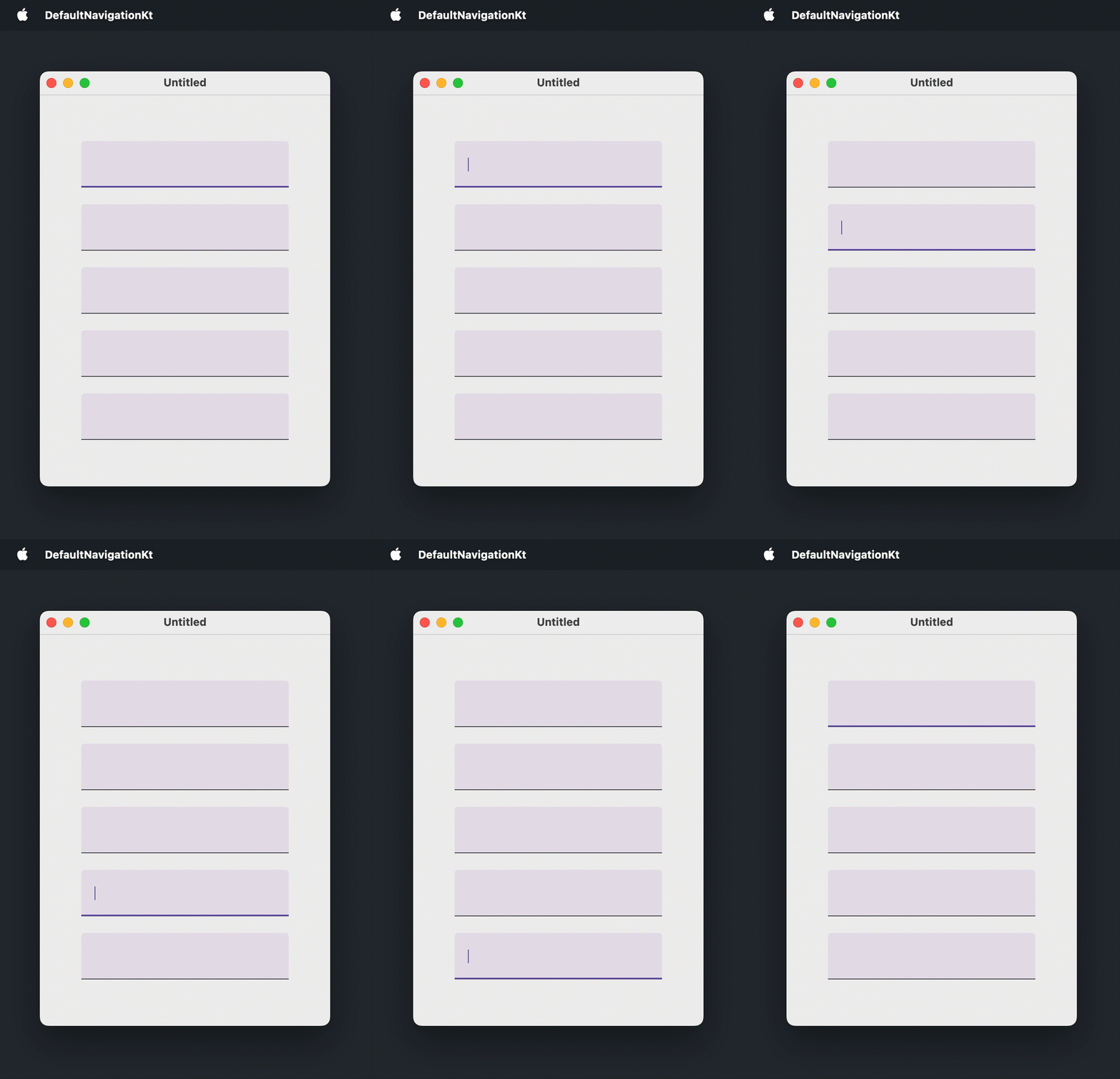
默认情况下,Tab 键导航允许用户按照组件出现的顺序在可获得焦点的组件之间移动。此功能默认启用,不需要任何额外代码。
可获得焦点的组件包括在其实现中使用了 clickable()、selectable()、toggleable() 或 focusable() 修饰符的任何内容。例如:文本字段、按钮、滑块、导航项、具有非 null 回调的选择控件,以及 Card()、Surface() 和 ListItem() 的 onClick 重载。
以下是一个窗口,用户可以使用标准快捷键在五个文本字段之间进行导航:
import androidx.compose.foundation.layout.Arrangement
import androidx.compose.foundation.layout.Box
import androidx.compose.foundation.layout.Column
import androidx.compose.foundation.layout.fillMaxSize
import androidx.compose.foundation.layout.padding
import androidx.compose.foundation.text.input.TextFieldLineLimits
import androidx.compose.foundation.text.input.rememberTextFieldState
import androidx.compose.material3.TextField
import androidx.compose.ui.Alignment
import androidx.compose.ui.Modifier
import androidx.compose.ui.unit.DpSize
import androidx.compose.ui.unit.dp
import androidx.compose.ui.window.Window
import androidx.compose.ui.window.WindowState
import androidx.compose.ui.window.application

fun main() = application {
    Window(
        onCloseRequest = ::exitApplication,
        state = WindowState(size = DpSize(350.dp, 500.dp))
    ) {
        Box(
            modifier = Modifier.fillMaxSize(),
            contentAlignment = Alignment.Center
        ) {
            Column(
                modifier = Modifier.padding(50.dp),
                verticalArrangement = Arrangement.spacedBy(20.dp)
            ) {
                repeat(5) {
                    TextField(
                        state = rememberTextFieldState(),
                        lineLimits = TextFieldLineLimits.SingleLine
                    )
                }
            }
        }
    }
}
自定义可获得焦点的组件
要将默认不可聚焦的组件包含在 Tab 键顺序中,请应用 focusable() 修饰符。
要更改组件获得焦点时的外观,请将 MutableInteractionSource 传递给 focusable() 修饰符,通过 collectIsFocusedAsState() 从中读取焦点状态,并使用该状态更改组件的样式:例如不同的背景、边框或任何其他高亮显示。要使组件对键盘按键做出反应,请使用 onKeyEvent() 修饰符处理按键事件。
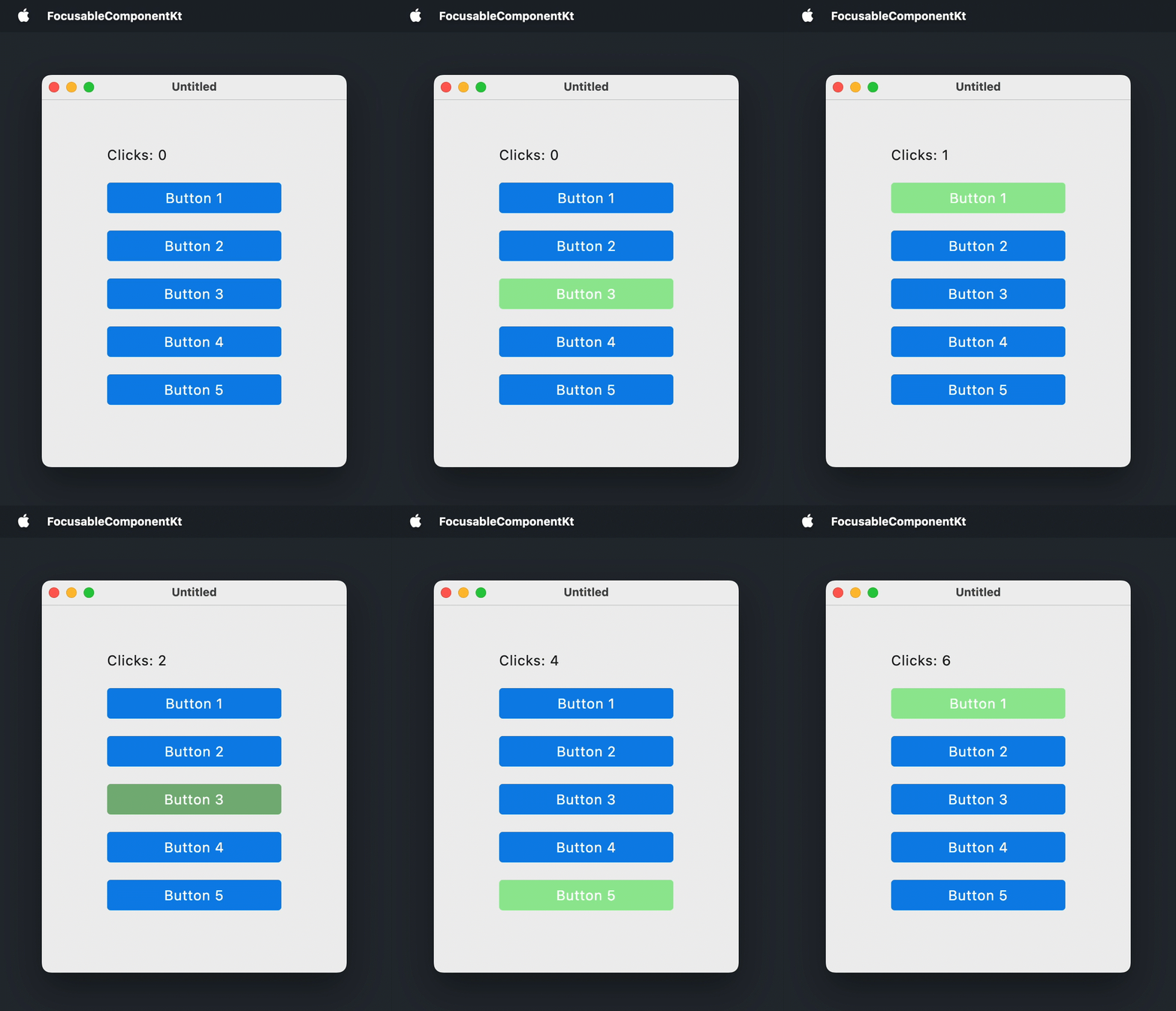
以下示例将 Box() 可组合项转换为类似于按钮的组件。该 Box 在获得焦点时会高亮显示,按下 键或 键会触发相关操作:
import androidx.compose.foundation.background
import androidx.compose.foundation.focusable
import androidx.compose.foundation.interaction.MutableInteractionSource
import androidx.compose.foundation.interaction.collectIsFocusedAsState
import androidx.compose.foundation.layout.Arrangement
import androidx.compose.foundation.layout.Box
import androidx.compose.foundation.layout.Column
import androidx.compose.foundation.layout.fillMaxSize
import androidx.compose.foundation.layout.padding
import androidx.compose.foundation.layout.size
import androidx.compose.foundation.shape.RoundedCornerShape
import androidx.compose.material3.MaterialTheme
import androidx.compose.material3.Text
import androidx.compose.runtime.Composable
import androidx.compose.runtime.getValue
import androidx.compose.runtime.mutableStateOf
import androidx.compose.runtime.remember
import androidx.compose.runtime.setValue
import androidx.compose.ui.Alignment
import androidx.compose.ui.ExperimentalComposeUiApi
import androidx.compose.ui.Modifier
import androidx.compose.ui.draw.clip
import androidx.compose.ui.graphics.Color
import androidx.compose.ui.graphics.lerp
import androidx.compose.ui.input.key.Key
import androidx.compose.ui.input.key.KeyEventType
import androidx.compose.ui.input.key.key
import androidx.compose.ui.input.key.onKeyEvent
import androidx.compose.ui.input.key.type
import androidx.compose.ui.input.pointer.PointerEventType
import androidx.compose.ui.input.pointer.onPointerEvent
import androidx.compose.ui.unit.DpSize
import androidx.compose.ui.unit.dp
import androidx.compose.ui.window.Window
import androidx.compose.ui.window.WindowState
import androidx.compose.ui.window.application

fun main() = application {
    Window(
        onCloseRequest = ::exitApplication,
        state = WindowState(size = DpSize(350.dp, 450.dp))
    ) {
        MaterialTheme(
            colorScheme = MaterialTheme.colorScheme.copy(
                primary = Color(10, 132, 232),
                secondary = Color(150, 232, 150)
            )
        ) {
            var clicks by remember { mutableStateOf(0) }
            Box(
                modifier = Modifier.fillMaxSize(),
                contentAlignment = Alignment.Center
            ) {
                Column(
                    modifier = Modifier.padding(40.dp),
                    verticalArrangement = Arrangement.spacedBy(20.dp)
                ) {
                    Text(text = "Clicks: $clicks")
                    repeat(5) { index ->
                        FocusableBox("Button ${index + 1}", onClick = { clicks++ })
                    }
                }
            }
        }
    }
}

@OptIn(ExperimentalComposeUiApi::class)
@Composable
fun FocusableBox(
    text: String = "",
    onClick: () -> Unit = {},
    size: DpSize = DpSize(200.dp, 35.dp)
) {
    var isKeyPressed by remember { mutableStateOf(false) }
    val interactionSource = remember { MutableInteractionSource() }
    val isFocused by interactionSource.collectIsFocusedAsState()
    val backgroundColor = when {
        isFocused && isKeyPressed -> lerp(MaterialTheme.colorScheme.secondary, Color(64, 64, 64), 0.3f)
        isFocused -> MaterialTheme.colorScheme.secondary
        else -> MaterialTheme.colorScheme.primary
    }
    Box(
        modifier = Modifier
            .clip(RoundedCornerShape(4.dp))
            .background(backgroundColor)
            .size(size)
            .onPointerEvent(PointerEventType.Press) { onClick() }
            .onKeyEvent {
                if (it.key == Key.Enter || it.key == Key.Spacebar) {
                    when (it.type) {
                        KeyEventType.KeyDown -> isKeyPressed = true
                        KeyEventType.KeyUp -> {
                            isKeyPressed = false
                            onClick()
                        }
                    }
                }
                false
            }
            .focusable(interactionSource = interactionSource),
        contentAlignment = Alignment.Center
    ) {
        Text(text = text, color = Color.White)
    }
}
自定义 Tab 键顺序
要按非出现顺序移动焦点,请结合使用两个修饰符:
focusRequester()将FocusRequester句柄附加到可聚焦组件。如果该组件默认不可聚焦,请在focusRequester()之后应用focusable()修饰符。focusProperties()设置 Tab 键顺序中的next和previous元素:即通过按下 或 获得焦点的带有FocusRequester句柄的组件。
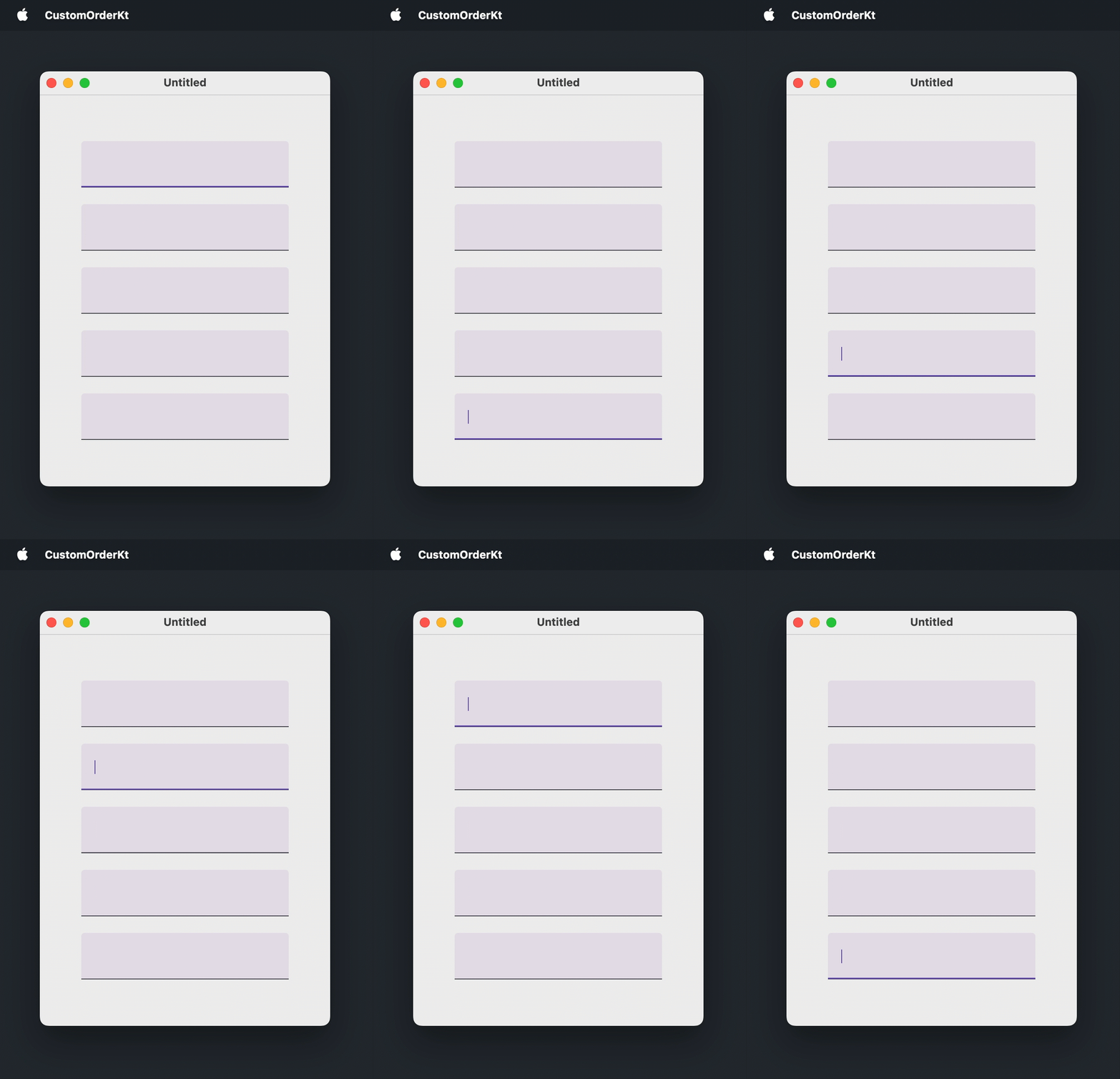
以下示例为五个文本字段中的每一个创建了一个 FocusRequester,并反转了默认的 Tab 键顺序:
import androidx.compose.foundation.layout.Arrangement
import androidx.compose.foundation.layout.Box
import androidx.compose.foundation.layout.Column
import androidx.compose.foundation.layout.fillMaxSize
import androidx.compose.foundation.layout.padding
import androidx.compose.foundation.text.input.TextFieldLineLimits
import androidx.compose.foundation.text.input.rememberTextFieldState
import androidx.compose.material3.TextField
import androidx.compose.runtime.remember
import androidx.compose.ui.Alignment
import androidx.compose.ui.Modifier
import androidx.compose.ui.focus.FocusRequester
import androidx.compose.ui.focus.focusProperties
import androidx.compose.ui.focus.focusRequester
import androidx.compose.ui.unit.DpSize
import androidx.compose.ui.unit.dp
import androidx.compose.ui.window.Window
import androidx.compose.ui.window.WindowState
import androidx.compose.ui.window.application

fun main() = application {
    Window(
        onCloseRequest = ::exitApplication,
        state = WindowState(size = DpSize(350.dp, 500.dp))
    ) {
        val focusRequesters = remember { List(5) { FocusRequester() } }
        Box(
            modifier = Modifier.fillMaxSize(),
            contentAlignment = Alignment.Center
        ) {
            Column(
                modifier = Modifier.padding(50.dp),
                verticalArrangement = Arrangement.spacedBy(20.dp)
            ) {
                focusRequesters.forEachIndexed { index, focusRequester ->
                    TextField(
                        state = rememberTextFieldState(),
                        lineLimits = TextFieldLineLimits.SingleLine,
                        modifier = Modifier
                            .focusRequester(focusRequester)
                            .focusProperties {
                                // 反转默认顺序:
                                next = focusRequesters[(index - 1 + focusRequesters.size) % focusRequesters.size]
                                previous = focusRequesters[(index + 1) % focusRequesters.size]
                            }
                    )
                }
            }
        }
    }
}
通过代码移动焦点
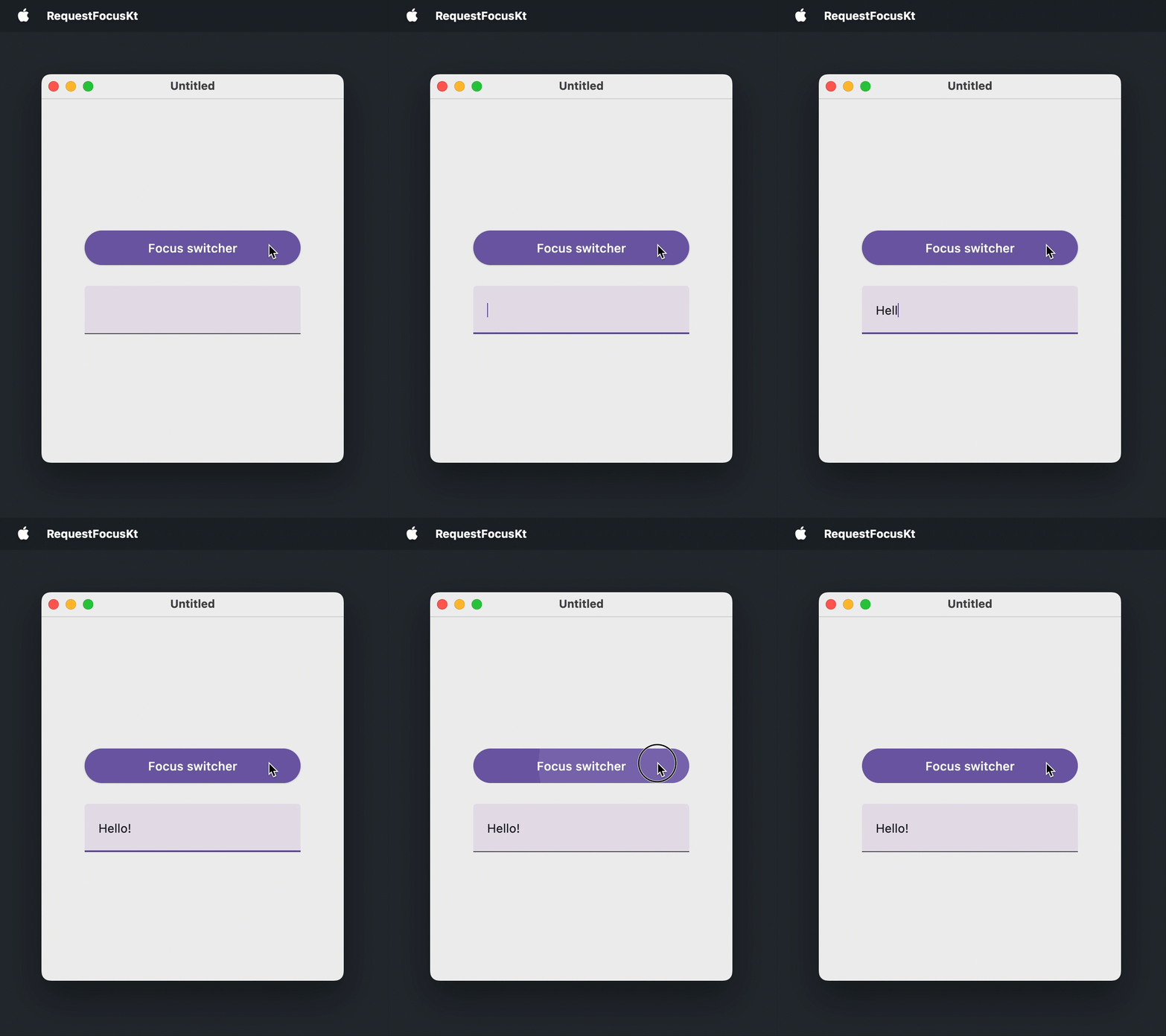
要在没有用户交互的情况下使组件获得焦点,请使用 focusRequester() 修饰符将 FocusRequester 附加到可聚焦组件,并调用 FocusRequester.requestFocus()。如果该组件默认不可聚焦,则应在 focusRequester() 之后应用 focusable() 修饰符。
在以下示例中,一个按钮会将焦点移动到文本字段,然后移回其自身:
import androidx.compose.foundation.layout.Arrangement
import androidx.compose.foundation.layout.Box
import androidx.compose.foundation.layout.Column
import androidx.compose.foundation.layout.fillMaxSize
import androidx.compose.foundation.layout.fillMaxWidth
import androidx.compose.foundation.layout.padding
import androidx.compose.foundation.text.input.TextFieldLineLimits
import androidx.compose.foundation.text.input.rememberTextFieldState
import androidx.compose.material3.Button
import androidx.compose.material3.Text
import androidx.compose.material3.TextField
import androidx.compose.runtime.getValue
import androidx.compose.runtime.mutableStateOf
import androidx.compose.runtime.remember
import androidx.compose.runtime.setValue
import androidx.compose.ui.Alignment
import androidx.compose.ui.Modifier
import androidx.compose.ui.focus.FocusRequester
import androidx.compose.ui.focus.focusRequester
import androidx.compose.ui.unit.DpSize
import androidx.compose.ui.unit.dp
import androidx.compose.ui.window.Window
import androidx.compose.ui.window.WindowState
import androidx.compose.ui.window.application

fun main() = application {
    Window(
        onCloseRequest = ::exitApplication,
        state = WindowState(size = DpSize(350.dp, 450.dp))
    ) {
        val buttonFocusRequester = remember { FocusRequester() }
        val textFieldFocusRequester = remember { FocusRequester() }
        var isTextFieldFocused by remember { mutableStateOf(false) }
        Box(
            modifier = Modifier.fillMaxSize(),
            contentAlignment = Alignment.Center
        ) {
            Column(
                modifier = Modifier.padding(50.dp),
                verticalArrangement = Arrangement.spacedBy(20.dp)
            ) {
                Button(
                    onClick = {
                        isTextFieldFocused = !isTextFieldFocused
                        if (isTextFieldFocused) {
                            textFieldFocusRequester.requestFocus()
                        } else {
                            buttonFocusRequester.requestFocus()
                        }
                    },
                    modifier = Modifier
                        .fillMaxWidth()
                        .focusRequester(buttonFocusRequester)
                ) {
                    Text(text = "Focus switcher")
                }
                TextField(
                    state = rememberTextFieldState(),
                    lineLimits = TextFieldLineLimits.SingleLine,
                    modifier = Modifier.focusRequester(textFieldFocusRequester)
                )
            }
        }
    }
}
组件出现时使其获得焦点
表单和对话框通常会立即聚焦到第一个输入,以便用户无需使用鼠标即可开始输入。在此用例中,请从 LaunchedEffect(Unit) 块请求焦点,该块在组件进入组合(composition)后运行一次。
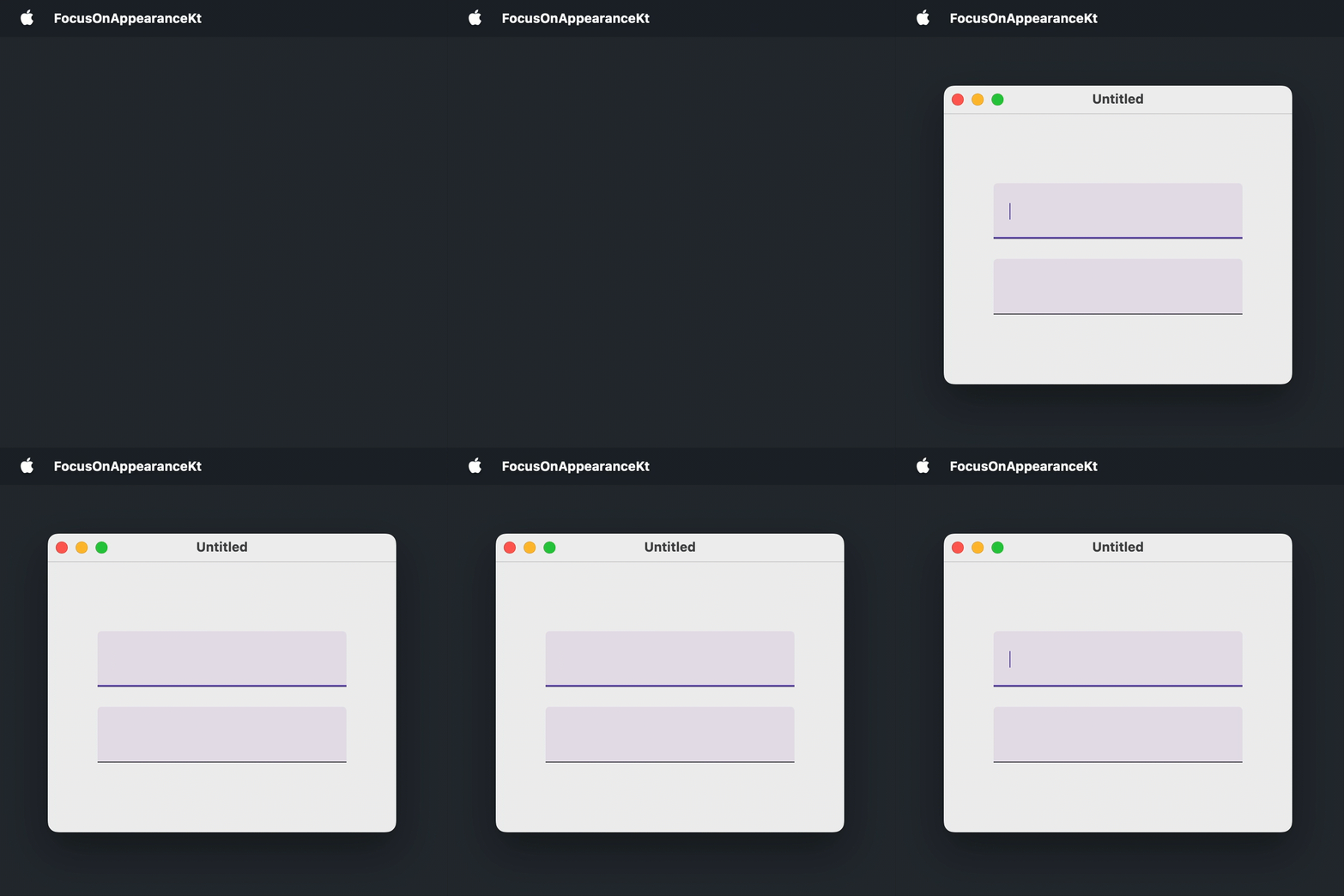
在以下示例中,第一个文本字段在窗口打开后立即获得焦点:
import androidx.compose.foundation.layout.Arrangement
import androidx.compose.foundation.layout.Box
import androidx.compose.foundation.layout.Column
import androidx.compose.foundation.layout.fillMaxSize
import androidx.compose.foundation.layout.padding
import androidx.compose.foundation.text.input.TextFieldLineLimits
import androidx.compose.foundation.text.input.rememberTextFieldState
import androidx.compose.material3.TextField
import androidx.compose.runtime.LaunchedEffect
import androidx.compose.runtime.remember
import androidx.compose.ui.Alignment
import androidx.compose.ui.Modifier
import androidx.compose.ui.focus.FocusRequester
import androidx.compose.ui.focus.focusRequester
import androidx.compose.ui.unit.DpSize
import androidx.compose.ui.unit.dp
import androidx.compose.ui.window.Window
import androidx.compose.ui.window.WindowState
import androidx.compose.ui.window.application

fun main() = application {
    Window(
        onCloseRequest = ::exitApplication,
        state = WindowState(size = DpSize(350.dp, 300.dp))
    ) {
        val focusRequester = remember { FocusRequester() }
        Box(
            modifier = Modifier.fillMaxSize(),
            contentAlignment = Alignment.Center
        ) {
            Column(
                modifier = Modifier.padding(50.dp),
                verticalArrangement = Arrangement.spacedBy(20.dp)
            ) {
                TextField(
                    state = rememberTextFieldState(),
                    lineLimits = TextFieldLineLimits.SingleLine,
                    modifier = Modifier.focusRequester(focusRequester)
                )
                TextField(
                    state = rememberTextFieldState(),
                    lineLimits = TextFieldLineLimits.SingleLine
                )
            }
        }
        LaunchedEffect(Unit) {
            focusRequester.requestFocus()
        }
    }
}
从多行文本字段中移动焦点
在多行文本字段中,按 键会插入制表符,而不是将焦点移动到下一个组件:
Column {
    repeat(5) {
        TextField(
            state = rememberTextFieldState("Hello, World!"),
            // MultiLine 是 lineLimits 的默认值
            lineLimits = TextFieldLineLimits.MultiLine(),
            modifier = Modifier.padding(8.dp)
        )
    }
}这是一个已知问题,CMP-5822。它会影响任何接受多行的文本字段,这也是默认行为。作为一种解决方法,可以使用 onPreviewKeyEvent 修饰符拦截 键,并使用来自 LocalFocusManager 的 FocusManager 移动焦点:
import androidx.compose.foundation.layout.Column
import androidx.compose.foundation.layout.padding
import androidx.compose.foundation.text.input.TextFieldLineLimits
import androidx.compose.foundation.text.input.rememberTextFieldState
import androidx.compose.material3.TextField
import androidx.compose.runtime.Composable
import androidx.compose.ui.Modifier
import androidx.compose.ui.focus.FocusDirection
import androidx.compose.ui.input.key.Key
import androidx.compose.ui.input.key.KeyEventType
import androidx.compose.ui.input.key.isShiftPressed
import androidx.compose.ui.input.key.key
import androidx.compose.ui.input.key.onPreviewKeyEvent
import androidx.compose.ui.input.key.type
import androidx.compose.ui.platform.LocalFocusManager
import androidx.compose.ui.unit.dp
import androidx.compose.ui.window.singleWindowApplication

fun main() = singleWindowApplication(title = "Multiline text fields") {
    Column {
        repeat(5) {
            TextField(
                state = rememberTextFieldState("Hello, World!"),
                lineLimits = TextFieldLineLimits.MultiLine(),
                modifier = Modifier.padding(8.dp).moveFocusOnTab()
            )
        }
    }
}

@Composable
fun Modifier.moveFocusOnTab(): Modifier {
    val focusManager = LocalFocusManager.current
    return onPreviewKeyEvent {
        if (it.type == KeyEventType.KeyDown && it.key == Key.Tab) {
            focusManager.moveFocus(
                if (it.isShiftPressed) FocusDirection.Previous else FocusDirection.Next
            )
            true
        } else {
            false
        }
    }
}
下一步
- 详细了解如何处理键盘事件。
- 了解不同平台上的无障碍支持。
- 探索关于其他桌面组件的教程。