
タブナビゲーションとキーボードフォーカス
タブナビゲーション
Compose Multiplatform for desktopでは、次のコンポーネントへ移動するための キーボードショートカットと、前のコンポーネントへ戻るための を使用して、コンポーネント間のナビゲーションを設定できます。
デフォルトのタブナビゲーション
デフォルトでは、タブナビゲーションにより、ユーザーはフォーカス可能なコンポーネント間をそれらが表示される順序で移動できます。 この機能はデフォルトで有効になっており、追加のコードは必要ありません。
フォーカス可能なコンポーネントには、その実装において clickable()、selectable()、toggleable()、または focusable() モディファイアを使用しているものがすべて含まれます。例えば、テキストフィールド、ボタン、スライダー、ナビゲーションアイテム、非nullのコールバックを持つ選択コントロール、Card()、Surface()、ListItem() の onClick オーバーロードなどがあります。
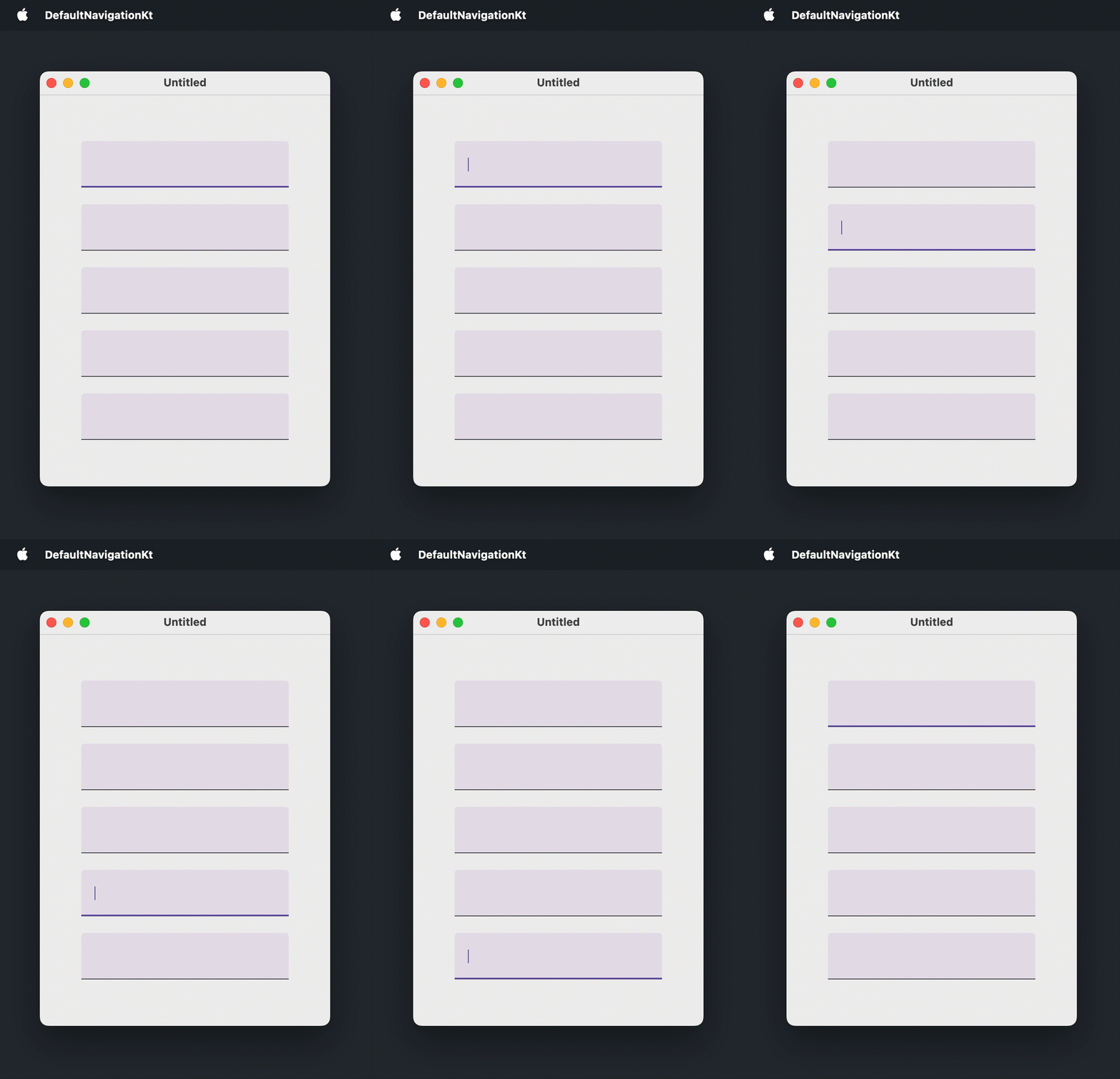
以下は、ユーザーが標準のショートカットを使用して5つのテキストフィールド間を移動できるウィンドウの例です。
import androidx.compose.foundation.layout.Arrangement
import androidx.compose.foundation.layout.Box
import androidx.compose.foundation.layout.Column
import androidx.compose.foundation.layout.fillMaxSize
import androidx.compose.foundation.layout.padding
import androidx.compose.foundation.text.input.TextFieldLineLimits
import androidx.compose.foundation.text.input.rememberTextFieldState
import androidx.compose.material3.TextField
import androidx.compose.ui.Alignment
import androidx.compose.ui.Modifier
import androidx.compose.ui.unit.DpSize
import androidx.compose.ui.unit.dp
import androidx.compose.ui.window.Window
import androidx.compose.ui.window.WindowState
import androidx.compose.ui.window.application

fun main() = application {
    Window(
        onCloseRequest = ::exitApplication,
        state = WindowState(size = DpSize(350.dp, 500.dp))
    ) {
        Box(
            modifier = Modifier.fillMaxSize(),
            contentAlignment = Alignment.Center
        ) {
            Column(
                modifier = Modifier.padding(50.dp),
                verticalArrangement = Arrangement.spacedBy(20.dp)
            ) {
                repeat(5) {
                    TextField(
                        state = rememberTextFieldState(),
                        lineLimits = TextFieldLineLimits.SingleLine
                    )
                }
            }
        }
    }
}
カスタムのフォーカス可能コンポーネント
デフォルトでフォーカス可能ではないコンポーネントをタブ順序に含めるには、focusable() モディファイアを適用します。
フォーカスを受け取ったときにコンポーネントの外観を変更するには、MutableInteractionSource を focusable() モディファイアに渡し、collectIsFocusedAsState() でフォーカス状態を読み取り、その状態を使用してコンポーネントのスタイル(異なる背景、境界線、またはその他のハイライト)を変更します。コンポーネントをキーボードの押下に対応させるには、onKeyEvent() モディファイアでキーイベントを処理します。
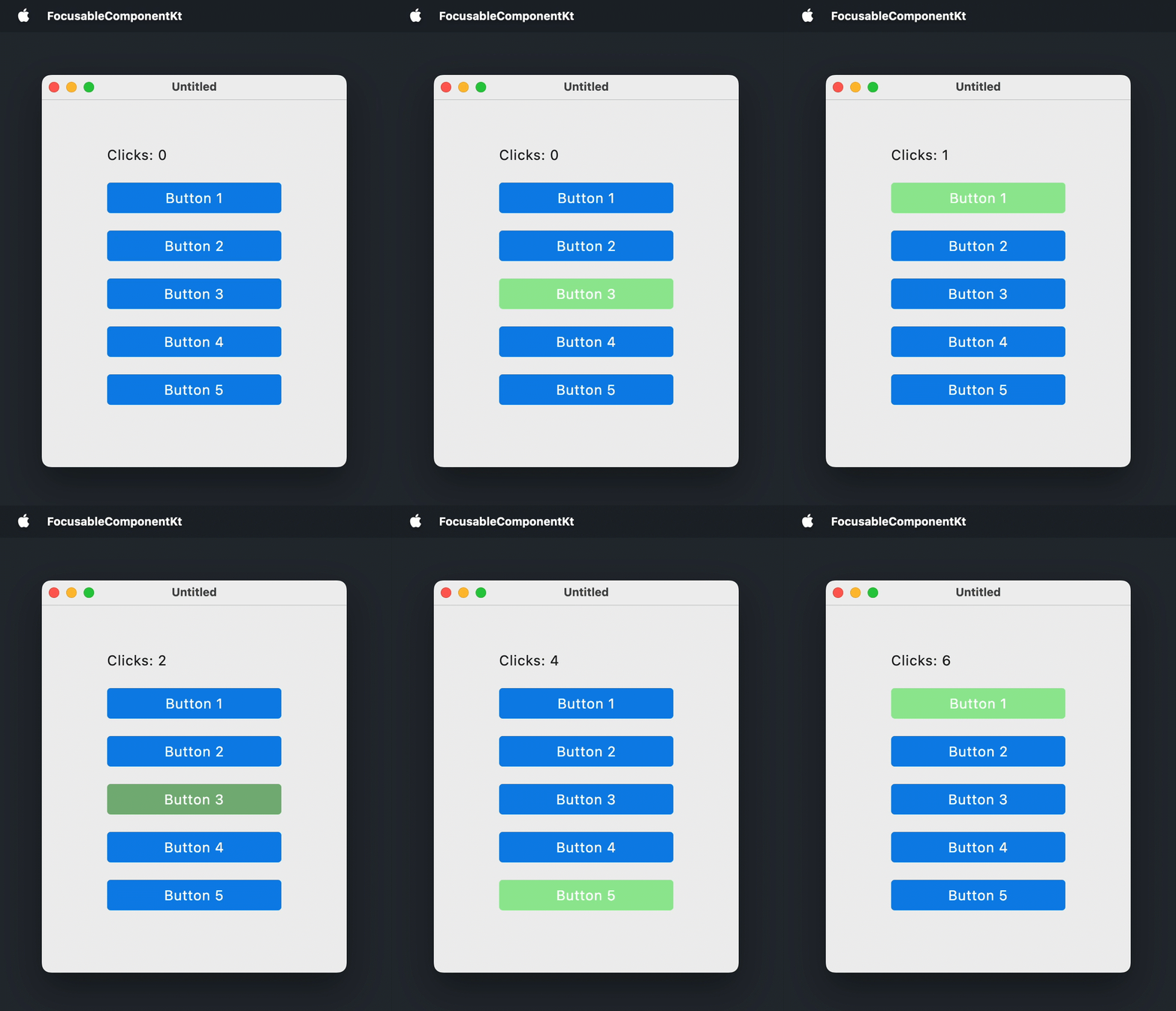
次の例では、Box() コンポーザブルをボタンのようなコンポーネントに変換しています。ボックスはフォーカスされるとハイライトされ、 または を押すと関連するアクションがトリガーされます。
import androidx.compose.foundation.background
import androidx.compose.foundation.focusable
import androidx.compose.foundation.interaction.MutableInteractionSource
import androidx.compose.foundation.interaction.collectIsFocusedAsState
import androidx.compose.foundation.layout.Arrangement
import androidx.compose.foundation.layout.Box
import androidx.compose.foundation.layout.Column
import androidx.compose.foundation.layout.fillMaxSize
import androidx.compose.foundation.layout.padding
import androidx.compose.foundation.layout.size
import androidx.compose.foundation.shape.RoundedCornerShape
import androidx.compose.material3.MaterialTheme
import androidx.compose.material3.Text
import androidx.compose.runtime.Composable
import androidx.compose.runtime.getValue
import androidx.compose.runtime.mutableStateOf
import androidx.compose.runtime.remember
import androidx.compose.runtime.setValue
import androidx.compose.ui.Alignment
import androidx.compose.ui.ExperimentalComposeUiApi
import androidx.compose.ui.Modifier
import androidx.compose.ui.draw.clip
import androidx.compose.ui.graphics.Color
import androidx.compose.ui.graphics.lerp
import androidx.compose.ui.input.key.Key
import androidx.compose.ui.input.key.KeyEventType
import androidx.compose.ui.input.key.key
import androidx.compose.ui.input.key.onKeyEvent
import androidx.compose.ui.input.key.type
import androidx.compose.ui.input.pointer.PointerEventType
import androidx.compose.ui.input.pointer.onPointerEvent
import androidx.compose.ui.unit.DpSize
import androidx.compose.ui.unit.dp
import androidx.compose.ui.window.Window
import androidx.compose.ui.window.WindowState
import androidx.compose.ui.window.application

fun main() = application {
    Window(
        onCloseRequest = ::exitApplication,
        state = WindowState(size = DpSize(350.dp, 450.dp))
    ) {
        MaterialTheme(
            colorScheme = MaterialTheme.colorScheme.copy(
                primary = Color(10, 132, 232),
                secondary = Color(150, 232, 150)
            )
        ) {
            var clicks by remember { mutableStateOf(0) }
            Box(
                modifier = Modifier.fillMaxSize(),
                contentAlignment = Alignment.Center
            ) {
                Column(
                    modifier = Modifier.padding(40.dp),
                    verticalArrangement = Arrangement.spacedBy(20.dp)
                ) {
                    Text(text = "Clicks: $clicks")
                    repeat(5) { index ->
                        FocusableBox("Button ${index + 1}", onClick = { clicks++ })
                    }
                }
            }
        }
    }
}

@OptIn(ExperimentalComposeUiApi::class)
@Composable
fun FocusableBox(
    text: String = "",
    onClick: () -> Unit = {},
    size: DpSize = DpSize(200.dp, 35.dp)
) {
    var isKeyPressed by remember { mutableStateOf(false) }
    val interactionSource = remember { MutableInteractionSource() }
    val isFocused by interactionSource.collectIsFocusedAsState()
    val backgroundColor = when {
        isFocused && isKeyPressed -> lerp(MaterialTheme.colorScheme.secondary, Color(64, 64, 64), 0.3f)
        isFocused -> MaterialTheme.colorScheme.secondary
        else -> MaterialTheme.colorScheme.primary
    }
    Box(
        modifier = Modifier
            .clip(RoundedCornerShape(4.dp))
            .background(backgroundColor)
            .size(size)
            .onPointerEvent(PointerEventType.Press) { onClick() }
            .onKeyEvent {
                if (it.key == Key.Enter || it.key == Key.Spacebar) {
                    when (it.type) {
                        KeyEventType.KeyDown -> isKeyPressed = true
                        KeyEventType.KeyUp -> {
                            isKeyPressed = false
                            onClick()
                        }
                    }
                }
                false
            }
            .focusable(interactionSource = interactionSource),
        contentAlignment = Alignment.Center
    ) {
        Text(text = text, color = Color.White)
    }
}
カスタムのタブ順序
表示順序以外の順序でフォーカスを移動させるには、2つのモディファイアを組み合わせます。
focusRequester()は、フォーカス可能なコンポーネントにFocusRequesterハンドルをアタッチします。コンポーネントがデフォルトでフォーカス可能でない場合は、focusRequester()の 後 にfocusable()モディファイアを適用します。focusProperties()は、タブ順序におけるnext(次)とprevious(前)の要素を設定します。これらは または を押すことでフォーカスされるFocusRequesterハンドルを持つコンポーネントです。
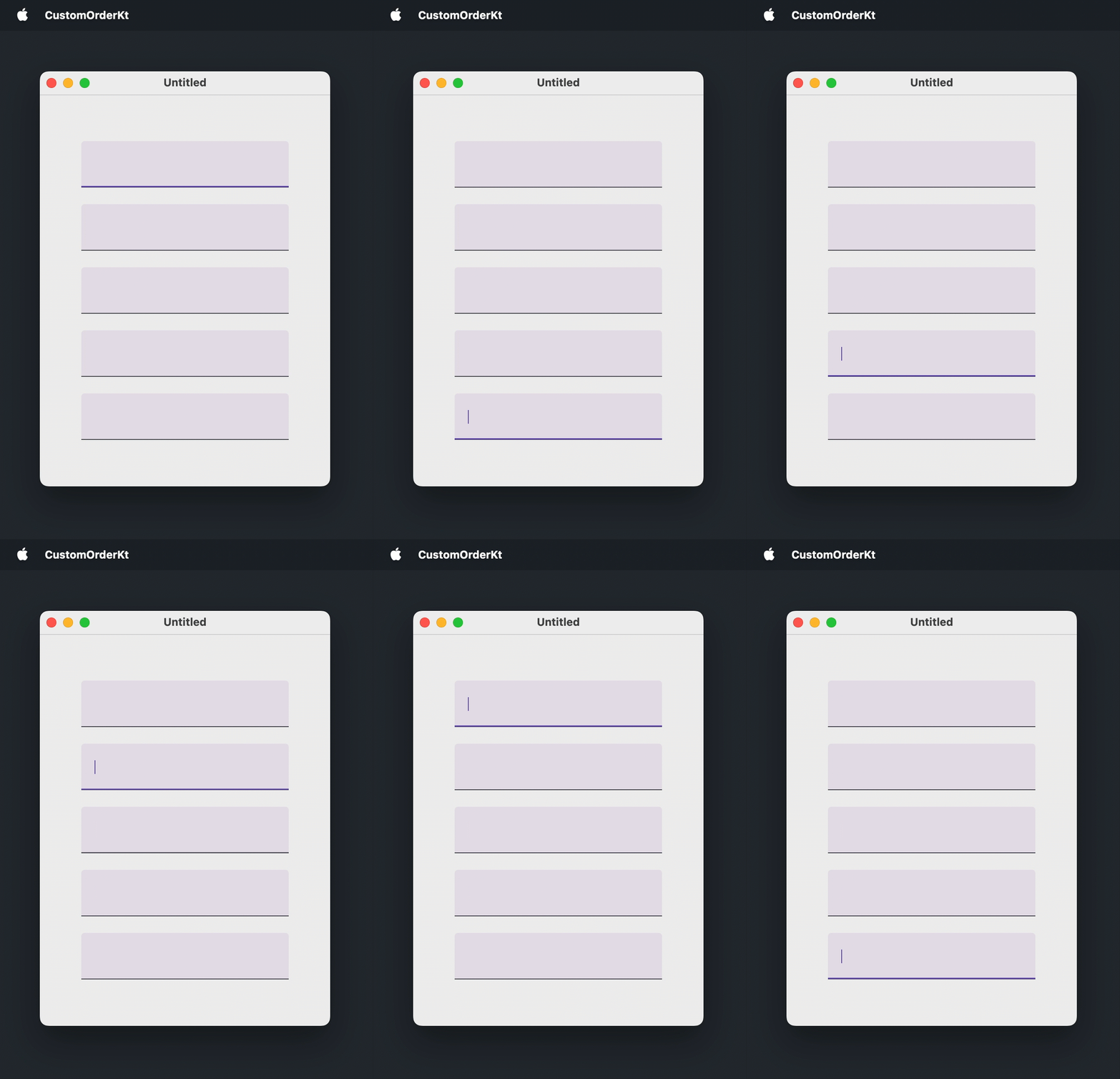
次の例では、5つのテキストフィールドのそれぞれに FocusRequester を作成し、デフォルトのタブ順序を逆にしています。
import androidx.compose.foundation.layout.Arrangement
import androidx.compose.foundation.layout.Box
import androidx.compose.foundation.layout.Column
import androidx.compose.foundation.layout.fillMaxSize
import androidx.compose.foundation.layout.padding
import androidx.compose.foundation.text.input.TextFieldLineLimits
import androidx.compose.foundation.text.input.rememberTextFieldState
import androidx.compose.material3.TextField
import androidx.compose.runtime.remember
import androidx.compose.ui.Alignment
import androidx.compose.ui.Modifier
import androidx.compose.ui.focus.FocusRequester
import androidx.compose.ui.focus.focusProperties
import androidx.compose.ui.focus.focusRequester
import androidx.compose.ui.unit.DpSize
import androidx.compose.ui.unit.dp
import androidx.compose.ui.window.Window
import androidx.compose.ui.window.WindowState
import androidx.compose.ui.window.application

fun main() = application {
    Window(
        onCloseRequest = ::exitApplication,
        state = WindowState(size = DpSize(350.dp, 500.dp))
    ) {
        val focusRequesters = remember { List(5) { FocusRequester() } }
        Box(
            modifier = Modifier.fillMaxSize(),
            contentAlignment = Alignment.Center
        ) {
            Column(
                modifier = Modifier.padding(50.dp),
                verticalArrangement = Arrangement.spacedBy(20.dp)
            ) {
                focusRequesters.forEachIndexed { index, focusRequester ->
                    TextField(
                        state = rememberTextFieldState(),
                        lineLimits = TextFieldLineLimits.SingleLine,
                        modifier = Modifier
                            .focusRequester(focusRequester)
                            .focusProperties {
                                // デフォルトの順序を逆にします:
                                next = focusRequesters[(index - 1 + focusRequesters.size) % focusRequesters.size]
                                previous = focusRequesters[(index + 1) % focusRequesters.size]
                            }
                    )
                }
            }
        }
    }
}
コードからのフォーカス移動
ユーザーの操作なしにコンポーネントをフォーカスさせるには、focusRequester() モディファイアを使用してフォーカス可能なコンポーネントに FocusRequester をアタッチし、FocusRequester.requestFocus() を呼び出します。コンポーネントがデフォルトでフォーカス可能でない場合は、focusRequester() の 後 に focusable() モディファイアを適用する必要があります。
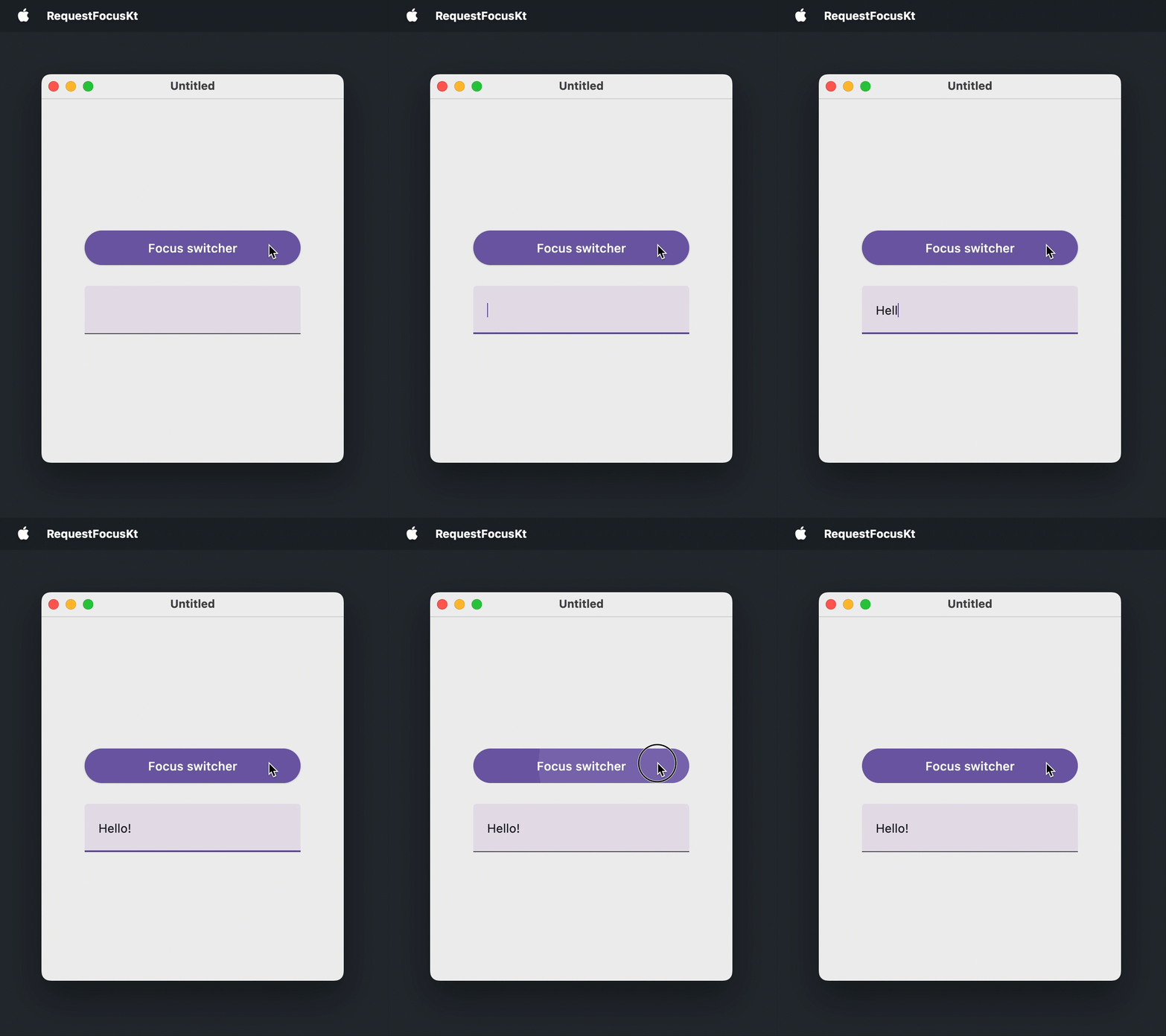
次の例では、ボタンがフォーカスをテキストフィールドに移動させ、また自身に戻します。
import androidx.compose.foundation.layout.Arrangement
import androidx.compose.foundation.layout.Box
import androidx.compose.foundation.layout.Column
import androidx.compose.foundation.layout.fillMaxSize
import androidx.compose.foundation.layout.fillMaxWidth
import androidx.compose.foundation.layout.padding
import androidx.compose.foundation.text.input.TextFieldLineLimits
import androidx.compose.foundation.text.input.rememberTextFieldState
import androidx.compose.material3.Button
import androidx.compose.material3.Text
import androidx.compose.material3.TextField
import androidx.compose.runtime.getValue
import androidx.compose.runtime.mutableStateOf
import androidx.compose.runtime.remember
import androidx.compose.runtime.setValue
import androidx.compose.ui.Alignment
import androidx.compose.ui.Modifier
import androidx.compose.ui.focus.FocusRequester
import androidx.compose.ui.focus.focusRequester
import androidx.compose.ui.unit.DpSize
import androidx.compose.ui.unit.dp
import androidx.compose.ui.window.Window
import androidx.compose.ui.window.WindowState
import androidx.compose.ui.window.application

fun main() = application {
    Window(
        onCloseRequest = ::exitApplication,
        state = WindowState(size = DpSize(350.dp, 450.dp))
    ) {
        val buttonFocusRequester = remember { FocusRequester() }
        val textFieldFocusRequester = remember { FocusRequester() }
        var isTextFieldFocused by remember { mutableStateOf(false) }
        Box(
            modifier = Modifier.fillMaxSize(),
            contentAlignment = Alignment.Center
        ) {
            Column(
                modifier = Modifier.padding(50.dp),
                verticalArrangement = Arrangement.spacedBy(20.dp)
            ) {
                Button(
                    onClick = {
                        isTextFieldFocused = !isTextFieldFocused
                        if (isTextFieldFocused) {
                            textFieldFocusRequester.requestFocus()
                        } else {
                            buttonFocusRequester.requestFocus()
                        }
                    },
                    modifier = Modifier
                        .fillMaxWidth()
                        .focusRequester(buttonFocusRequester)
                ) {
                    Text(text = "Focus switcher")
                }
                TextField(
                    state = rememberTextFieldState(),
                    lineLimits = TextFieldLineLimits.SingleLine,
                    modifier = Modifier.focusRequester(textFieldFocusRequester)
                )
            }
        }
    }
}
表示時のコンポーネントへのフォーカス
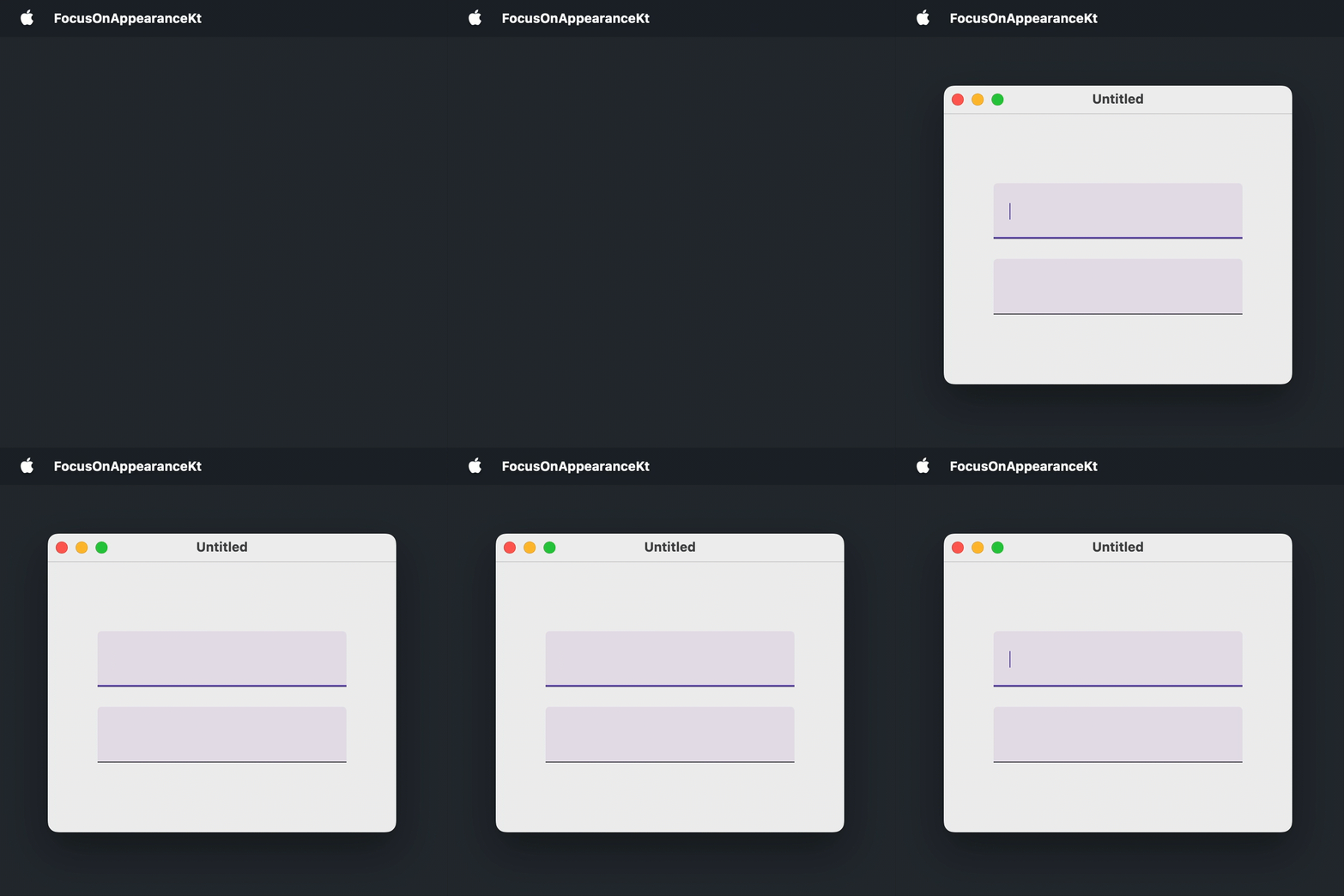
フォームやダイアログでは、ユーザーがマウスに手を伸ばさずにタイピングを開始できるように、最初の入力項目にすぐフォーカスを合わせるのが一般的です。このユースケースでは、コンポーネントがコンポジションに入った後に一度だけ実行される LaunchedEffect(Unit) ブロックからフォーカスを要求します。
次の例では、ウィンドウが開くとすぐに最初のテキストフィールドにフォーカスが合わされます。
import androidx.compose.foundation.layout.Arrangement
import androidx.compose.foundation.layout.Box
import androidx.compose.foundation.layout.Column
import androidx.compose.foundation.layout.fillMaxSize
import androidx.compose.foundation.layout.padding
import androidx.compose.foundation.text.input.TextFieldLineLimits
import androidx.compose.foundation.text.input.rememberTextFieldState
import androidx.compose.material3.TextField
import androidx.compose.runtime.LaunchedEffect
import androidx.compose.runtime.remember
import androidx.compose.ui.Alignment
import androidx.compose.ui.Modifier
import androidx.compose.ui.focus.FocusRequester
import androidx.compose.ui.focus.focusRequester
import androidx.compose.ui.unit.DpSize
import androidx.compose.ui.unit.dp
import androidx.compose.ui.window.Window
import androidx.compose.ui.window.WindowState
import androidx.compose.ui.window.application

fun main() = application {
    Window(
        onCloseRequest = ::exitApplication,
        state = WindowState(size = DpSize(350.dp, 300.dp))
    ) {
        val focusRequester = remember { FocusRequester() }
        Box(
            modifier = Modifier.fillMaxSize(),
            contentAlignment = Alignment.Center
        ) {
            Column(
                modifier = Modifier.padding(50.dp),
                verticalArrangement = Arrangement.spacedBy(20.dp)
            ) {
                TextField(
                    state = rememberTextFieldState(),
                    lineLimits = TextFieldLineLimits.SingleLine,
                    modifier = Modifier.focusRequester(focusRequester)
                )
                TextField(
                    state = rememberTextFieldState(),
                    lineLimits = TextFieldLineLimits.SingleLine
                )
            }
        }
        LaunchedEffect(Unit) {
            focusRequester.requestFocus()
        }
    }
}
マルチラインテキストフィールドからのフォーカス移動
マルチラインテキストフィールドでは、 を押すと次のコンポーネントにフォーカスを移動する代わりに、タブ文字が挿入されます。
Column {
    repeat(5) {
        TextField(
            state = rememberTextFieldState("Hello, World!"),
            // MultiLine は lineLimits のデフォルト値です
            lineLimits = TextFieldLineLimits.MultiLine(),
            modifier = Modifier.padding(8.dp)
        )
    }
}
これは既知の問題 CMP-5822 です。デフォルトの挙動である複数行を受け入れるすべてのテキストフィールドに影響します。回避策として、onPreviewKeyEvent モディファイアで キーをインターセプトし、LocalFocusManager から FocusManager を使用してフォーカスを移動させます。
import androidx.compose.foundation.layout.Column
import androidx.compose.foundation.layout.padding
import androidx.compose.foundation.text.input.TextFieldLineLimits
import androidx.compose.foundation.text.input.rememberTextFieldState
import androidx.compose.material3.TextField
import androidx.compose.runtime.Composable
import androidx.compose.ui.Modifier
import androidx.compose.ui.focus.FocusDirection
import androidx.compose.ui.input.key.Key
import androidx.compose.ui.input.key.KeyEventType
import androidx.compose.ui.input.key.isShiftPressed
import androidx.compose.ui.input.key.key
import androidx.compose.ui.input.key.onPreviewKeyEvent
import androidx.compose.ui.input.key.type
import androidx.compose.ui.platform.LocalFocusManager
import androidx.compose.ui.unit.dp
import androidx.compose.ui.window.singleWindowApplication

fun main() = singleWindowApplication(title = "Multiline text fields") {
    Column {
        repeat(5) {
            TextField(
                state = rememberTextFieldState("Hello, World!"),
                lineLimits = TextFieldLineLimits.MultiLine(),
                modifier = Modifier.padding(8.dp).moveFocusOnTab()
            )
        }
    }
}

@Composable
fun Modifier.moveFocusOnTab(): Modifier {
    val focusManager = LocalFocusManager.current
    return onPreviewKeyEvent {
        if (it.type == KeyEventType.KeyDown && it.key == Key.Tab) {
            focusManager.moveFocus(
                if (it.isShiftPressed) FocusDirection.Previous else FocusDirection.Next
            )
            true
        } else {
            false
        }
    }
}
次のステップ
- キーボードイベントの処理について詳しく学ぶ。
- 異なるプラットフォームにおけるアクセシビリティサポートについて学ぶ。
- その他のデスクトップコンポーネントに関するチュートリアルを調べる。