
协程上下文与调度器
协程始终在由 Kotlin 标准库中定义的 CoroutineContext 类型的值所表示的某种上下文中执行。
协程上下文是各种不同元素的集合。其中主要的元素包括我们之前见过的协程的 Job,以及本节将要介绍的调度器。
调度器与线程
协程上下文包含一个协程调度器(参见 CoroutineDispatcher),用于确定对应的协程使用哪个或哪些线程来执行。协程调度器可以将协程的执行限制在特定线程上、调度到线程池中,或者让其不受限制地运行。
所有协程构建器(如 launch 和 async)都接受一个可选的 CoroutineContext 参数,可用于显式为新协程指定调度器及其他上下文元素。
尝试运行以下示例:
import kotlinx.coroutines.*

fun main() = runBlocking<Unit> {
    launch { // context of the parent, main runBlocking coroutine
        println("main runBlocking      : I'm working in thread ${Thread.currentThread().name}")
    }
    launch(Dispatchers.Unconfined) { // not confined -- will work with main thread
        println("Unconfined            : I'm working in thread ${Thread.currentThread().name}")
    }
    launch(Dispatchers.Default) { // will get dispatched to DefaultDispatcher
        println("Default               : I'm working in thread ${Thread.currentThread().name}")
    }
    launch(newSingleThreadContext("MyOwnThread")) { // will get its own new thread
        println("newSingleThreadContext: I'm working in thread ${Thread.currentThread().name}")
    }
}可以在此处获取完整代码。
它会产生以下输出(顺序可能有所不同):
Unconfined            : I'm working in thread main
Default               : I'm working in thread DefaultDispatcher-worker-1
newSingleThreadContext: I'm working in thread MyOwnThread
main runBlocking      : I'm working in thread main
当 launch { ... } 不带参数使用时,它会从启动它的 CoroutineScope 中继承上下文(从而继承调度器)。在此例中,它继承了在 main 线程中运行的主 runBlocking 协程的上下文。
Dispatchers.Unconfined 是一个特殊的调度器,它看似也在 main 线程中运行,但实际上它是一种不同的机制,稍后会进行详细说明。
当作用域中未显式指定其他调度器时,将使用默认调度器。它由 Dispatchers.Default 表示,并使用共享的后台线程池。
newSingleThreadContext 为协程运行创建一个专属线程。专属线程是一项非常昂贵的资源。在实际应用程序中,当不再需要它时,必须使用 close 函数将其释放,或者将其存储在顶级变量中并在整个应用程序中复用。
非受限调度器与受限调度器
Dispatchers.Unconfined 协程调度器会在调用方线程中启动协程,但仅持续到第一个挂起点为止。在挂起之后,它将在由所调用的挂起函数完全决定的线程中恢复协程。非受限调度器适用于既不消耗 CPU 时间,也不更新限制在特定线程上的任何共享数据(例如 UI)的协程。
另一方面,调度器默认从外层的 CoroutineScope 继承。特别是 runBlocking 协程的默认调度器是受限于调用方线程的,因此继承它具有将执行限制在此线程上的效果,并具有可预测的 FIFO 调度行为。
import kotlinx.coroutines.*

fun main() = runBlocking<Unit> {
    launch(Dispatchers.Unconfined) { // not confined -- will work with main thread
        println("Unconfined      : I'm working in thread ${Thread.currentThread().name}")
        delay(500)
        println("Unconfined      : After delay in thread ${Thread.currentThread().name}")
    }
    launch { // context of the parent, main runBlocking coroutine
        println("main runBlocking: I'm working in thread ${Thread.currentThread().name}")
        delay(1000)
        println("main runBlocking: After delay in thread ${Thread.currentThread().name}")
    }
}可以在此处获取完整代码。
产生以下输出:
Unconfined      : I'm working in thread main
main runBlocking: I'm working in thread main
Unconfined      : After delay in thread kotlinx.coroutines.DefaultExecutor
main runBlocking: After delay in thread main
因此,继承了 runBlocking {...} 上下文的协程会继续在 main 线程中执行,而非受限协程则在 delay 函数所使用的默认执行器线程中恢复。
非受限调度器是一种高级机制,在某些特定边缘情况下非常有用,例如当协程中的某些操作必须立即执行,而不需要将协程调度以便稍后执行,或者调度会产生不良副作用时。非受限调度器不应在常规代码中使用。
调试协程与线程
协程可以在一个线程上挂起,并在另一个线程上恢复。如果没有专门的工具,即使使用单线程调度器,也很难搞清楚协程在何时、何地以及正在做什么。
使用 IDEA 进行调试
Kotlin 插件的协程调试器(Coroutine Debugger)简化了在 IntelliJ IDEA 中调试协程的过程。
调试功能适用于 1.3.8 或更高版本的 kotlinx-coroutines-core。
Debug 工具窗口包含 Coroutines 选项卡。在此选项卡中,你可以找到有关当前正在运行以及已挂起的协程的信息。这些协程按它们运行所在的调度器进行分组。
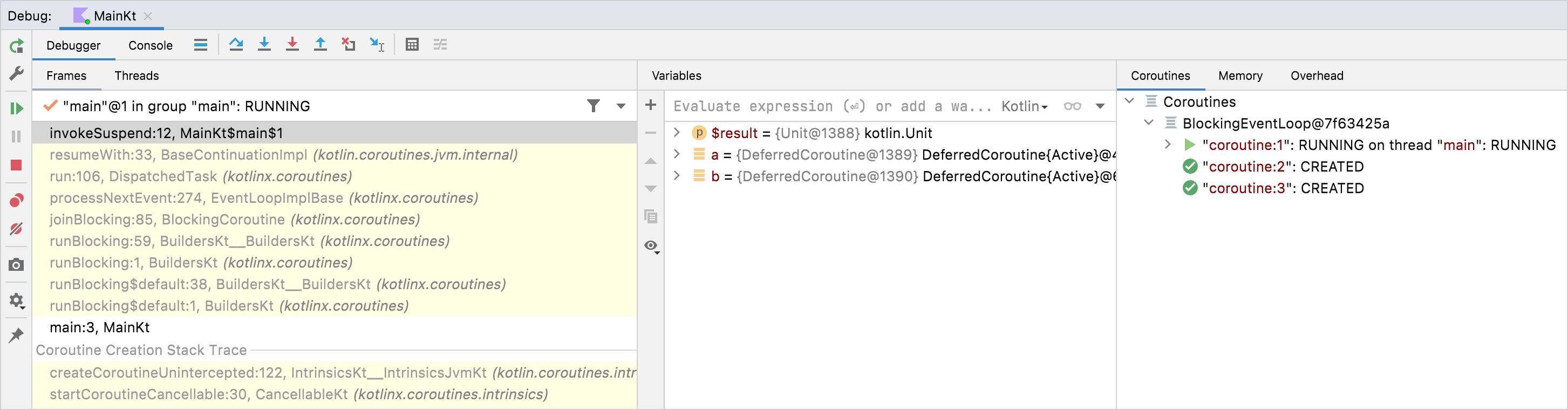
通过协程调试器,你可以:
- 检查每个协程的状态。
- 查看正在运行和已挂起协程的局部变量与捕获变量的值。
- 查看完整的协程创建堆栈,以及协程内部的调用堆栈。该堆栈包含所有带有变量值的帧,甚至包括在标准调试期间会丢失的帧。
- 获取包含每个协程状态及其堆栈的完整报告。要获取它,请在 Coroutines 选项卡内部右键点击,然后点击 Get Coroutines Dump。
要开始协程调试,只需设置断点并在调试模式下运行应用程序即可。
在教程中详细了解协程调试。
使用日志进行调试
在没有协程调试器的情况下,调试带线程应用程序的另一种方法是在每个日志语句中将线程名称输出到日志文件中。日志框架普遍支持此功能。使用协程时,仅凭线程名称无法提供太多上下文信息,因此 kotlinx.coroutines 包含了调试设施来让这一切更简单。
使用 -Dkotlinx.coroutines.debug JVM 选项运行以下代码:
import kotlinx.coroutines.*

fun log(msg: String) = println("[${Thread.currentThread().name}] $msg")

fun main() = runBlocking<Unit> {
    val a = async {
        log("I'm computing a piece of the answer")
        6
    }
    val b = async {
        log("I'm computing another piece of the answer")
        7
    }
    log("The answer is ${a.await() * b.await()}")
}可以在此处获取完整代码。
这里有三个协程:runBlocking 内部的主协程(#1),以及两个计算延迟值 a(#2)和 b(#3)的协程。它们都在 runBlocking 的上下文中执行,并且被限制在主线程中。该代码的输出为:
[main @coroutine#2] I'm computing a piece of the answer
[main @coroutine#3] I'm computing another piece of the answer
[main @coroutine#1] The answer is 42
log 函数在方括号中输出线程的名称,你可以看到它是 main 线程,后面附加了当前正在执行的协程的标识符。当开启调试模式时,该标识符会连续分配给所有创建的协程。
当 JVM 使用 -ea 选项运行时,调试模式也会开启。 可以在 DEBUG_PROPERTY_NAME 属性的文档中详细了解调试设施。
在线程间跳转
使用 -Dkotlinx.coroutines.debug JVM 选项运行以下代码(参见调试):
import kotlinx.coroutines.*

fun log(msg: String) = println("[${Thread.currentThread().name}] $msg")

fun main() {
    newSingleThreadContext("Ctx1").use { ctx1 ->
        newSingleThreadContext("Ctx2").use { ctx2 ->
            runBlocking(ctx1) {
                log("Started in ctx1")
                withContext(ctx2) {
                    log("Working in ctx2")
                }
                log("Back to ctx1")
            }
        }
    }
}可以在此处获取完整代码。
上面的示例演示了协程用法中的一些新技术。
第一项技术展示了如何使用带有指定上下文的 runBlocking。 第二项技术涉及调用 withContext,如果新上下文与现有上下文不同,它可能会挂起当前协程并切换到新上下文。具体而言,如果指定了不同的 CoroutineDispatcher,则需要额外的调度:代码块会被调度到新的调度器上运行,一旦运行完成,执行就会返回到原调度器。
因此,上述代码的输出为:
[Ctx1 @coroutine#1] Started in ctx1
[Ctx2 @coroutine#1] Working in ctx2
[Ctx1 @coroutine#1] Back to ctx1
上面的示例使用了 Kotlin 标准库中的 use 函数,以便在不再需要由 newSingleThreadContext 创建的线程资源时正确释放它们。
上下文中的 Job
协程的 Job 是其上下文的一部分,可以使用 coroutineContext[Job] 表达式从上下文中检索它:
import kotlinx.coroutines.*

fun main() = runBlocking<Unit> {
    println("My job is ${coroutineContext[Job]}")
}可以在此处获取完整代码。
在调试模式下,它会输出类似以下内容:
My job is "coroutine#1":BlockingCoroutine{Active}@6d311334请注意,CoroutineScope 中的 isActive 只是 coroutineContext[Job]?.isActive == true 的便捷快捷方式。
子协程
当一个协程在另一个协程的 CoroutineScope 中启动时,它会通过 CoroutineScope.coroutineContext 继承其上下文,并且新协程的 Job 会成为父协程作业的子作业。当父协程被取消时,其所有的子协程也都会被以递归方式取消。
但是,可以通过以下两种方式之一显式重写这种父子关系:
- 在启动协程时显式指定了不同的作用域(例如
GlobalScope.launch),它就不会从父作用域继承Job。 - 当把不同的
Job对象作为新协程的上下文传入时(如下例所示),它会重写父作用域的Job。
在这两种情况下,启动的协程都不会绑定到启动它的作用域,而是独立运行。
import kotlinx.coroutines.*

fun main() = runBlocking<Unit> {
    // launch a coroutine to process some kind of incoming request
    val request = launch {
        // it spawns two other jobs
        launch(Job()) {
            println("job1: I run in my own Job and execute independently!")
            delay(1000)
            println("job1: I am not affected by cancellation of the request")
        }
        // and the other inherits the parent context
        launch {
            delay(100)
            println("job2: I am a child of the request coroutine")
            delay(1000)
            println("job2: I will not execute this line if my parent request is cancelled")
        }
    }
    delay(500)
    request.cancel() // cancel processing of the request
    println("main: Who has survived request cancellation?")
    delay(1000) // delay the main thread for a second to see what happens
}可以在此处获取完整代码。
该代码的输出为:
job1: I run in my own Job and execute independently!
job2: I am a child of the request coroutine
main: Who has survived request cancellation?
job1: I am not affected by cancellation of the request
父协程的职责
父协程始终会等待其所有子协程完成。父协程不必显式跟踪它启动的所有子协程,也不必使用 Job.join 在末尾等待它们:
import kotlinx.coroutines.*

fun main() = runBlocking<Unit> {
    // launch a coroutine to process some kind of incoming request
    val request = launch {
        repeat(3) { i -> // launch a few children jobs
            launch  {
                delay((i + 1) * 200L) // variable delay 200ms, 400ms, 600ms
                println("Coroutine $i is done")
            }
        }
        println("request: I'm done and I don't explicitly join my children that are still active")
    }
    request.join() // wait for completion of the request, including all its children
    println("Now processing of the request is complete")
}可以在此处获取完整代码。
结果将会是:
request: I'm done and I don't explicitly join my children that are still active
Coroutine 0 is done
Coroutine 1 is done
Coroutine 2 is done
Now processing of the request is complete
命名协程以进行调试
当协程频繁记录日志且你只需关联来自同一协程的日志记录时,自动分配的 ID 非常有用。但是,当协程绑定到特定请求的处理或执行某些特定的后台任务时,为了调试目的最好显式对其进行命名。CoroutineName 上下文元素的作用与线程名称相同。当开启调试模式时,它会包含在正在执行此协程的线程名称中。
以下示例演示了这一概念:
import kotlinx.coroutines.*

fun log(msg: String) = println("[${Thread.currentThread().name}] $msg")

fun main() = runBlocking(CoroutineName("main")) {
    log("Started main coroutine")
    // run two background value computations
    val v1 = async(CoroutineName("v1coroutine")) {
        delay(500)
        log("Computing v1")
        6
    }
    val v2 = async(CoroutineName("v2coroutine")) {
        delay(1000)
        log("Computing v2")
        7
    }
    log("The answer for v1 * v2 = ${v1.await() * v2.await()}")
}可以在此处获取完整代码。
使用 -Dkotlinx.coroutines.debug JVM 选项运行时产生的输出类似于:
[main @main#1] Started main coroutine
[main @v1coroutine#2] Computing v1
[main @v2coroutine#3] Computing v2
[main @main#1] The answer for v1 * v2 = 42
组合上下文元素
有时我们需要为协程上下文定义多个元素。我们可以为此使用 + 运算符。例如,我们可以同时使用显式指定的调度器和显式指定的名称来启动协程:
import kotlinx.coroutines.*

fun main() = runBlocking<Unit> {
    launch(Dispatchers.Default + CoroutineName("test")) {
        println("I'm working in thread ${Thread.currentThread().name}")
    }
}可以在此处获取完整代码。
使用 -Dkotlinx.coroutines.debug JVM 选项运行此代码的输出为:
I'm working in thread DefaultDispatcher-worker-1 @test#2协程作用域
让我们将关于上下文、子协程和作业的知识整合起来。假设我们的应用程序中有一个具有生命周期的对象,但该对象并不是协程。例如,我们正在编写一个 Android 应用程序,并在 Android activity 的上下文中启动各种协程以执行异步操作来获取和更新数据、执行动画等。当该 activity 被销毁时,必须取消这些协程以避免内存泄漏。当然,我们可以手动操作上下文和作业来绑定 activity 及其协程的生命周期,但是 kotlinx.coroutines 提供了封装该逻辑的抽象:CoroutineScope。你应该已经对协程作用域很熟悉了,因为所有协程构建器都被声明为它的扩展函数。
我们通过创建一个绑定到 activity 生命周期的 CoroutineScope 实例来管理协程的生命周期。可以通过 CoroutineScope() 或 MainScope() 工厂方法来创建 CoroutineScope 实例。前者创建通用作用域,而后者专为 UI 应用程序创建作用域,并使用 Dispatchers.Main 作为默认调度器:
class Activity {
    private val mainScope = MainScope()

    fun destroy() {
        mainScope.cancel()
    }
    // to be continued ...
现在,我们可以使用定义的 mainScope 在此 Activity 的作用域中启动协程。为了进行演示,我们启动了十个延迟不同时间的协程:
    // class Activity continues
    fun doSomething() {
        // launch ten coroutines for a demo, each working for a different time
        repeat(10) { i ->
            mainScope.launch {
                delay((i + 1) * 200L) // variable delay 200ms, 400ms, ... etc
                println("Coroutine $i is done")
            }
        }
    }
} // class Activity ends
在 main 函数中,我们创建该 activity,调用测试用的 doSomething 函数,并在 500ms 后销毁该 activity。这会取消从 doSomething 中启动的所有协程。我们可以观察到这一点,因为在销毁 activity 之后,即使我们再等待一会儿,也不会再有更多消息输出。
import kotlinx.coroutines.*

class Activity {
    private val mainScope = CoroutineScope(Dispatchers.Default) // use Default for test purposes

    fun destroy() {
        mainScope.cancel()
    }

    fun doSomething() {
        // launch ten coroutines for a demo, each working for a different time
        repeat(10) { i ->
            mainScope.launch {
                delay((i + 1) * 200L) // variable delay 200ms, 400ms, ... etc
                println("Coroutine $i is done")
            }
        }
    }
} // class Activity ends

fun main() = runBlocking<Unit> {
    val activity = Activity()
    activity.doSomething() // run test function
    println("Launched coroutines")
    delay(500L) // delay for half a second
    println("Destroying activity!")
    activity.destroy() // cancels all coroutines
    delay(1000) // visually confirm that they don't work
}可以在此处获取完整代码。
该示例的输出为:
Launched coroutines
Coroutine 0 is done
Coroutine 1 is done
Destroying activity!
如你所见,只有前两个协程输出了消息,其他协程都在 Activity.destroy() 中通过单次调用 mainScope.cancel() 被取消了。
请注意,Android 对所有具有生命周期的实体都提供协程作用域的第一方支持。 参见相应文档。
线程局部数据
有时,能够将某些线程局部数据传递给协程或在协程之间传递是很方便的。然而,由于协程并不绑定到任何特定线程,如果手动完成这项操作很可能会导致大量模板代码。
对于 ThreadLocal,asContextElement 扩展函数可以解燃眉之急。它创建了一个额外的上下文元素,该元素保留给定 ThreadLocal 的值,并在协程每次切换上下文时将其恢复。
通过实际运行很容易演示这一点:
import kotlinx.coroutines.*

val threadLocal = ThreadLocal<String?>() // declare thread-local variable

fun main() = runBlocking<Unit> {
    threadLocal.set("main")
    println("Pre-main, current thread: ${Thread.currentThread()}, thread local value: '${threadLocal.get()}'")
    val job = launch(Dispatchers.Default + threadLocal.asContextElement(value = "launch")) {
        println("Launch start, current thread: ${Thread.currentThread()}, thread local value: '${threadLocal.get()}'")
        yield()
        println("After yield, current thread: ${Thread.currentThread()}, thread local value: '${threadLocal.get()}'")
    }
    job.join()
    println("Post-main, current thread: ${Thread.currentThread()}, thread local value: '${threadLocal.get()}'")
}可以在此处获取完整代码。
在此示例中,我们使用 Dispatchers.Default 在后台线程池中启动了一个新协程,因此它在该线程池的不同线程上运行,但它仍然具有我们使用 threadLocal.asContextElement(value = "launch") 所指定的线程局部变量的值,无论协程在哪个线程上执行。 因此,输出(使用调试)为:
Pre-main, current thread: Thread[main @coroutine#1,5,main], thread local value: 'main'
Launch start, current thread: Thread[DefaultDispatcher-worker-1 @coroutine#2,5,main], thread local value: 'launch'
After yield, current thread: Thread[DefaultDispatcher-worker-2 @coroutine#2,5,main], thread local value: 'launch'
Post-main, current thread: Thread[main @coroutine#1,5,main], thread local value: 'main'
很容易忘记设置对应的上下文元素。如果运行协程的线程不同,则从协程访问的线程局部变量可能会具有意外的值。为了避免这种情况,建议使用 ensurePresent 方法并在使用不当时快速失败(fail-fast)。
ThreadLocal 具有一等支持,可以与 kotlinx.coroutines 提供的任何原语一起使用。不过它有一个关键限制:当线程局部变量发生变化时,新值不会传播给协程调用方(因为上下文元素无法跟踪所有 ThreadLocal 对象的访问),并且更新后的值会在下一次挂起时丢失。使用 withContext 来更新协程中线程局部变量的值,有关更多详细信息,请参见 asContextElement。
或者,可以将值存储在可变包装箱中,例如 class Counter(var i: Int),进而将其存储在线程局部变量中。但是,在这种情况下,你完全有责任对该可变包装箱中的变量进行潜在并发修改的同步。
对于高级用法,例如与日志记录 MDC、事务上下文或内部使用线程局部变量传递数据的任何其他库集成,请参见应实现的 ThreadContextElement 接口的文档。